









World modifiers make Valheim easier or harder. On a Loafhosts server you set them on the World page, in the Difficulty card. Pick a preset first, then change single modifiers on top of it. They apply at the next server start. More about the game: Valheim servers.
What you can set
Iron Gate’s own server manual lists these. A preset sets everything at once:
- Preset: None, Normal, Casual, Easy, Hard, Hardcore, Immersive, or Hammer (no build costs).
Then five modifiers. Each list starts with As the preset sets it, which keeps the preset’s value. There is no Normal value in these lists: Normal is what the preset itself sets.
- Combat: Very easy, Easy, Hard, Very hard. See Valheim combat difficulty.
- Death penalty: Casual, Very easy, Easy, Hard, Hardcore. See Valheim death penalty.
- Resources: Much less, Less, More, Much more, Most. See Valheim resources modifier.
- Raids: None, Much less, Less, More, Much more. Raids are attacks on your base. The wiki says night raids still happen even when raids are set to none.
- Portals: Everything can go through, Not during a boss fight, No portals. Tamed animals cannot use a portal in any case.
And four switches:
- No build costs: building needs no materials. You still need to know the recipes.
- Raids follow players’ progress: raids follow each player’s own progress, not which bosses the server has beaten.
- Passive enemies: enemies do not attack until they are provoked.
- No map: nobody has the map or the minimap.
The Hammer (no build costs) preset gives no build cost for pieces you make with the hammer. It does not change the cost of crafting gear at a crafting station.
What each preset sets is not listed in anything we read, so we do not list it here. After the next start, read the line “The world remembers: …” on the World page to see the values in force.
Set them in the panel
- Open the World page and find the Difficulty card.
- Choose a Preset. A preset sets every modifier at once.
- Change any modifier you want to differ from the preset. These change the preset, so choose the preset first. A modifier left at As the preset sets it keeps the preset’s value.
- Tick the switches you want.
- Choose Save (box 3 in the picture).
- Choose Restart at the top of the server page.
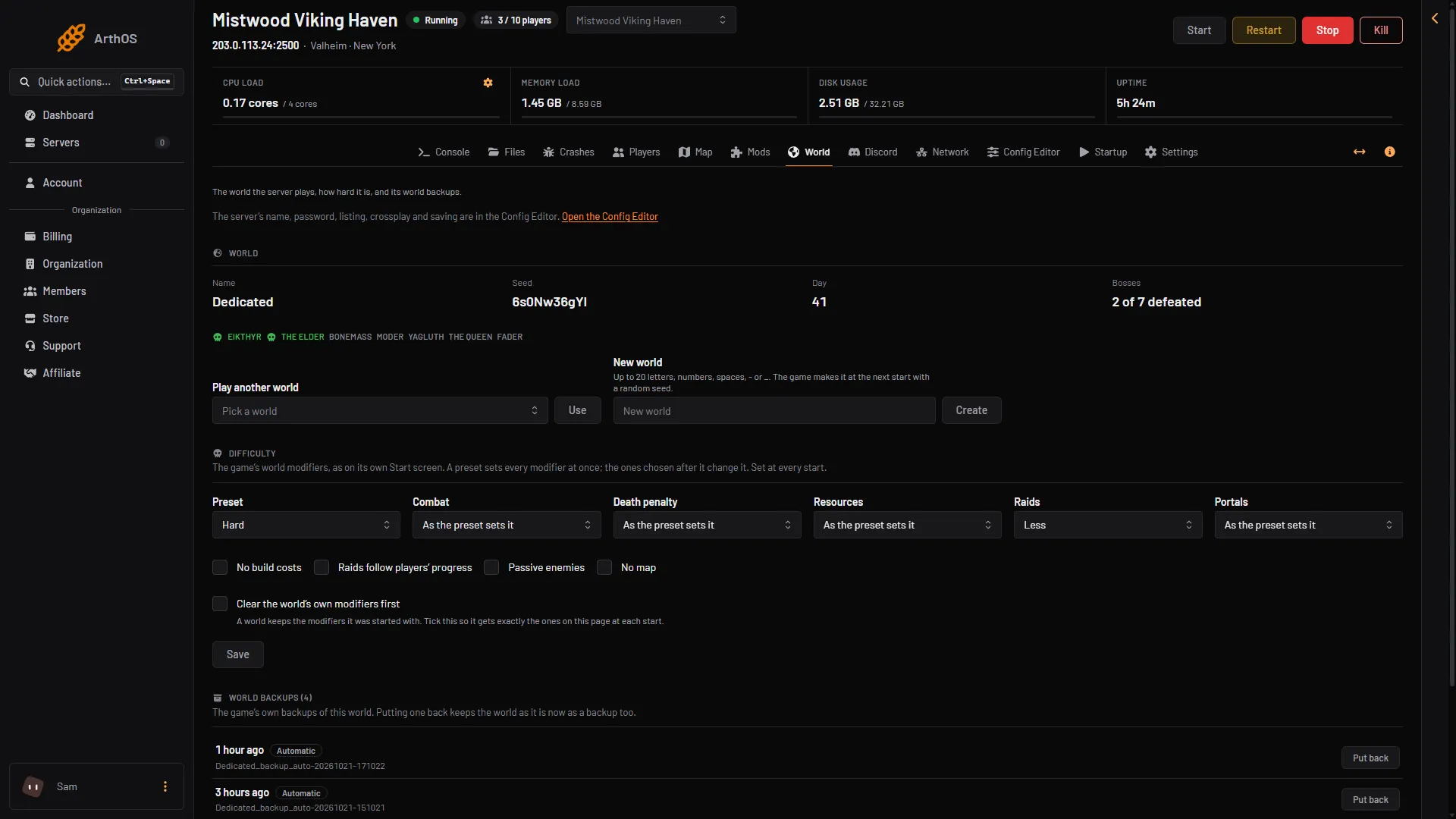
- Preset
- Combat
- Save
The card says “Set at every start”. The panel passes your choices to the game each time the server starts. The Startup page shows them in World modifiers, read only. Change them on the World page, not there.
A world remembers its modifiers
The game keeps the modifiers a world was started with inside the world. Leaving a modifier out later does not undo it. So if you set Raids to None once, then leave Raids alone, the world may still have none.
To get exactly the settings on the page every time, tick Clear the world’s own modifiers first before you save. The server then clears what the world remembers at each start and applies only what the page says.
If the page shows “The world remembers: (list)”, that list is what the world already carries.
By hand
If you start the game yourself, the server’s own manual gives these start options:
-preset hardsets a preset. It overwrites any earlier modifiers.-modifier raids nonesets one modifier. Put it after the preset.-setkey nomapturns on a switch. The keys arenobuildcost,playerevents,passivemobsandnomap.
The panel writes the modifier names combat, deathpenalty, resources, raids and portals in lower case, with the values in lower case and no spaces, for example veryhard or muchmore. The manual’s example is -modifier raids none, and its list writes DeathPenalty and Combat. Whether case matters: Not checked on 1.0.20 as of 21 October 2026.
A whole start line, in the pattern of the manual (modifiers after the preset):
./valheim_server.x86_64 -name "My server" -port 2456 -world "Dedicated" -password "secret" -crossplay -preset hard -modifier raids noneA world keeps the modifiers it was started with. The panel puts -resetmodifiers first when Clear the world’s own modifiers first is ticked. It is not in the game’s manual. The wiki’s way to reset in the game is the admin command setworldpreset default, which resets every key set by setworldmodifier. Not checked on 1.0.20 as of 21 October 2026.
If it does not work
- A change did not show up. Restart the server. The game reads modifiers only when it starts.
- A modifier I removed is still on. The world remembers it. Tick Clear the world’s own modifiers first, save and restart.
- The page warns that the start line holds modifiers it does not show. Someone wrote them by hand. Saving on the page replaces them.
Sources: valheim.fandom.com: World Modifiers