









Crossplay lets players on other platforms join your Valheim server, such as Xbox and Game Pass, as well as Steam. Turn it on with Crossplay in the Config Editor and restart. Players then join with the join code shown on the Players page. New servers from Loafhosts start with crossplay on.
Without crossplay, only Steam players can see and join the server. That comes from the game’s own manual.
With crossplay, players do not connect straight to your server. They connect through a Microsoft service that passes the traffic on, called a relay.
Turn crossplay on
- Open the Config Editor.
- In Server settings, find the Server group and turn on Crossplay (1).
- Choose Save (2).
- Choose Restart at the top of the server page. The change applies at the next start.
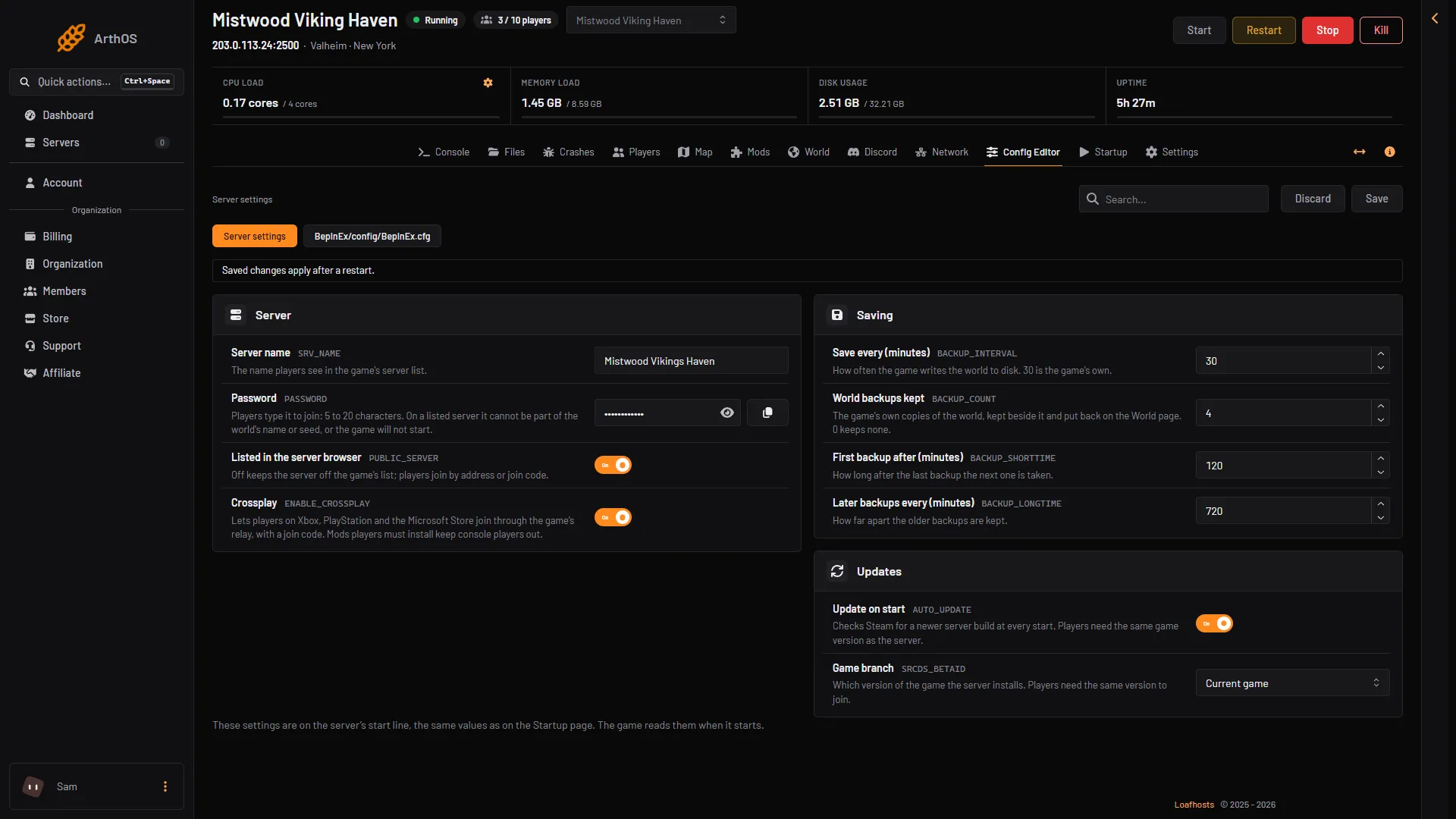
- Crossplay
- Save
You can set the same thing on the Startup page. Crossplay: 1 is on, 0 is off.
Find the join code
- Open the Players page.
- In the Joining card, find the join code. The card shows it as Join code (2).
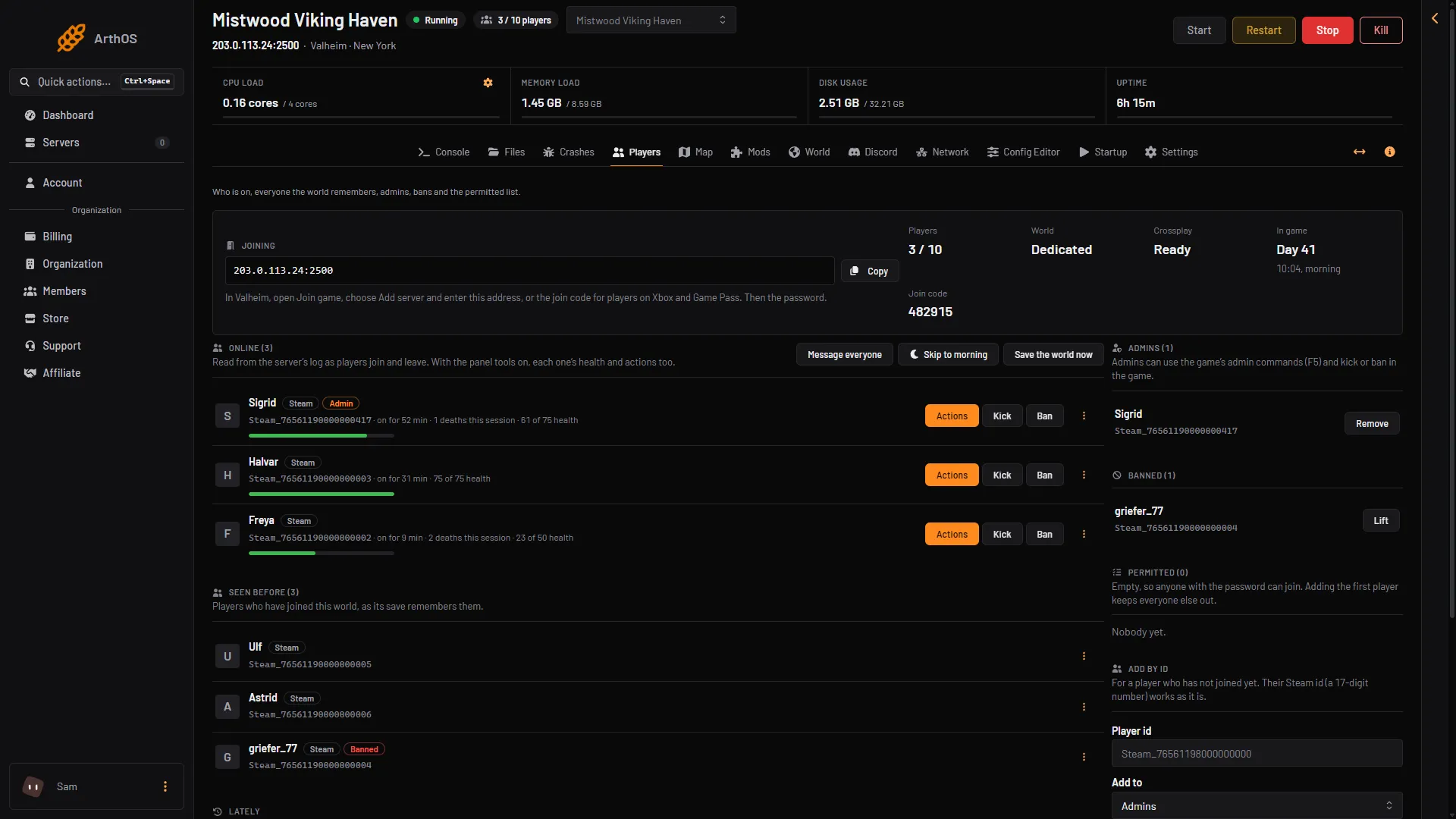
- Crossplay stat
- Join code
A join code can change. On a first start the join code can change in the first minute. Always read it from the page, never from an old message.
How players join
In Valheim, a player opens Join game, chooses Add server, and enters the address or the join code. Then they enter the password. Players on Xbox and Game Pass use the join code.
With crossplay on, the game does not open a port on the server for players. The relay is run by PlayFab, a Microsoft service. The address and port only tell the game which server’s relay to find. See connect to your server.
The Crossplay stat
The Crossplay stat in the Joining card on the Players page tells you where crossplay stands.
- Off: crossplay is switched off.
- Connecting: the server is registering with the relay. It takes about half a minute after a start.
- Ready: players can join with the join code.
- Not connecting: the server cannot reach its relay. While that lasts, nobody can join. The address does not help, because it only finds the relay.
- Restart the server.
- If it keeps failing, turn Crossplay off. Steam players then join by the address.
- Players on Xbox and Game Pass cannot join until crossplay is on and working again.
Mods can keep players on Xbox and Game Pass out
Players on Xbox and Game Pass cannot install mods. If your server runs a mod that players must install too, these players cannot join. The install box on the Mods page warns you and asks you to tick “Crossplay is on, and console players cannot join while a mod they need is installed. Install anyway.” before Install turns on.
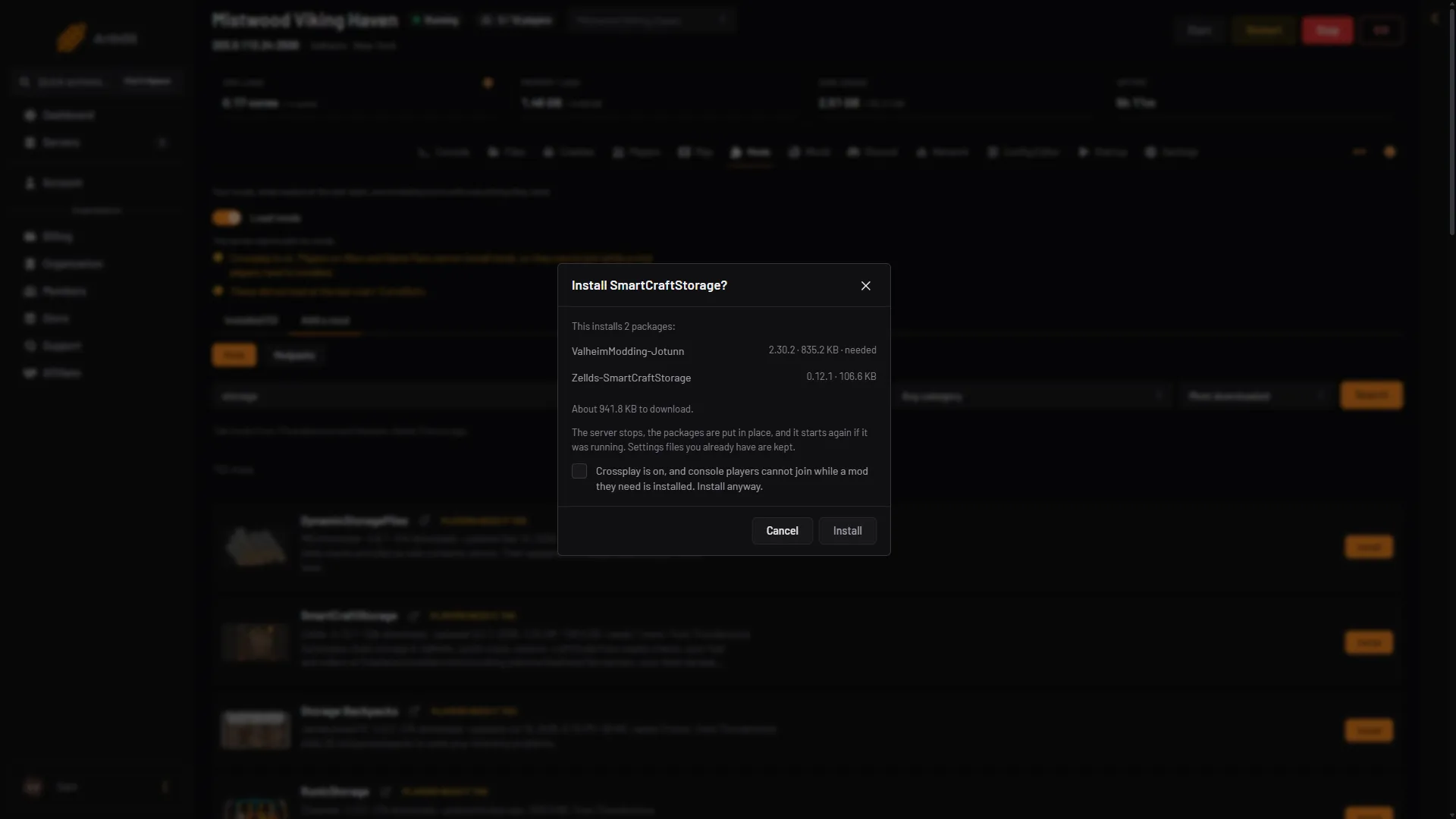
- Tick to install anyway
- Install
If you want players on Xbox and Game Pass, keep to mods marked Server only. This is a label from the mod’s Thunderstore categories, not a test: the mod’s own page has the last word. See mods players need to install.
Things to know
- Players on a crossplay server are more likely to see lag and disconnects, because of the extra hop through a relay. This is from the Valheim wiki.
- The game is made for 1 to 10 players, crossplay or not.
- Not checked on 1.0.20 as of 21 October 2026: which platforms other than Steam and Xbox can join. The manual from Iron Gate, the studio that makes Valheim, says players “from any platform”.
By hand
This part is for a server you run yourself. It comes from the game’s manual and the wiki.
-crossplayon the start line runs the server on the crossplay backend (PlayFab). Players on any platform can then join. Without-crossplay, only Steam players can see and join.- With crossplay you need no port forwarding. The port still tells several servers on one address apart. The server needs outbound access to Microsoft services.
-instanceid "1"gives each of several servers on the same port and machine its own PlayFab id.- On Linux the manual lists these packages:
libatomic1,libpulse-devandlibpulse0. - A player can join by the public address and port, by a join code, or from the list. A local address or a loopback address does not work.
A whole start line looks like this, from the manual’s pattern:
./valheim_server.x86_64 -name "My server" -port 2456 -world "Dedicated" -password "secret" -crossplay
If it does not work
- The stat says Not connecting. Restart the server. If it keeps failing, open Crashes: it reports “Crossplay could not reach its relay”. Turn Crossplay off if you need Steam players back.
- Players on Xbox and Game Pass cannot join. Check the Mods page for a mod players need.
- A player cannot find the server. Give them the join code from the page.
More about the game: Valheim servers.