









In Valheim, open Join game, choose Add server, type the server address and then the password. Players on Xbox and Game Pass type the join code instead of the address. You find both on the Players page of your server. If you run the server, read both parts. If you only play, start at Join from the game.
Find the address and the join code
- Open your server and choose the Players page.
- In the Joining card (1), choose Copy (2) to copy the address.
- With crossplay on, the card also shows the join code (3).
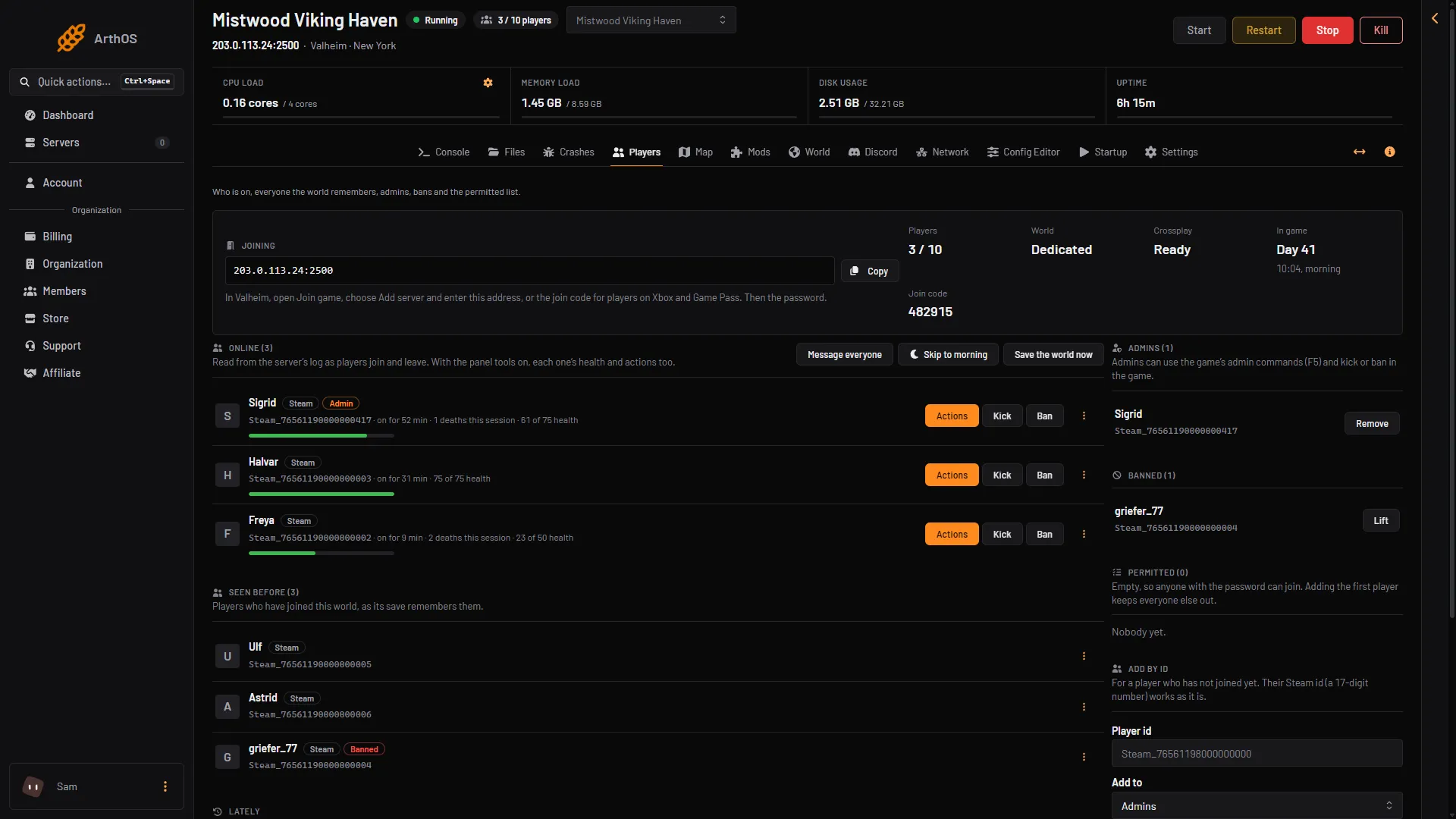
- Joining
- Copy
- Join code
The server must be running. If the card says the server has no address yet, wait for the server to finish starting. A new server is ready about 17 seconds after it starts, and takes longer with mods or after an update. The join code appears about half a minute after the start.
The join code can change after a restart. Read it from the page each time. An old message with a code in it may be wrong.
Join from the game
- Start Valheim and choose your character.
- Open Join game.
- Choose Add server.
- Type the whole address, with the colon and the port number, exactly as Copy gives it. If you are on Xbox or Game Pass, type the join code instead.
- Type the password and join.
Ask the server owner for the password. The owner finds it in the Config Editor under Server settings, as Password.
Use the server list
A server that is listed also shows in the game’s server list. Search for the server name. Crossplay servers can be found there too.
If the owner turned off Listed in the server browser, the server is not in the list. Use the address or the join code.
What the game says about joining a crossplay server
Iron Gate, the studio that makes Valheim, writes in its server manual that you can join a crossplay server in three ways:
- With its public IP address and port number.
- With a join code.
- From the server list.
Two kinds of address do not work: a local address and a loopback address. So never type 127.0.0.1 or an address that starts with 192.168. Use the address from the Players page.
With crossplay, players do not connect straight to the server. They connect through a Microsoft service that passes the traffic on, called a relay. If the Crashes page says “Crossplay could not reach its relay”, nobody can join, not even by the address. See Valheim crossplay server for the steps the owner takes.
If it does not work
- Wrong version. Your game must be the same version as the server. The server updates to the newest game at each start. Update Valheim in Steam, or on your console, and try again.
- Wrong password. Type it exactly as the owner gives it. The owner can read the current one in the Config Editor.
- Not on the permitted list. If the owner has a permitted list, only players on it can join. Give the server owner your player id.
- Banned. The owner can lift a ban on the Players page.
- The server is full. A Valheim server takes 10 players at most. See Valheim max players.
- A mod is needed. If the owner added mods players need, you must install the same mods. Players on Xbox and Game Pass cannot install mods.
The owner can see why a join failed in the Lately list on the Players page. The Lately list shows what happened a short time ago. It names a different version, a full server, a wrong password and a turned away player.
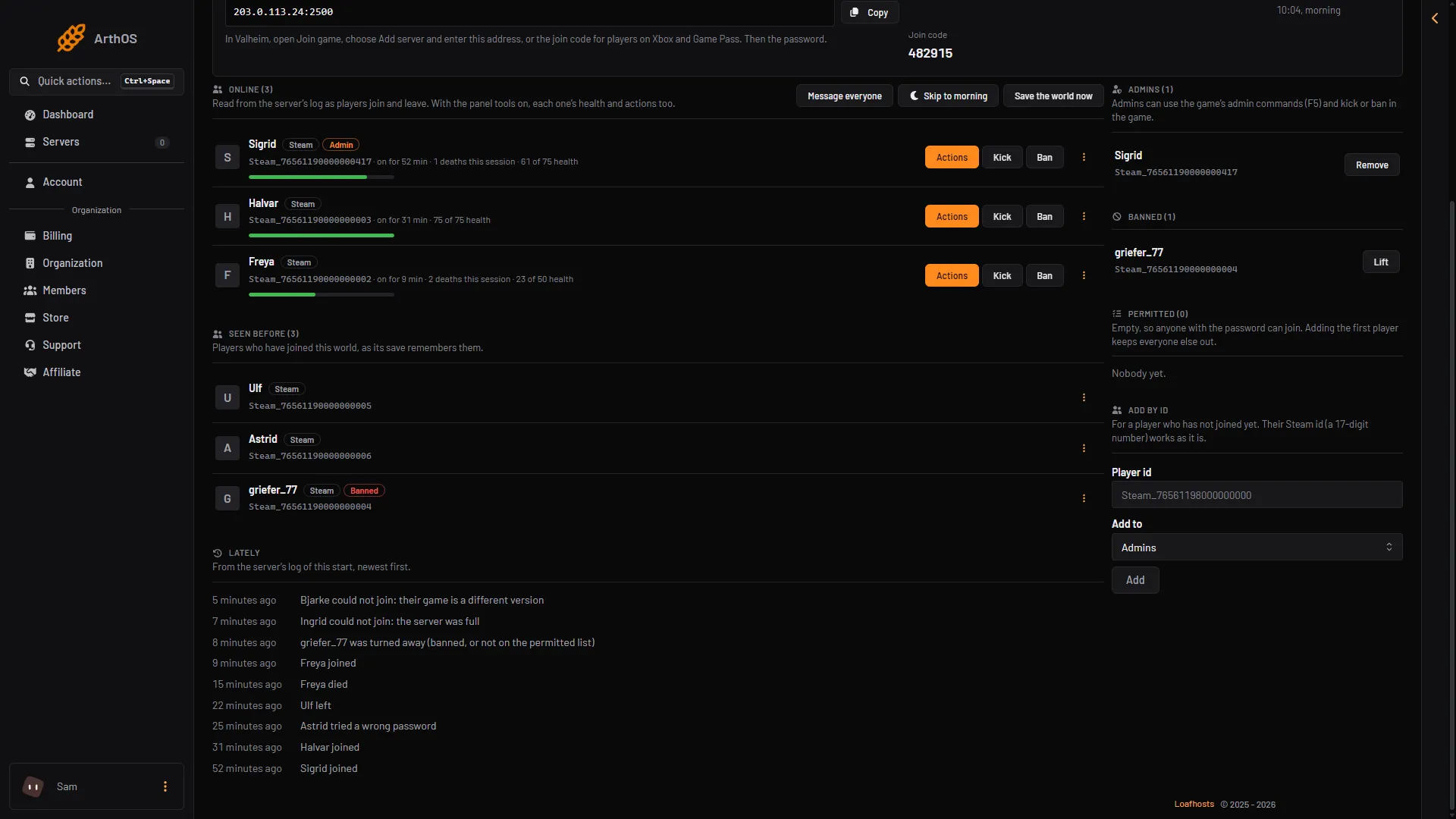
- Different version
- Server full
- Turned away
- Wrong password
Back to the server setup: set up a Valheim server. More about the game: Valheim servers.