









In 7 Days to Die V3.3, difficulty is not one setting. It is a set of World rules: how much damage players and zombies take and deal, how strong the zombies can get, and how fast they move. Change them on the World rules page and restart the server. They apply from the next start.
Older guides tell you to set GameDifficulty from 0 to 5 in serverconfig.xml. The V3.3.0 file has no such line. See serverconfig.xml explained.
The rules that set difficulty
Each rule has a key, shown in small type under its label. The rules are stored in the SandboxCode line of the server’s settings file. Find the first six under the group Players, and the rest under Zombies and animals. Each has a list of values. The default is marked “(default)”.
| Rule | Key | Group | Default | Values |
|---|---|---|---|---|
| Incoming Damage | IncomingDamage | Players | 100% | None, 25%, 35%, 50%, 65%, 75%, 85%, 100%, 125%, 150%, 200%, 250%, 300% |
| Ranged Damage | RangedDamage | Players | 100% | the same list |
| Melee Damage | MeleeDamage | Players | 100% | the same list |
| Block Damage | BlockDamage | Players | 100% | the same list |
| Terrain Damage | TerrainDamage | Players | 100% | the same list |
| Headshot Multiplier | HeadshotMultiplier | Players | 100% | the same list |
| Entity Damage | EntityDamage | Zombies and animals | 100% | the same list |
| Entity Incoming Damage | EntityIncomingDamage | Zombies and animals | 100% | 25% up to 300% (no None) |
| Max Enemy Type | MaxEnemyTier | Zombies and animals | Elites | Normals, Strongs, Specials, Ferals, Radiated, Elites |
| Zombie Day Speed | ZombieMove | Zombies and animals | Walk | Walk, Jog, Run, Sprint, Nightmare |
| Zombie Night Speed | ZombieMoveNight | Zombies and animals | Sprint | the same five |
| Zombie Feral Speed | ZombieFeralMove | Zombies and animals | Sprint | the same five |
| Zombie Blood Moon Speed | ZombieBMMove | Zombies and animals | Sprint | the same five |
| Not checked on V3.3.0 as of 19 October 2026: exactly what Block Damage, Terrain Damage, Incoming Damage, Entity Damage, Entity Incoming Damage and Max Enemy Type scale in play. Raise one a step, restart, and see how the game plays. |
The five zombie speeds go from Walk, which is slow, to Sprint, about a player’s sprint speed, to Nightmare, faster than a sprinting player. Feral zombies use Zombie Feral Speed, not the day and night speeds.
Change the difficulty
- Open the World rules page.
- Find a rule from the table. Type its name in the search box to find it quickly.
- Pick a new value from the list.
- Choose Save.
- Choose Restart now, or choose Restart at the top of the server page.
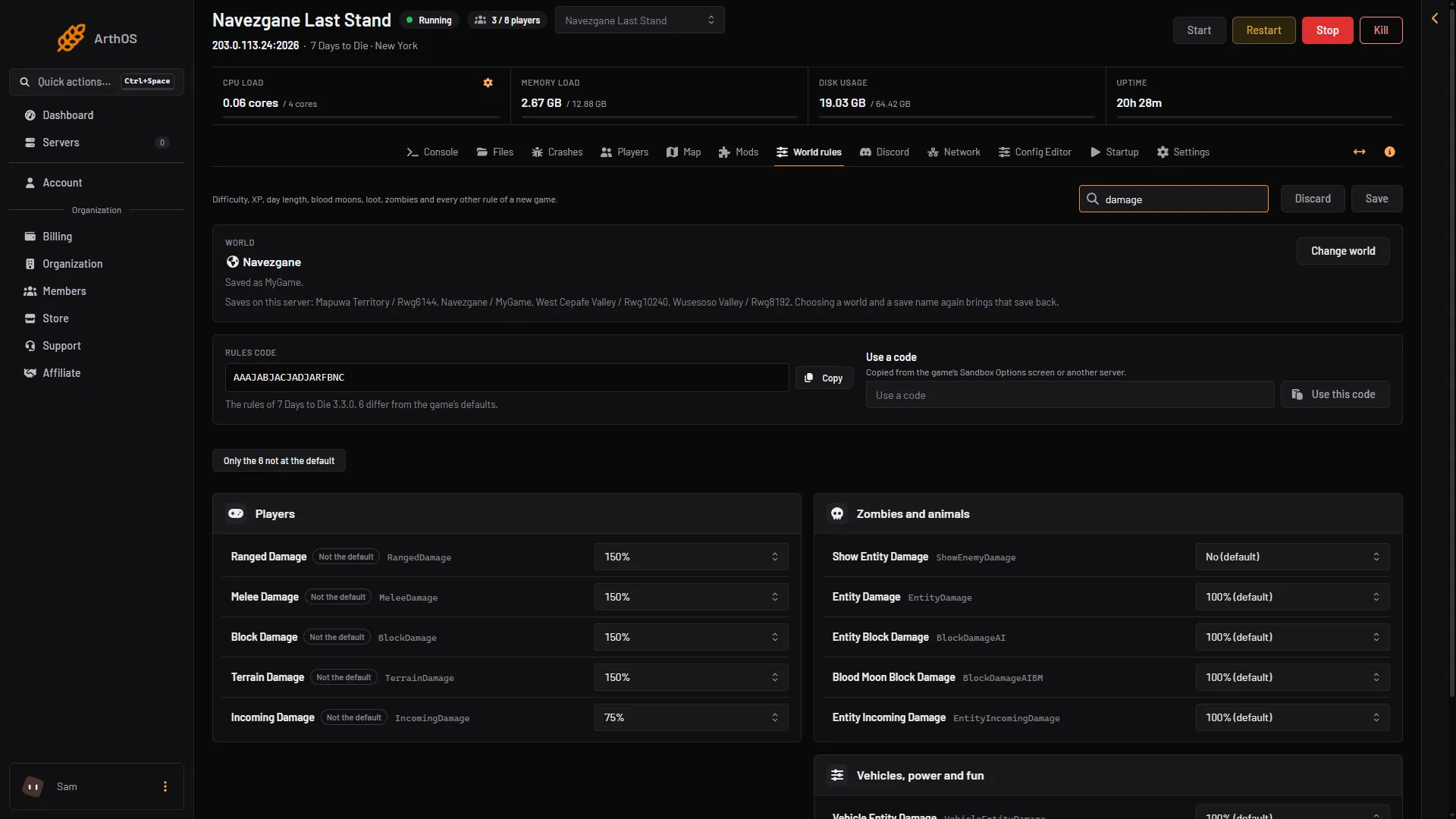
- Ranged Damage
- Melee Damage
- Block Damage
- Incoming Damage
- Entity Damage
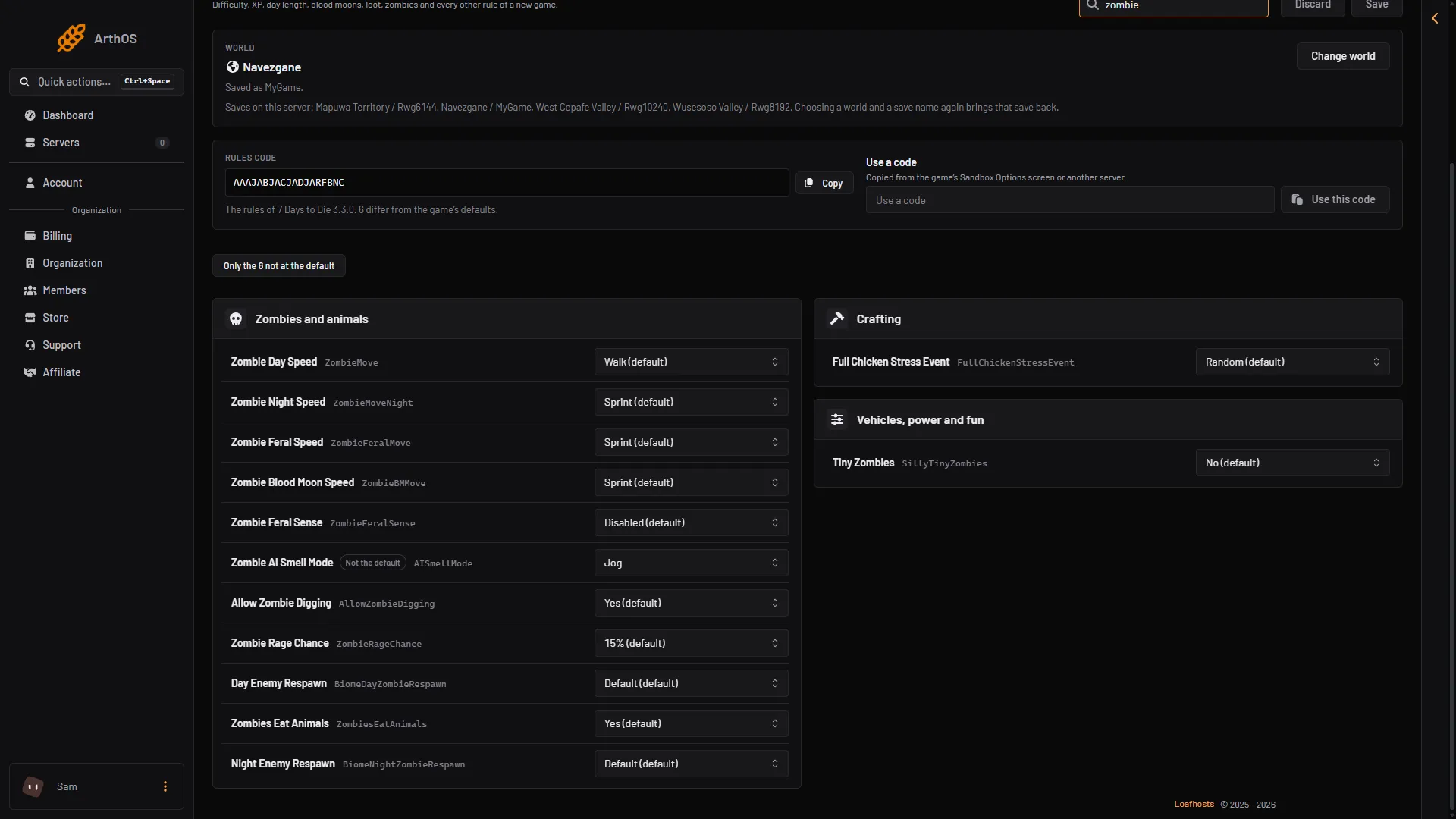
- Zombie Day Speed
- Zombie Night Speed
- Zombie Feral Speed
- Zombie Blood Moon Speed
You can change several rules and save once. A rule that is not at its default shows the tag Not the default.
Where the Adventurer difficulty comes from
A new server starts from the settings file the game ships. Its comment says the code is the default difficulty of Adventurer. That code sets Ranged, Melee, Block and Terrain Damage to 150% and Incoming Damage to 75%. It also sets Zombie AI Smell Mode to Jog. Choose Only the N not at the default to see these on your page.
The old wiki lists six named difficulties from Scavenger to Insane, written before V3.0. Not checked on V3.3.0 as of 19 October 2026: whether the Sandbox Options screen in the game still offers named presets, and which values each one sets. To use a preset made in the game, copy its code and paste it with Use a code. See the SandboxCode.
If it does not work
- Nothing changed in play. The rules are read when the server starts. Restart it after saving.
- Save is off. You have not changed a rule yet, or the server is starting or stopping.
- The zombies are still fast. Check all four speed rules. Night, feral and blood moon speeds are separate from the day speed.
- You cannot find a rule. Clear the filter Only the N not at the default, which hides rules at their default.
More about the game: 7 Days to Die servers.
Sources: 7daystodie.wiki.gg: Game Settings