
















basic.cfg tunes the network side of an Arma 3 server: how big its packets are, how many it sends and how much bandwidth it may use. The Config Editor shows nine of its settings in three cards: Packets (4), Bandwidth (2) and Smoothness (3). Most servers never need to change them.
Choose basic.cfg under Settings files in the Config Editor. A change applies at the next start. How the editor works is in the Config Editor guide. More about the game: Arma 3 servers.
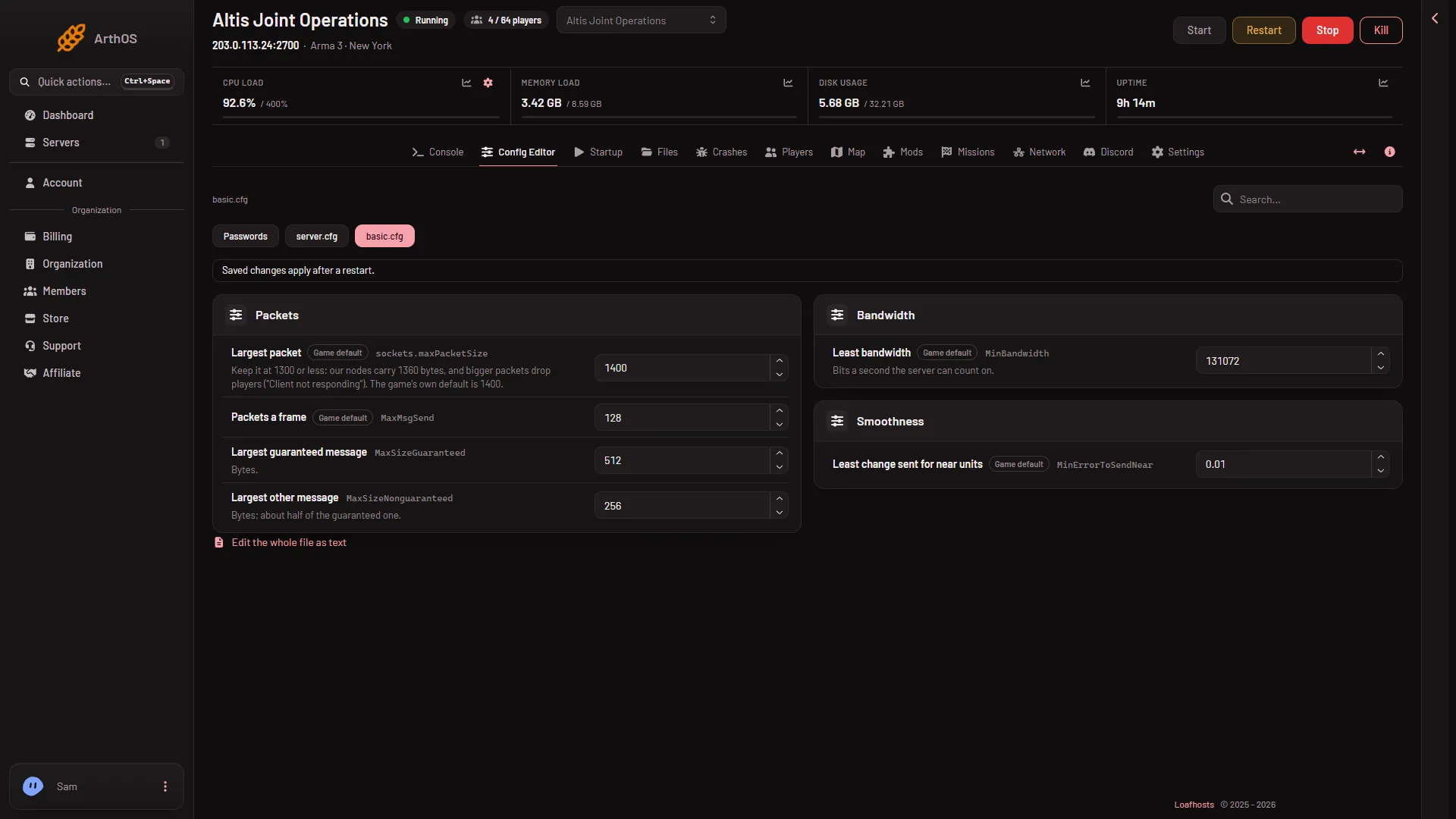
- Largest packet
- Packets a frame
- Least bandwidth
The picture shows rows (1), (2) and (3). Which rows show depends on the file: a setting the file does not hold may not be listed.
Packets
- Largest packet (
sockets.maxPacketSize): from 576 to 1500. The game’s own default is 1400. The panel’s advice is: “Keep it at 1300 or less: our nodes carry 1360 bytes, and bigger packets drop players (“Client not responding”).” If the file has no value, the editor offers 1400 as the game default. Which size is best has not been measured with real players, so lower it only if players are dropped. See the packet size guide. - Packets a frame (
MaxMsgSend): from 16 to 4096. The game’s default is 128. The sample file says a higher value can reduce lag but can raise desync. - Largest guaranteed message (
MaxSizeGuaranteed): from 64 to 1300 bytes. The default is 512. Guaranteed messages carry events that must arrive, such as shots. A small message is packed with others into a bigger packet. - Largest other message (
MaxSizeNonguaranteed): from 64 to 1300 bytes. The default is 256. The help says it should be about half of the guaranteed one.
Bandwidth
- Least bandwidth (
MinBandwidth): the bits a second the server can count on. From 8192 up. The game’s default is 131072. - Most bandwidth (
MaxBandwidth): the most bits a second the server may use.
These are bits a second, not bytes.
Smoothness
- Least change sent for far units (
MinErrorToSend): a smaller value makes distant units move more smoothly but sends more traffic. - Least change sent for near units (
MinErrorToSendNear): a larger value sends less traffic for units close to a player. The default is 0.01. - Largest custom face or sound (
MaxCustomFileSize): in bytes. 0 allows none.
Both change values accept a number from 0.0001 to 1.
Change a value
- Open the Config Editor and choose
basic.cfg. - Change one value. Change one at a time so you can tell which helped.
- Choose Save. The page says “Saved. Restart the server to apply the changes.” if the server is running.
- Choose Restart now, or restart later. A restart drops everyone who is on. Warn them first with A message to everyone on the Players page, then choose Send.
When you save Largest packet and the file has no active class sockets block, the editor adds one at the end of the file.
By hand
Open basic.cfg in Files. A setting is a line such as MaxSizeGuaranteed=512;. The packet size lives inside a class:
class sockets
{
    maxPacketSize = 1300;
};
The basic.cfg file Loafhosts ships has a //class sockets{maxPacketSize=1400}; line that is switched off by the //. A class that never closes makes the editor show the file as text.
If it does not work
- The editor shows the file as plain text. A class has no closing
};. Fix it in the file editor. - Players see “Client not responding”. Packets may be too big. See that guide.
- Nothing changed. The server was not restarted since you saved.
Sources: Bohemia wiki: Basic.cfg