
















maxPacketSize is the largest network packet the server sends to players. The game’s own default is 1400. The panel’s advice is to keep it at 1300 or less. The panel warns that bigger packets drop players, who then see “Client not responding”.
The setting lives in basic.cfg, in a class called sockets:
class sockets
{
    maxPacketSize = 1300;
};
Read and change it in the panel
- Open the Config Editor.
- Under Settings files, choose
basic.cfg. - Find the card Packets and the field Largest packet (1). The field accepts 576 to 1500.
- Type the new number. A bar reads “Unsaved changes: (n)” with Discard and Save. Choose Save.
- Restart the server. A running server shows “Saved. Restart the server to apply the changes.” A restart drops everyone who is on, so choose a quiet moment and warn players first with A message to everyone and Send on the Players page.
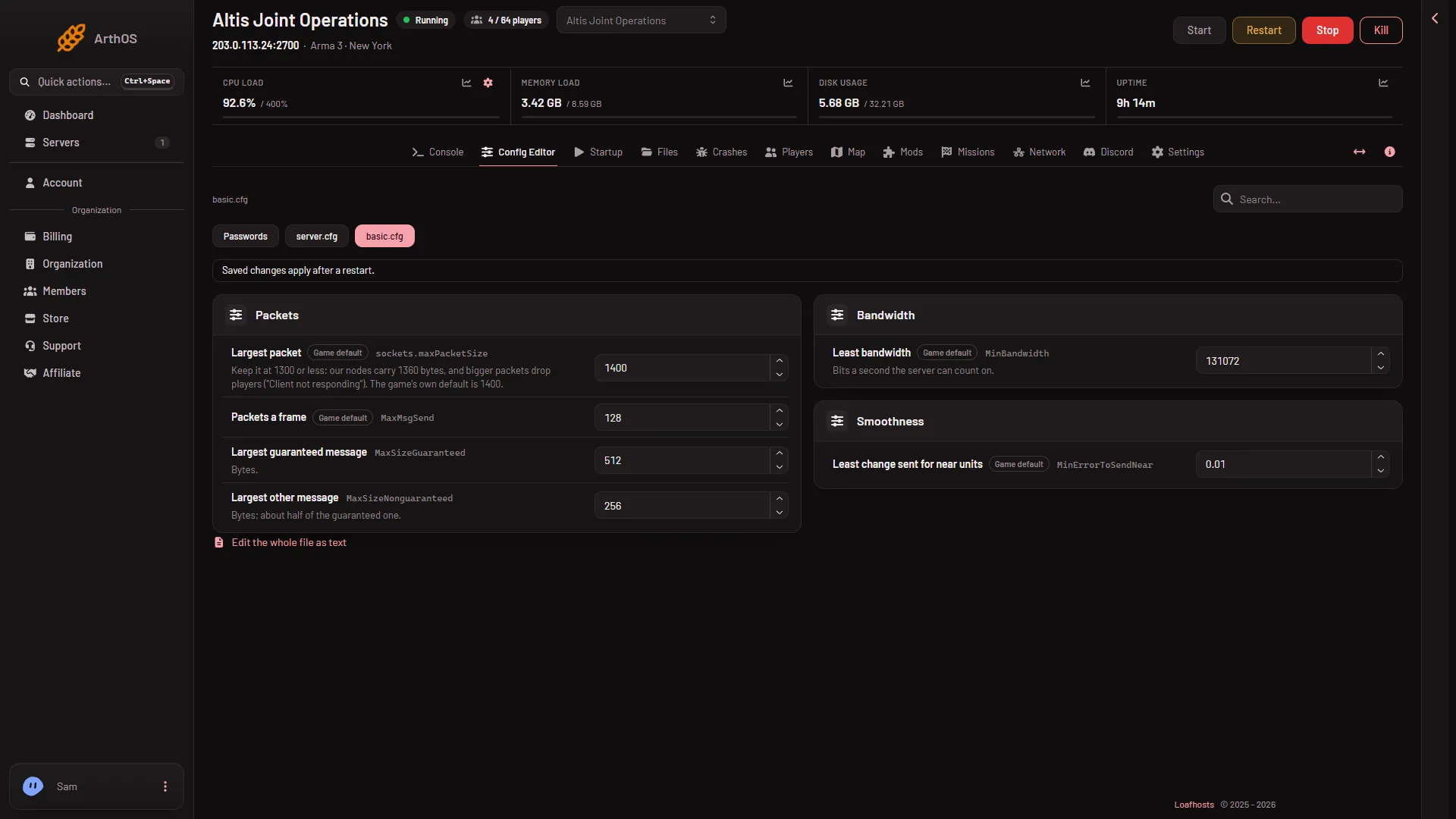
- Largest packet
The help text under the field says: “Keep it at 1300 or less: our nodes carry 1360 bytes, and bigger packets drop players (“Client not responding”). The game’s own default is 1400.”
The field carries a Game default tag. When the file has no active sockets class, the field offers the game’s own 1400. Saving a number writes the class for you.
What the other fields in the card do
The card also holds Packets a frame, Largest guaranteed message and Largest other message. Leave them alone unless you know why you are changing them. They are not needed to change the packet size.
By hand
- Open Files and edit
basic.cfgin the server’s folder. - Add the
socketsclass shown above, or change the number in the one that is there. A line starting with//is a comment and the game ignores it. - Save and restart the server. The restart drops everyone who is on.
A basic.cfg with a class that does not close is shown in the Config Editor as plain text. Fix the missing }; first.
Not checked
Not checked on (2.22.154089) as of 13 November 2026: which packet size is best for players on a Loafhosts server. Use the panel’s advice as a starting point, and change it only if players report the drop.
If it does not work
- Nothing changed. The server has not restarted since you saved.
- Players still see “Client not responding”. The packet size is one possible cause. See the Client not responding kick.
- The file is shown as text. It has a class that does not close. Fix it in the text view.
More about the other settings in the file: basic.cfg explained. More about the game: Arma 3 servers.
Sources: Bohemia wiki: Dedicated Server