
















server.cfg holds the rules of an Arma 3 server: its name, who can join, how missions run and when slow players are kicked. The Config Editor shows 42 of its settings in seven cards: Server (5), Joining (14), Game (8), Voice (3), Voting (2), Network health (5) and Scripting (5).
Every change applies at the next start, and a restart drops everyone who is on (warn them first with A message to everyone on the Players page). The editor lists a setting only when the file holds it or the game has a default for it, so a card can show fewer rows than the counts here. How the editor works is in the Config Editor guide. A setting the file does not hold yet shows Game default.
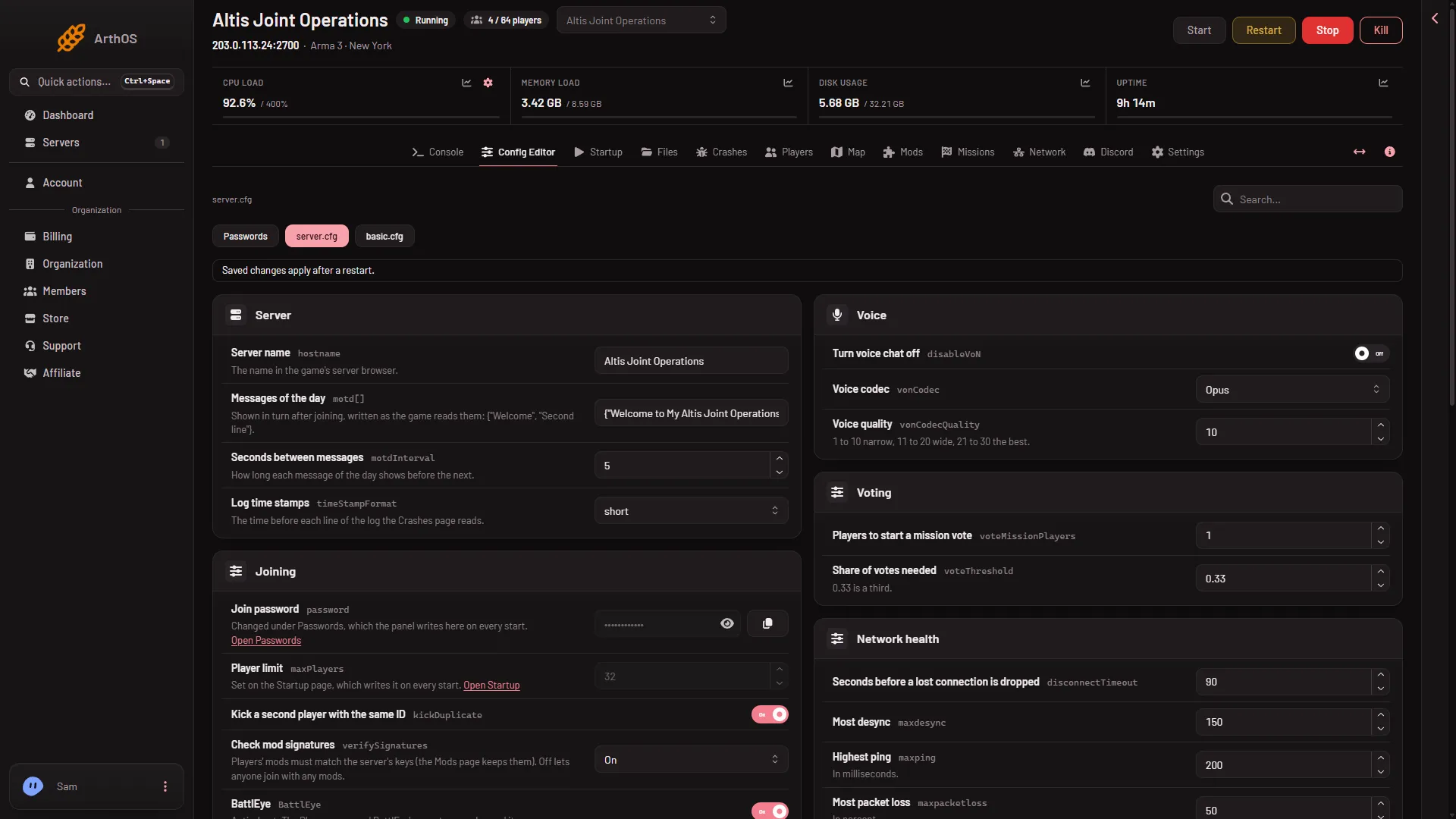
- Server name
- Messages of the day
Server (5)
- Server name (
hostname): the name in the game’s server browser. Rename Server on Settings changes only the panel’s own name. - Messages of the day (
motd[]): lines shown to players in turn after they join. See message of the day. - Seconds between messages (
motdInterval): how long each message shows before the next. From 1 to 600. - Admins without a password (
admins[]): Steam IDs that log in as admin with#loginalone. The Players page adds and removes them. It applies at the next restart. - Log time stamps (
timeStampFormat): the time before each log line. Choose none, short or full. The Crashes page reads this log.
Joining (14)
- Join password (
password): the password players type to join. It is set under Passwords, where it is called Server Password, not here. - Admin password (
passwordAdmin): the password typed in game after#login. Also under Passwords. - Server command password (
serverCommandPassword): for missions and mods that run server commands from scripts. - Player limit (
maxPlayers): how many players can join. It is set on Startup as Max Players, from 1 to 256. Headless clients count too. The game uses the lower of this number and the mission’s slots. - Kick a second player with the same ID (
kickDuplicate): when on, a player whose ID is already on the server is kicked. Theserver.cfga new server starts with sets it to 1 (on). The game’s own default is off. - Check mod signatures (
verifySignatures): On or Off. See verify signatures. - BattlEye (
BattlEye): the game’s anti-cheat. The Players page and BattlEye’s remote console need it on. - Loose files from players (
allowedFilePatching): whether players may load files from outside their mods. Choose No clients, Headless clients only or Every client. - Oldest game build allowed (
requiredBuild): the minimum game version a player must have, as a build number. - Server browser data size (
steamProtocolMaxDataSize): from 1024 to 20000. The help says to raise it to 4096 or more when the Launcher shows only part of a long mod list. The game warns that a very big value can send packets that are too large for the network. - LAN only (
loopback): an on or off switch. Leave it off for a server that players reach over the internet. - UPnP (
upnp): “Not used on our servers.” - Headless client addresses and Local client addresses: set by the Headless Clients value on Startup, so they are locked.
Game (8)
- Keep the mission running when everyone leaves (
persistent): the mission does not end when the last player goes. - Start the first mission at once (
autoSelectMission): the first mission of the rotation starts at every start, without waiting for an admin. - Missions in random order (
randomMissionOrder): the next mission is picked at random from the rotation. - Missions before a restart (
missionsToServerRestart): from 0 to 1000. “0 never restarts for it.” - Difficulty for every mission (
forcedDifficulty): Recruit, Regular, Veteran or Custom. “Custom takes the profile’s own settings.” - Drawing on the map (
drawingInMap): lets players draw on the map. A setting the file lacks is on. - Helicopter flight model (
forceRotorLibSimulation): Players choose, Advanced or Simple. - Skip the role lobby (
skipLobby): skips the role lobby, where players choose a role.
The mission rotation itself is on the Missions page, and the entries in server.cfg are locked in the editor. Three of these switches also appear on the Missions page and write the same file.
Voice (3)
- Turn voice chat off (
disableVoN): no voice for anyone. - Voice codec (
vonCodec): Opus or Speex. - Voice quality (
vonCodecQuality): from 1 to 30. “1 to 10 narrow, 11 to 20 wide, 21 to 30 the best.”
Voice travels on the game port, so there is no extra port to set up.
Voting (2)
- Players to start a mission vote (
voteMissionPlayers): how many players must be on before a vote can start. From 0 to 256. - Share of votes needed (
voteThreshold): from 0.0 to 1.0. “0.33 is a third.” A new server starts with 0.33. The game’s own default is 0.5.
Network health (5)
- Seconds before a lost connection is dropped (
disconnectTimeout): from 5 to 90. A new server starts with 90. The game’s own default is 15. - Most desync (
maxdesync): the desync value a player may reach. From 0 to 100000. A new server starts with 150. The game’s own default is -1. - Highest ping (
maxping): in milliseconds. A new server starts with 200. The game’s own default is -1. - Most packet loss (
maxpacketloss): in percent. A new server starts with 50. The game’s own default is -1. - Kick for ping, loss, desync, timeout (
kickClientsOnSlowNetwork[]): four switches, in that order. “1 kicks and 0 only logs: {1, 1, 0, 1}.” A new server starts with {1, 1, 0, 1}: ping and loss kick, desync and timeout only log.
A player over a limit is kicked only where the matching switch in the last line is 1. A 0 only logs it.
Scripting (5)
These are script lines the server runs on an event. Each is a text value.
- When a player’s file is unsigned (
onUnsignedData): “Script the server runs; the shipped one kicks.” - When a player’s file was changed (
onHackedData) - When a player’s file differs (
onDifferentData) - When a player joins (
onUserConnected) - When a player leaves (
onUserDisconnected)
Change them only if you know the game’s scripting.
Advanced and the missions
- The Advanced card says “(n) more settings are in this file. Most servers never change them.” Choose Show them to see them.
- Each mission in the rotation has its own locked card. Those are kept on the Missions page.
By hand
Each setting is one line in server.cfg that ends with a semicolon. A list uses braces.
hostname = "My server";
kickDuplicate = 1;
motd[] = {"Welcome", "Second line"};
The game reads the file once, at start.
Locked here
The join password and admin password are under Passwords. Player limit and the headless client addresses are on Startup. Every Missions entry is on the Missions page. See the Config Editor guide.
More about the game: Arma 3 servers.
Sources: Bohemia wiki: Server Config File, Bohemia wiki: Headless Client