
















Check mod signatures has two choices, On and Off. On means a player’s mod files must match the keys on your server. Off means anyone can join with any mods. Keep it On unless you have a reason. A new Loafhosts server starts with it On.
The setting is verifySignatures in server.cfg. On is the value 2 and Off is 0. The game’s own page is not consistent about 1, so the panel offers only On (2) and Off (0). A change applies at the next start. More about the game: Arma 3 servers.
What it checks
Each mod carries signature files, and its author’s public key is a .bikey file. The server keeps the keys in its keys folder. With signatures On, the server checks each player’s mod files against those keys. A player whose files do not match is refused.
You do not have to copy keys yourself. The Mods page copies each mod’s keys into keys when you apply a list, and it removes a key only when the mod that used it leaves. See mod keys and signatures.
What Off allows
The panel says it plainly: “Off lets anyone join with any mods.” The server stops checking the players’ mod files. That means:
- A player with a different version of a mod can join.
- A player with a changed or unsigned file can join.
- A player with an extra mod you did not choose can join.
Switching it Off does not turn BattlEye (the game’s anti-cheat) off. They are separate settings.
Off is the quick answer to “players are refused for a wrong signature”, but it gives up a protection, and the server then trusts every player’s files. The better fix is to give players the same mods and versions as the server. The Mods page can give your players a preset for the Launcher. If a mod’s key is missing from keys, add its .bikey there.
Change it
- Open the Config Editor and choose
server.cfgunder Settings files. - On the Joining card, find Check mod signatures.
- Choose On or Off in the box (1).
- Choose Save. The page says “Saved. Restart the server to apply the changes.” if the server is running.
- Choose Restart now, or restart later. A restart drops everyone who is on. Warn them first with A message to everyone on the Players page (type the text, then choose Send).
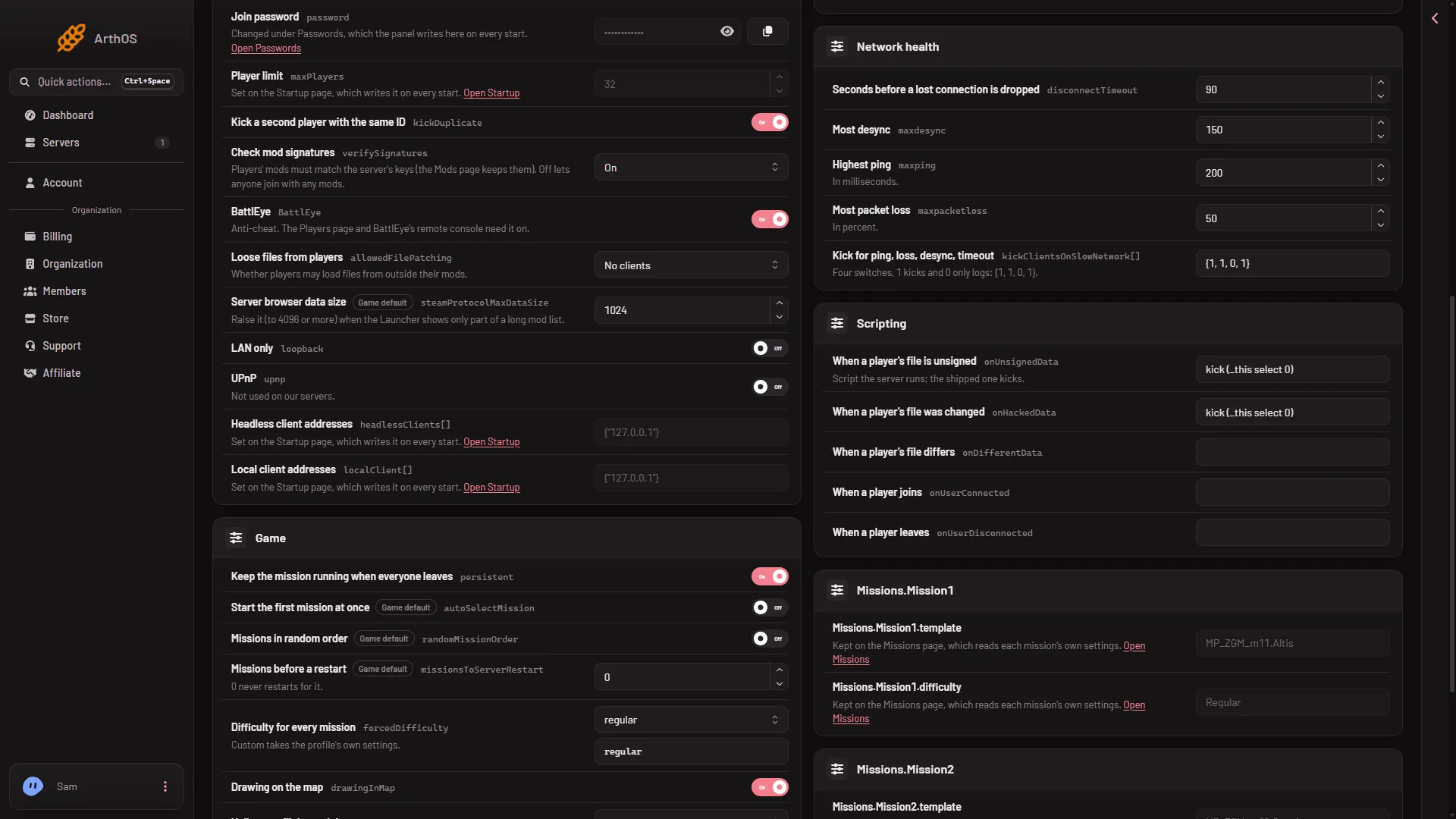
- Check mod signatures
What happens to a player who fails
The Scripting card has When a player’s file is unsigned. Its help says: “Script the server runs; the shipped one kicks.” The signature check is what refuses the file. The script is what the server file ships to act on it, and the shipped one kicks. The two lines after it, for a changed file and a different file, are on the same card. See every server.cfg setting.
By hand
- Open
server.cfgin Files. - Find
verifySignatures = 2;. Change it toverifySignatures = 0;to turn checks Off. With2, the server trusts the keys in itskeysfolder, so put the keys you want to trust there. With0, the keys are not used. - Save and restart. The game reads the file once at the start.
If it does not work
- Players are refused with “wrong signature”. Their mod files differ from the server’s. Update the mods on the server and have players update theirs. The Crashes page shows this as “A player’s files did not match the server’s keys”.
- A mod’s key is not in
keys. Apply the mod list again on the Mods page, or put the.bikeyinkeysby hand. - The change did not apply. The server was not restarted after you saved.
Sources: Bohemia wiki: Server Config File