
















Arma 3 voice chat is called Voice over Network, or VoN. You control it with three settings in the Voice card of the Config Editor: Turn voice chat off, Voice codec and Voice quality. By default voice chat is on, the codec is Opus, and quality is a number from 1 to 30.
The three settings
| Panel label | Key in server.cfg | What it does |
|---|---|---|
| Turn voice chat off | disableVoN | 0 keeps voice chat on (the game’s default). 1 turns it off. |
| Voice codec | vonCodec | Opus is 1 (the game’s default). Speex is 0, the older codec. |
| Voice quality | vonCodecQuality | A number from 1 to 30. A higher number sounds better. |
The panel’s help for Voice quality reads “1 to 10 narrow, 11 to 20 wide, 21 to 30 the best.” The game describes the same ranges by sampling rate: 8 kHz for 0 to 10 and 16 kHz for 11 to 20. For 21 to 30 it is 32 kHz with Speex and 48 kHz with Opus. The game’s own default quality is 3.
Opus is the newer standard. Speex is there for old setups, so keep Opus unless you have a reason.
Change them in the panel
- Open the Config Editor page of your server.
- Choose server.cfg in the list of settings files.
- Find the Voice card.
- Switch Turn voice chat off on to stop voice chat. Leave it off to keep voice chat.
- Pick Opus or Speex in Voice codec.
- Type a number from 1 to 30 in Voice quality.
- Choose Save.
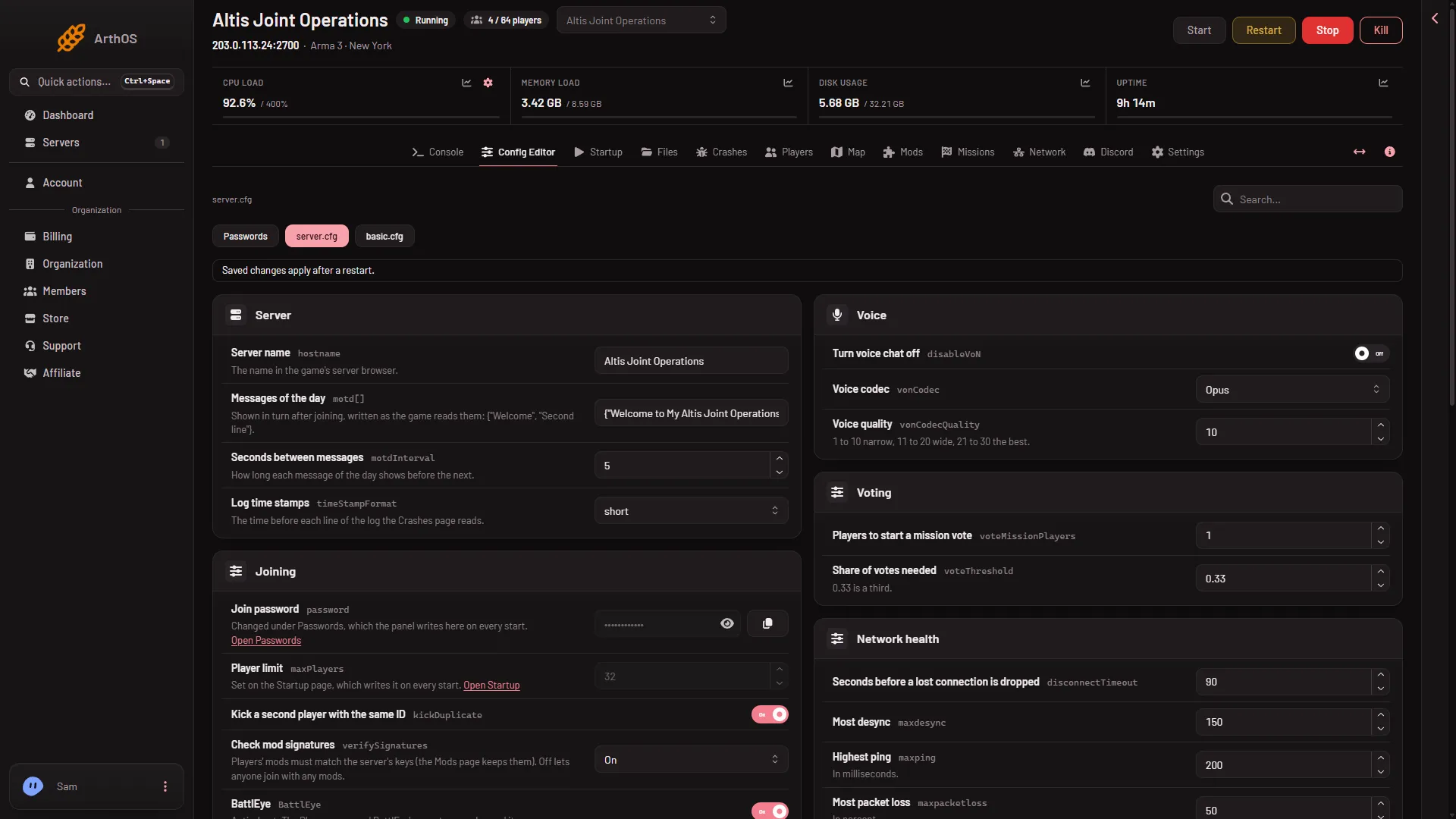
When the server is running, the page says “Saved. Restart the server to apply the changes.” and shows Restart now. The game reads server.cfg once, when it starts, so voice settings change only after a restart. A restart drops everyone who is on. Warn them first with A message to everyone on the Players page (type the text, then choose Send).
Each field has a Game default. If your file does not carry Turn voice chat off, the editor offers it at the game’s default, which is voice chat on.
By hand
Open Files, open server.cfg and write the lines. All three are numbers:
disableVoN = 0;
vonCodec = 1;
vonCodecQuality = 10;
Keep each semicolon. Save, then restart the server.
Ports
Voice runs on the game port, so players need nothing extra for it. The port three above the game port is kept for voice and not used. On the Network page the game port has a star, and the rows do not say what each port is for. See server ports.
What to pick
Turn voice chat off only when you want players to use another voice program. Not checked on 2.22.154089 as of 13 November 2026: how each quality number sounds with players on a Loafhosts server. Try a value, restart, and ask a player to listen.
If it does not work
- Nothing changed. The server was not restarted after the save.
- Voice quality is refused. It must be a whole number from 1 to 30.
- Players cannot talk. Check that Turn voice chat off is off, then restart.
- The save is refused. Your role may not allow changing files.
The other settings of this file are in server.cfg explained. More about the game: Arma 3 servers.
Sources: Bohemia wiki: Server Config File, Bohemia wiki: Dedicated Server