
















Make Me Admin fails when the password you type is not the server’s current Admin password. The usual causes are the wrong password, or a new one that the server has not started with yet. Check both. Make Me Admin is a button in the game, not in the panel.
Find the right password
Passwords are not on the Startup page. Open the Config Editor, then the Passwords source (1). There are three rows:
- Join password (3) is what players type to join. It can be empty.
- Admin password (2) is the one for Make Me Admin.
- Remote console password is only for the panel. Players never use it.
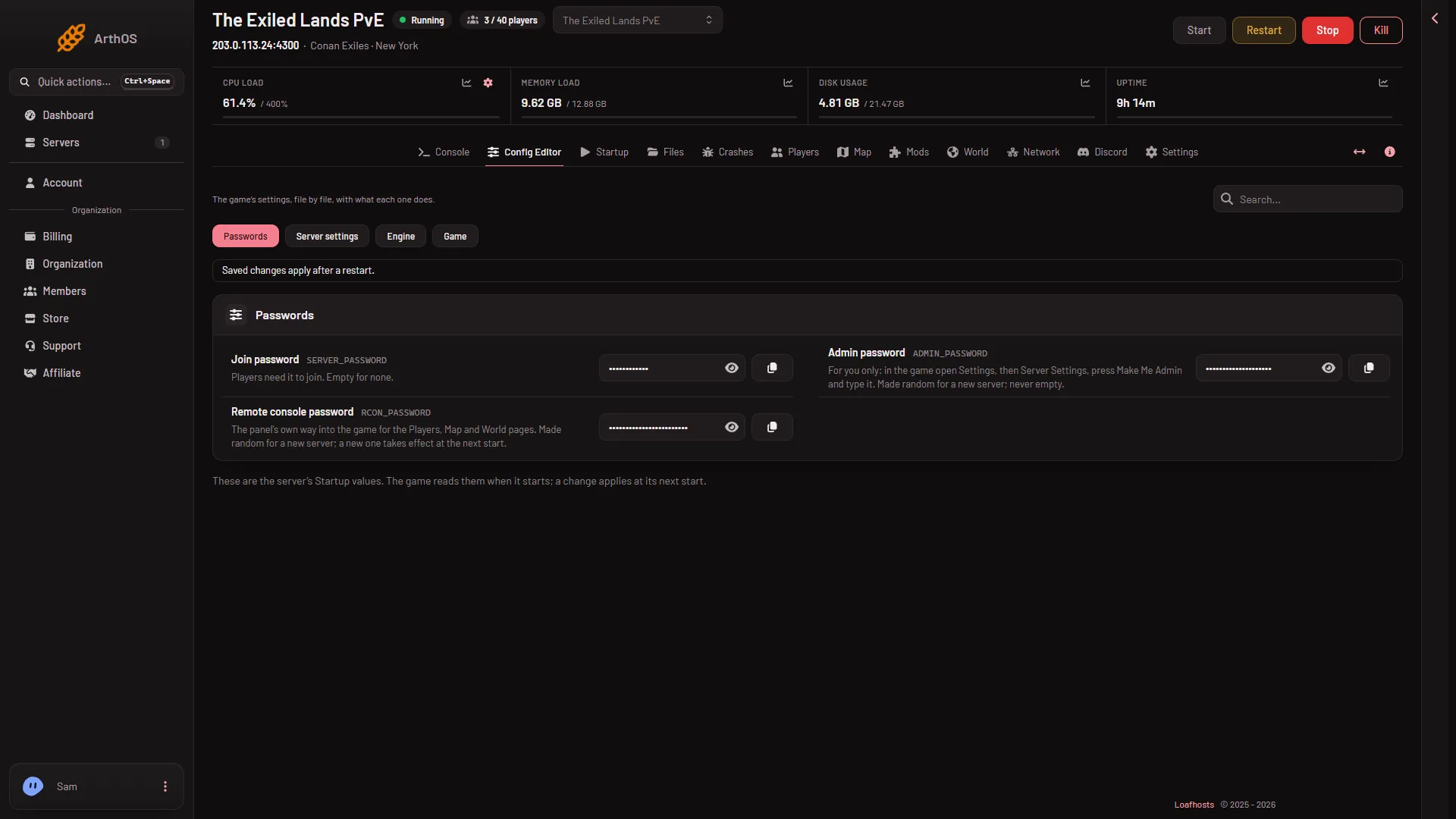
- Passwords source
- Admin password
- Join password
Many people type the join password by mistake. Use the Admin password row. The values are hidden: press the eye button beside Admin password to read it, or the copy button to copy it.
Use it in the game
The row says: in the game open Settings, then Server Settings, press Make Me Admin and type the password. The password is for you only, so do not share it.
Restart after you change it
The panel writes the admin password into the server’s settings at every start. A new password therefore works from the next start. A restart drops everyone who is on. On the Players page, Restart with a warning tells them first, but only while the game answers the panel. If you changed the password and the old one still seems to count, or the new one fails:
- Read the row with the eye button and check it holds what you typed. An admin password is 6 to 64 characters: letters, digits,
-and_. The page refuses anything else. - After an edit a bar reads “Unsaved changes: (n)”. Choose Save, then restart the server.
- Try Make Me Admin again with the new password.
You cannot change the admin password in the Server settings file view. The panel sets it itself, so use Passwords.
If it does not work
- You do not remember the password. Press the eye button beside the Admin password row to read it. To set a new one, type it, choose Save, and restart.
- A new server. A new server starts with a random admin password. Read it with the eye button.
More about the game: Conan Exiles servers. For the full steps, see Make Me Admin.