
















On the World page, choose Allow or Refuse next to an address a mod asked for. The panel writes the line into ModHttp.ini for you. The decision applies from the next start. If you edit the file yourself, quote the address and match it exactly.
First read why mods need approval.
In the panel
- Start the server, so the game can ask about addresses.
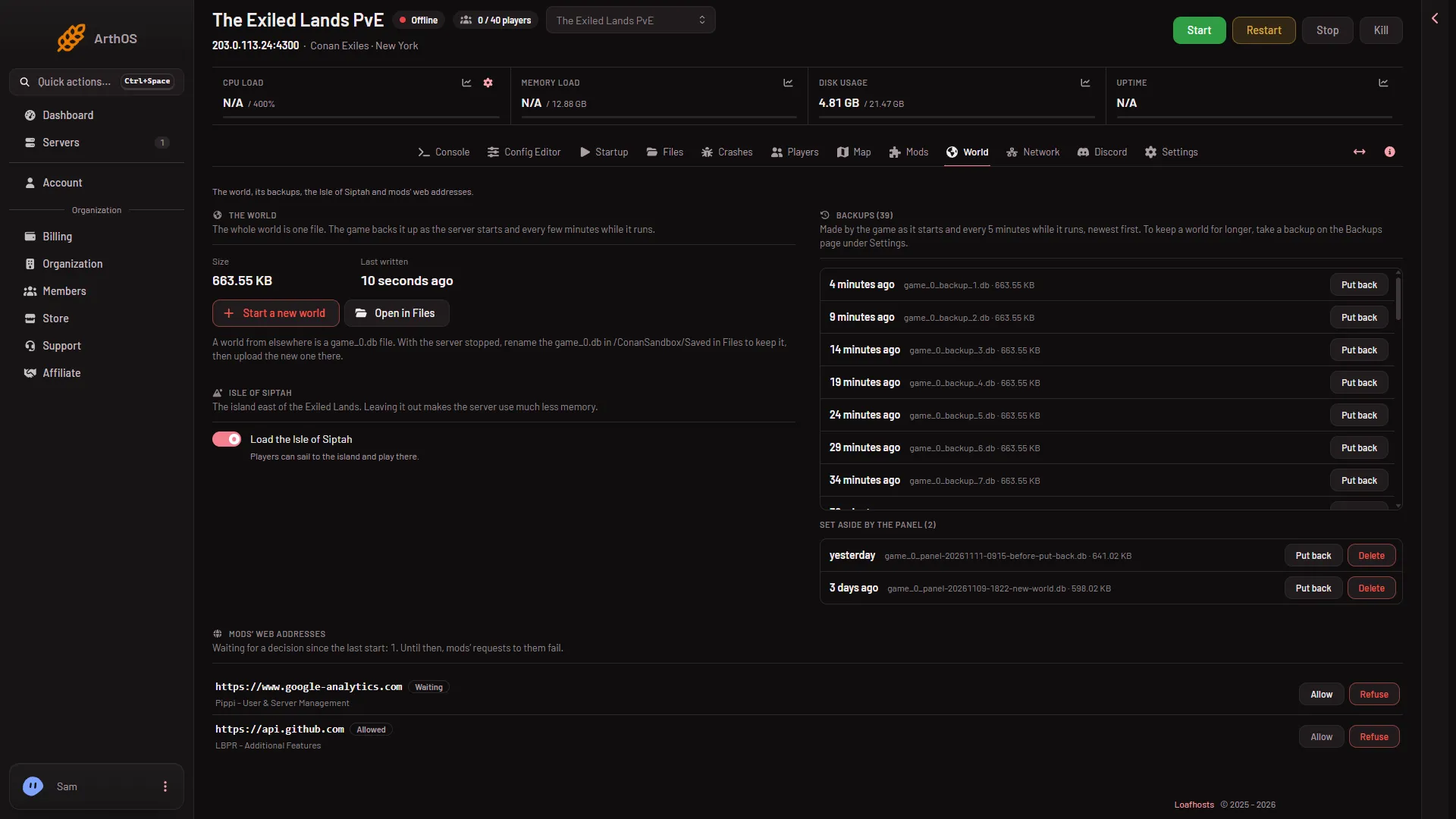
- Open the World page and find Mods’ web addresses.
- On a row in the state Waiting, read the address and the line “the mod says: (reason)”.
- Choose Allow (1) to let the mod use it, or Refuse (2) to keep it out.
- Allow
- Refuse
The panel answers “(address) is allowed from the next start.” or “(address) is refused from the next start.” The row changes to Allowed or Refused.
You can decide again later. The new choice replaces the old one for that address. Restart the server to use it. A restart drops everyone who is on, so warn them first with Restart with a warning on the Players page (it works only while the game answers the panel).
What the panel writes
The file is ConanSandbox/Saved/Config/LinuxServer/ModHttp.ini. Each mod has a section named after its folder. Under it, one line for each address:
[HttpTest]
AllowedOrigin="https://api.example.com"
DeniedOrigin="https://example.org:8443"
HttpTest and the two addresses are examples. AllowedOrigin lets the mod use the address. DeniedOrigin blocks it. The second example shows a port, which is written only when it is not the usual one for the scheme.
Two rules from Funcom matter if you edit the file by hand:
- Quote the address. “An unquoted // is read as the start of a comment”, so
https://example.comwithout quotes loses everything afterhttps:. The panel always writes the quotes. - Matching is exact. The address must be the same as the one the mod uses: the scheme, the host, and the port when it is not the usual one. An address that is close is a different address.
An address is the scheme, the host and maybe a port, and nothing after it. https://api.example.com is right. https://api.example.com/v1/data is not. The panel refuses an address that has a path and says: “that is not a mod’s folder and an address the game takes (scheme://host, with a port when it is not the usual one)”.
By hand
- Stop the server, or be ready to restart it.
- Open Files and go to
ConanSandbox/Saved/Config/LinuxServer. OpenModHttp.ini. If it is missing, create it. - Add the section and the line, as in the example above. The section name is the mod’s folder name, as the game logged it in its
LogModHttp: Warning:lines. - Save, then restart the server. Funcom says to restart after editing.
The easiest way to get the exact section name and address is to read the game’s log from a start. The game prints lines beginning LogModHttp: Warning: that name each mod and each address it asked for. These are the lines the panel shows on the World page.
If it does not work
- Allow and Refuse do nothing for you. Your role may not let you change files. Ask the owner.
- The panel refuses the address. It has a path, a space, or a character the game does not take. Use only the scheme, the host and the port.
- The mod is still blocked after you allowed it. Restart the server. A decision is used at the next start.
- You edited the file and nothing changed. Check the quotes and the section name.
More about the game: Conan Exiles servers.