
















When you stop a Conan Exiles server, the panel asks the game to save and shut down. Auto-Kill is the safety net: if the game is still running after the number of seconds on the Auto-Kill card, the panel kills it. A kill does not save the world, so leave Conan enough time.
What the card says
Open Settings on your server and find the Auto-Kill card. It explains: “Stop asks the game to save and shut down. If it is still running this many seconds later, it is killed, so a stuck stop cannot hang.”
Above the field is an Enabled switch. Leave it on. What turning it off does has not been checked: not checked on Enhanced, server build 25792439 as of 13 November 2026. The field is Seconds until auto-kill. The number in it is the time the server gets. Read it there. Do not use a number from another page: it is different for each game and server.
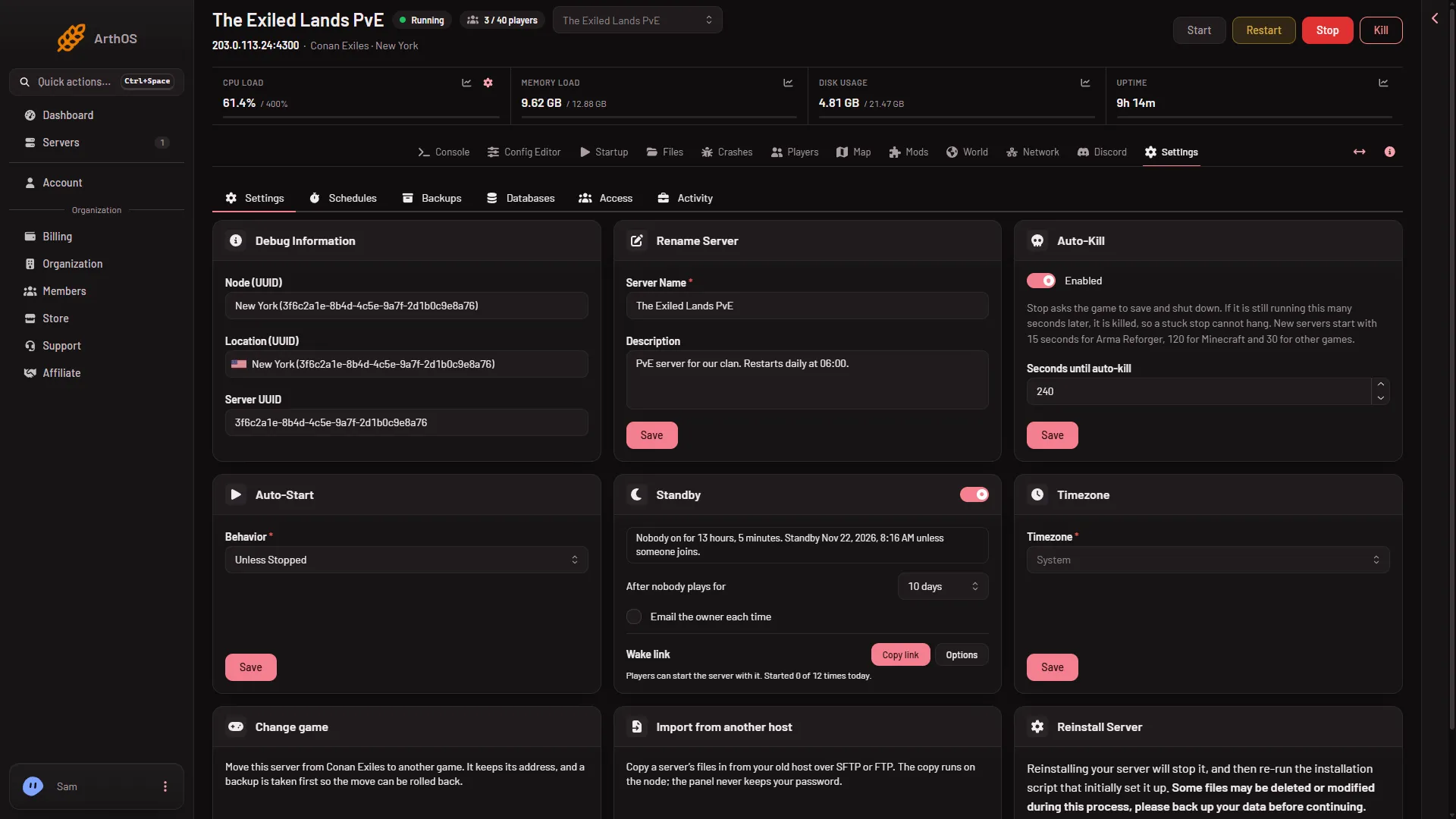
- Auto-Kill card
- Read the seconds here
Find the Auto-Kill card (1) and read Seconds until auto-kill (2). The picture shows one server’s number, not a recommendation. The card’s own sentence about 15, 120 and 30 seconds names other games, not Conan Exiles. A Conan stop can take nearly four minutes (see below), so the number must be above that.
Why Conan needs time
Stopping is not instant. The game writes its world to disk, then exits. On Loafhosts’ own servers, a stop took:
- about 40 seconds on a world that had been played;
- up to 3 minutes and 43 seconds on a new world.
That second number is long, and it is normal for a first stop. A stop that takes minutes is not a hang.
Watch a stop
- Press Stop on your server.
- Open the Console tab.
- The panel prints a line: “If it has not stopped in (seconds) seconds, it is killed. Change this under Settings, Auto-Kill.” The number in it is the one on your card.
- Wait. The game prints its shutdown lines, then the server shows as offline.
The panel does not need the kill when the game exits by itself. The kill only happens if the time runs out.
Change the number
- Open Settings and find the Auto-Kill card.
- Change Seconds until auto-kill.
- Save. The panel says “Server auto-kill updated.”
The new number is used the next time you stop the server. Choose a higher number if a stop of your world is slow. Do not lower it.
Other things that stop the server
Standby, a restart from the Players page and a schedule all use the same stop. They save the world as a normal stop does, and they are covered by the same Auto-Kill time.
If it does not work
- The server was killed during a stop. The time ran out before the game finished. Raise Seconds until auto-kill and stop again. If the world will not load afterwards, put back a game backup from the World page.
- The stop seems stuck. Wait for the time on the card. A new world, a big world or a server with many mods takes longer. The Console shows the game’s own lines while it works.
- Auto-Kill is not the same as Auto-Start. Auto-Start is a separate card on Settings, with a Behavior field. It is about starting the server, not about how long a stop may take.
More about the game: Conan Exiles servers.