
















Four settings in the Day, night and weather group change the length of the day: Day Cycle Speed for the whole 24 hours, and Day Time Speed, Night Time Speed and Dawn/Dusk Time speed for one part each. All four start at 1, Funcom’s default. While the server runs, the panel saves a change to the running game. Not checked on Enhanced, server build 25792439 as of 13 November 2026: whether the game re-reads each one live.
The hours each setting covers
Funcom gives these in-game clock hours. The last column is the key in ConanSandbox/Saved/Config/LinuxServer/ServerSettings.ini, under [ServerSettings]:
| Setting | In-game hours | Key |
|---|---|---|
| Dawn/Dusk Time speed | Dawn 5:00 to 6:59, and dusk 17:00 to 18:59 | DawnDuskSpeedScale |
| Day Time Speed | 7:00 to 16:59 | DayTimeSpeedScale |
| Night Time Speed | 19:00 to 4:59 | NightTimeSpeedScale |
| Day Cycle Speed | The whole 24 hours | DayCycleSpeedScale |
Dawn/Dusk Time speed is one number for both dawn and dusk. You cannot set them apart. Edit the file by hand only while the server is stopped: the game writes it again when it stops.
How they combine
Day Cycle Speed speeds up or slows the whole cycle. Funcom notes that it is applied “in addition to” the three part settings. So the whole-cycle number counts for every hour, and a part setting counts on top of it for its own hours. With Day Cycle Speed at 2 and Night Time Speed at 2, the night gets both changes and the day gets only the first.
Funcom words the three part settings as “the time spent” in that part of the day, and the whole-cycle setting as a “speed”. Because of that, change one setting by a small step, then watch the in-game clock to see which way it went before you set a large number.
In the panel
- Open the Config Editor for the server.
- Choose the source Server settings.
- Find the Day, night and weather group. It holds these four rows and Enable Sandstorm.
- Change the rows you want. Use a decimal for a fraction, such as
0.5. - A bar reads “Unsaved changes: (n)” with Discard and Save. Choose Save.
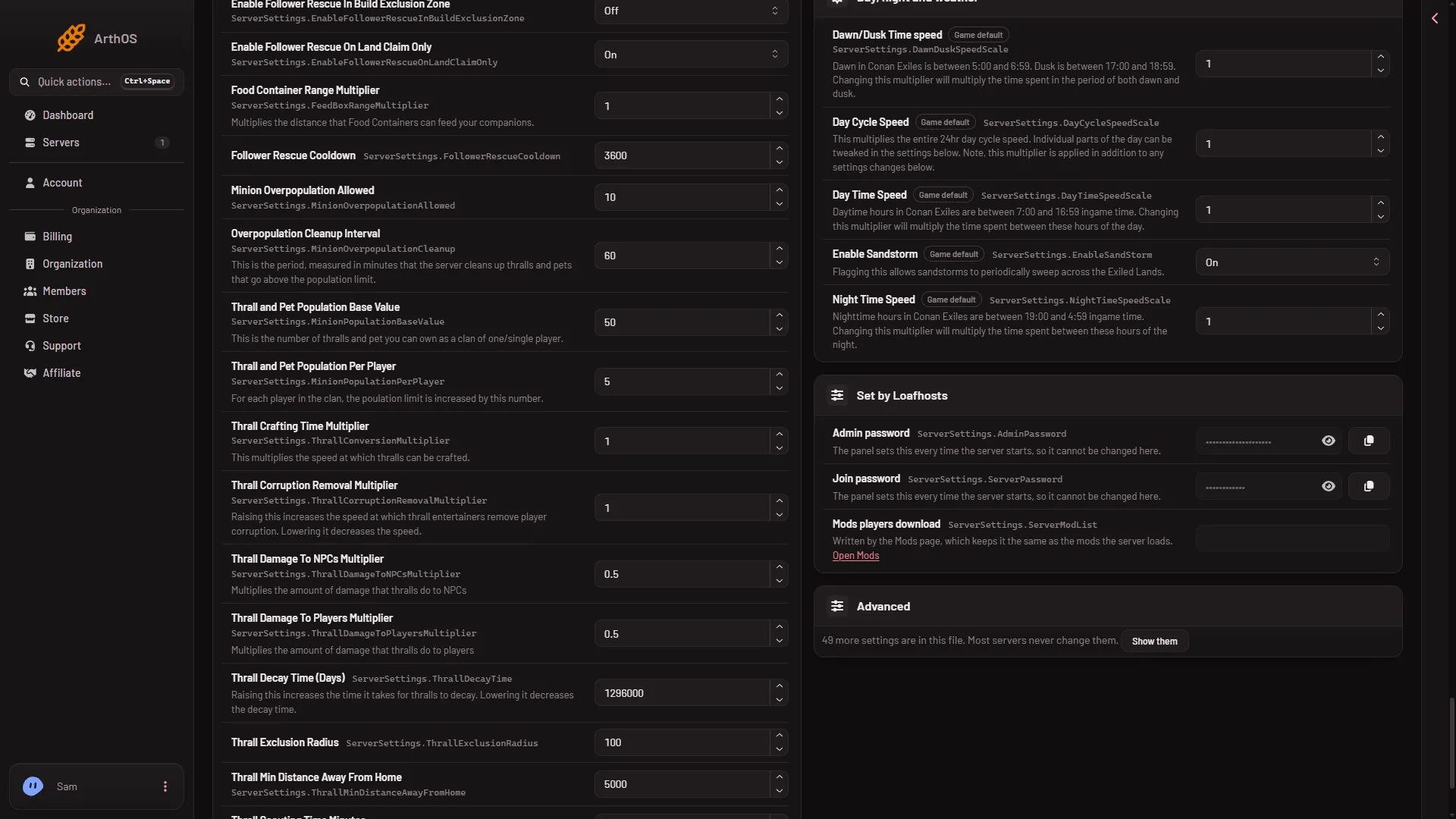
- Day Cycle Speed
- Day Time Speed
- Night Time Speed
On a running server the page says “Saved and in use now.” or “Saved and in use now, except (names): those apply at the next start.” On a stopped server it says “Saved. The changes apply when the server starts.”
Example: change only the night
Leave Day Cycle Speed at 1. Change only Night Time Speed, save, and watch the clock through a night. If the night went the wrong way, set a number on the other side of 1 and check again.
Take a setting back
Set the row to 1 and save.
If it does not work
- The panel says the server is starting or stopping. Wait until it has finished, then save.
- The panel says the server is not answering yet. Try again once it has finished starting, or stop the server and save.
- Two settings seem to stack. They do, for the hours both cover. Put Day Cycle Speed back to
1and change one part at a time. - You cannot find a row. Type its name in the search box, for example
Dawn.
More about the game on Loafhosts: Conan Exiles servers.