
















Conan Exiles has three ways to limit raiding. You can allow building damage only in set hours (Time-Restrict PVP Building Damage). You can allow it only while a base’s owner is online or just left (Dynamic Building Damage). And you can stop players building during raid hours (Disable Building During Time Restricted PVP). All of them are in the Config Editor.
Every one of them is off by default. Funcom lists each as relying on other settings, so turn those on first.
Start here
- Open the Config Editor and choose Server settings. Find the group PvP and raiding.
- Set PVP Enabled to On. It applies at the next start. See turn on PvP.
- Set Can Damage Player Owned Structures to On. Funcom lists Time-Restrict PVP Building Damage and Dynamic Building Damage as relying on it and on PVP Enabled.
- A bar reads “Unsaved changes: (n)” with Discard and Save. Choose Save. A restart for PVP Enabled drops everyone who is on the server, so warn players first with Restart with a warning on the Players page (it works while the game answers the panel).
On your own machine, the keys are in ConanSandbox/Saved/Config/LinuxServer/ServerSettings.ini under [ServerSettings]: PVPEnabled, CanDamagePlayerOwnedStructures, RestrictPVPBuildingDamageTime, DynamicBuildingDamage, DynamicBuildingDamagePeriod and DisableBuildingDuringTimeRestrictedPVP. Edit that file only with the server stopped.
Raid hours
Time-Restrict PVP Building Damage. Funcom: “When this is flagged, players can only attack and destroy other player’s structures within the set time periods.”
Then set each weekday. As with PvP time restrictions, times are four digits, HHMM, such as 2000 for 8 pm.
- Monday: building damage allowed to Sunday: building damage allowed. Whether buildings can be damaged that day. Each starts off. Keys
PVPBuildingDamageEnabledMondaytoPVPBuildingDamageEnabledSunday. - Monday: building damage starts to Sunday: building damage starts. Each starts at
0. KeysPVPBuildingDamageTimeMondayStarttoPVPBuildingDamageTimeSundayStart. - Monday: building damage ends to Sunday: building damage ends. Each starts at
0. KeysPVPBuildingDamageTimeMondayEndtoPVPBuildingDamageTimeSundayEnd.
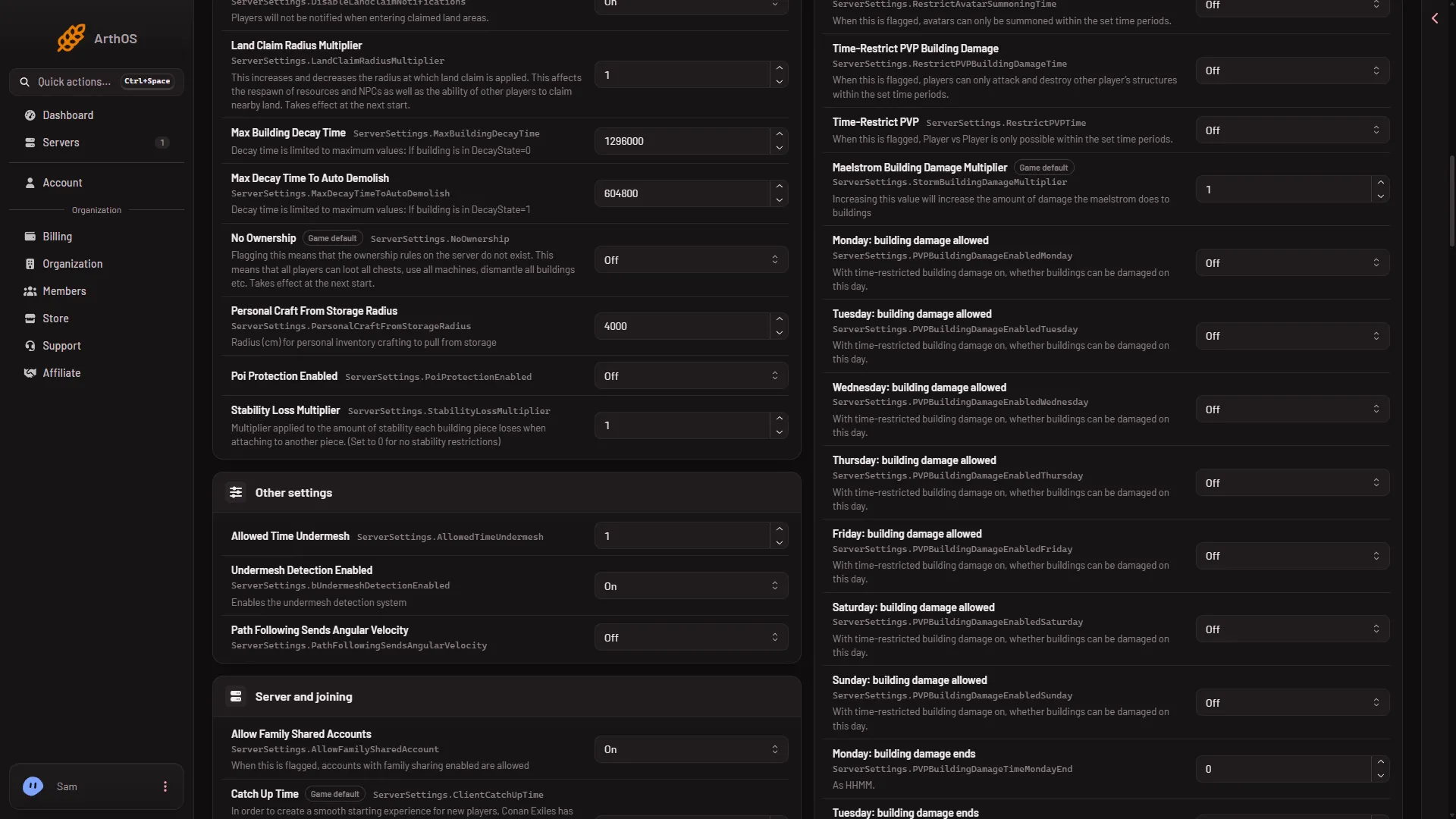
- Time-Restrict PVP Building Damage
Set Time-Restrict PVP Building Damage (1) to On, then the days below it.
Only while owners are online
Dynamic Building Damage. Funcom: players can attack and destroy other player’s structures “while any building owner (clan or individual) is online or for time specified by DYNAMIC BUILDING DAMAGE PERIOD after the last owner disconnected.”
Dynamic Building Damage Period sets that time in seconds. The default is 1800, which is 30 minutes. Funcom: “Time in seconds in which players can attack and destroy other player’s structures after last building owner (from clan or individual) disconnected form server.”
No building during raid hours
Disable Building During Time Restricted PVP. Funcom: “When enabled players will be unable to build during raid hours.” Funcom lists it as relying on PVP Enabled and Time-Restrict PVP Building Damage, so switch both on first.
When it takes effect
None of these rows is one of the six settings that wait for a restart. While the server runs, the panel sends each change to the game and the page says “Saved and in use now.” Not checked on Enhanced, server build 25792439 as of 13 November 2026: whether the game re-reads every one of these rows live. PVP Enabled is the exception: it applies at the next start.
Not checked on Enhanced, server build 25792439 as of 13 November 2026: which clock the times follow, whether the hours and the owner-online rule work together, and how the building ban looks to a player. Test your rules with a friend before you announce them.
If it does not work
- Buildings cannot be damaged at all. Check that PVP Enabled and Can Damage Player Owned Structures are On, and that the day’s building damage allowed is On.
- The save was refused. Wait until the server has finished starting, or stop it and save. If the page says the file changed, reload and try again.
- A row seems to do nothing. The panel shows every setting, even when the one it relies on is off. Set the setting it relies on to On.