
















Most of a Conan Exiles server is under ConanSandbox, in Files. The world is ConanSandbox/Saved/game_0.db, settings are in ConanSandbox/Saved/Config/LinuxServer, logs are in ConanSandbox/Saved/Logs, and Workshop mods are in steamapps/workshop.
Open Files
Open the Files tab of your server. Open the folders in the order below.
The world folder
Folder: ConanSandbox/Saved
This folder holds what changes while people play.
game_0.dbis the world. The whole world, with every character, base and thrall, is this one file. See the world file.game_0_backup_1.db,game_0_backup_2.dband so on are the game’s own copies of the world. The game makes one as the server starts and every 5 minutes while it runs. The number 1 is the newest. The World page lists them and puts one back.whitelist.txtis the whitelist, one line for each player in the formid:name. A player the game has not seen shows the nameUnknown.blacklist.txtis the ban list.
The game reads the whitelist and the ban list at its start.
game_0.db-wal and game_0.db-shm sit beside the world and belong to it while the server runs. Move or copy the world only when the server is stopped. A world the panel set aside is named game_0_panel- followed by the reason (such as before-new-world), a time stamp and .db.
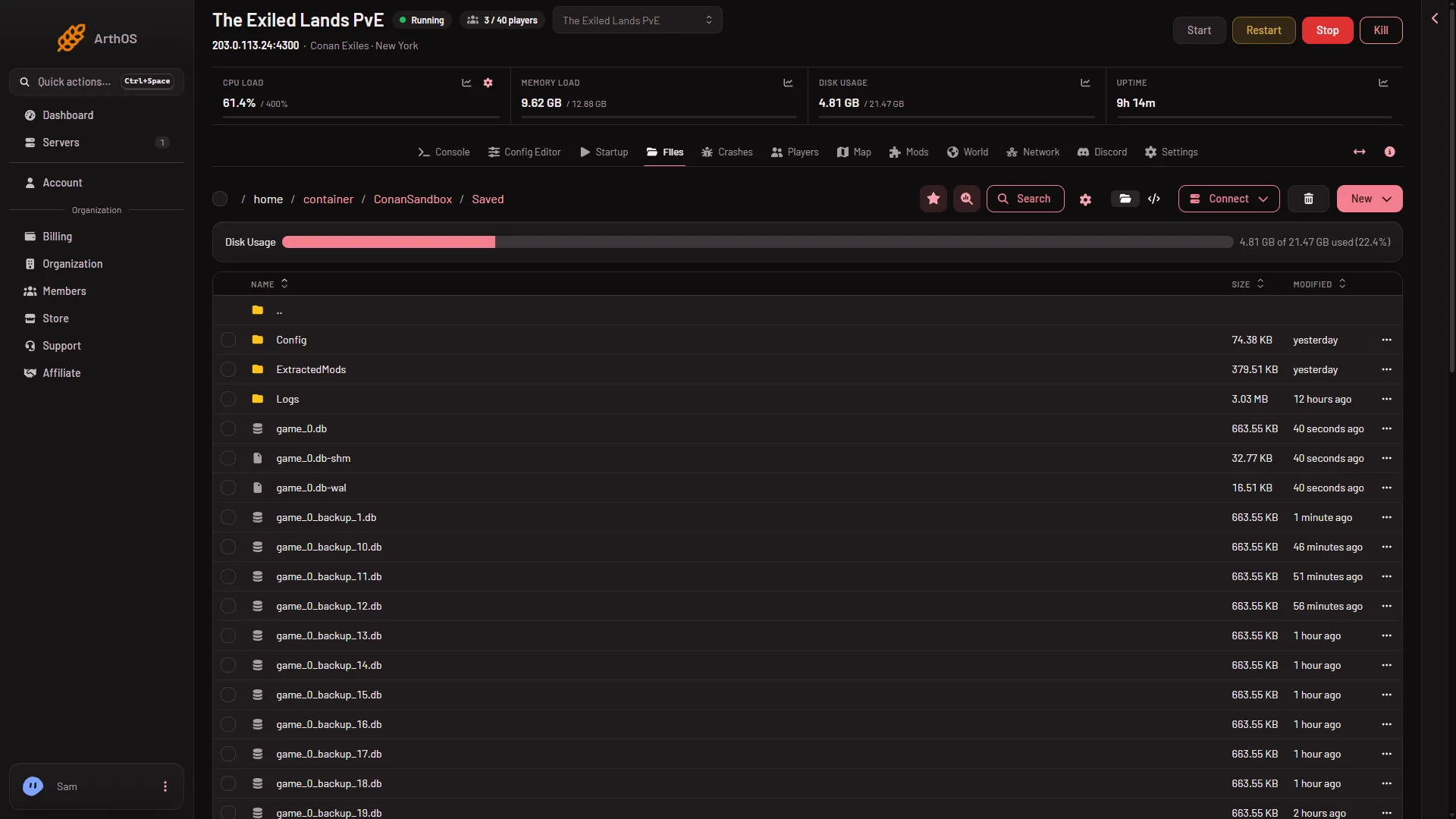
- The world file
- Connect for SFTP
The world file (1) is in the list after the folders. The Connect button (2) is how you reach these files from a file program.
The settings folder
Folder: ConanSandbox/Saved/Config/LinuxServer
These are the settings files. You can change them in the Config Editor, which is easier and checks values.
ServerSettings.iniholds the server settings: PvP, rates, whitelist switch, the message of the day and more.Engine.iniholds the engine’s settings. The panel writes the server name here at every start. It also holds the line that leaves the Isle of Siptah out, when you turn it off.Game.iniholds the remote console settings the panel uses.ModHttp.inilists the web addresses mods may reach. The World page edits it.
The panel writes some keys into these files every time the server starts: the passwords, the remote console settings and the server name. If you change one of those by hand, it is set back at the next start. Change passwords under Passwords in the Config Editor and the name on Startup.
The logs
Folder: ConanSandbox/Saved/Logs
ConanSandbox.logis the log of the current start.ConanSandbox-backup-with a date and time is an older start. The game keeps the newest ten.RconCommandLog.logrecords every command sent through the remote console.
See the Console page for how these relate to what you see on screen.
Crash reports
Folder: ConanSandbox/Saved/Crashes
If the game’s engine crashes, it writes a folder here with a crash report inside. The Crashes tab reads these for you.
The mod list
Folder: ConanSandbox/Mods
modlist.txt is the list of mods the game loads, one line for each, in order. The Mods tab writes it when you apply changes. See modlist.txt.
Downloaded mods
Folder: steamapps/workshop
Workshop mods download to steamapps/workshop/content/440900, in a folder named after each mod’s number. Inside is the mod’s .pak file. Do not rename a .pak file. Funcom says a renamed mod file fails to load.
Get a file out
To download a file, open its menu in Files and choose Download. To get a whole folder, choose Archive on it and download the archive. For many files, use the Connect menu, then via SFTP, which shows SFTP Details for a file program.
A file you delete goes to the Trash button on the Files page and can be restored with Restore to… for a limited time.
If it does not work
- You cannot find game_0.db. A new server makes it at its first start. The World page says “Not made yet” until then.
- A setting you changed by hand came back. It is one of the keys the panel sets at every start. Use Passwords or Startup instead.
- A mod’s folder is empty. The mod was not downloaded yet. Apply it from the Mods tab.
More about the game: Conan Exiles servers.
Sources: exiles-enhanced.inflexion.io: Mod http, exiles-enhanced.inflexion.io: Regions