
















A Conan Exiles Enhanced world is one file: game_0.db. It is a SQLite database. It holds every character, clan, base and thrall. It lives in the folder ConanSandbox/Saved on the server.
Find it
- Open the Files page.
- Go to
ConanSandbox, thenSaved. - Look for
game_0.db.
There is a shortcut. On the World page, the card The world has the button Open in Files, which goes to that folder. The card also shows the file’s Size and when it was Last written.
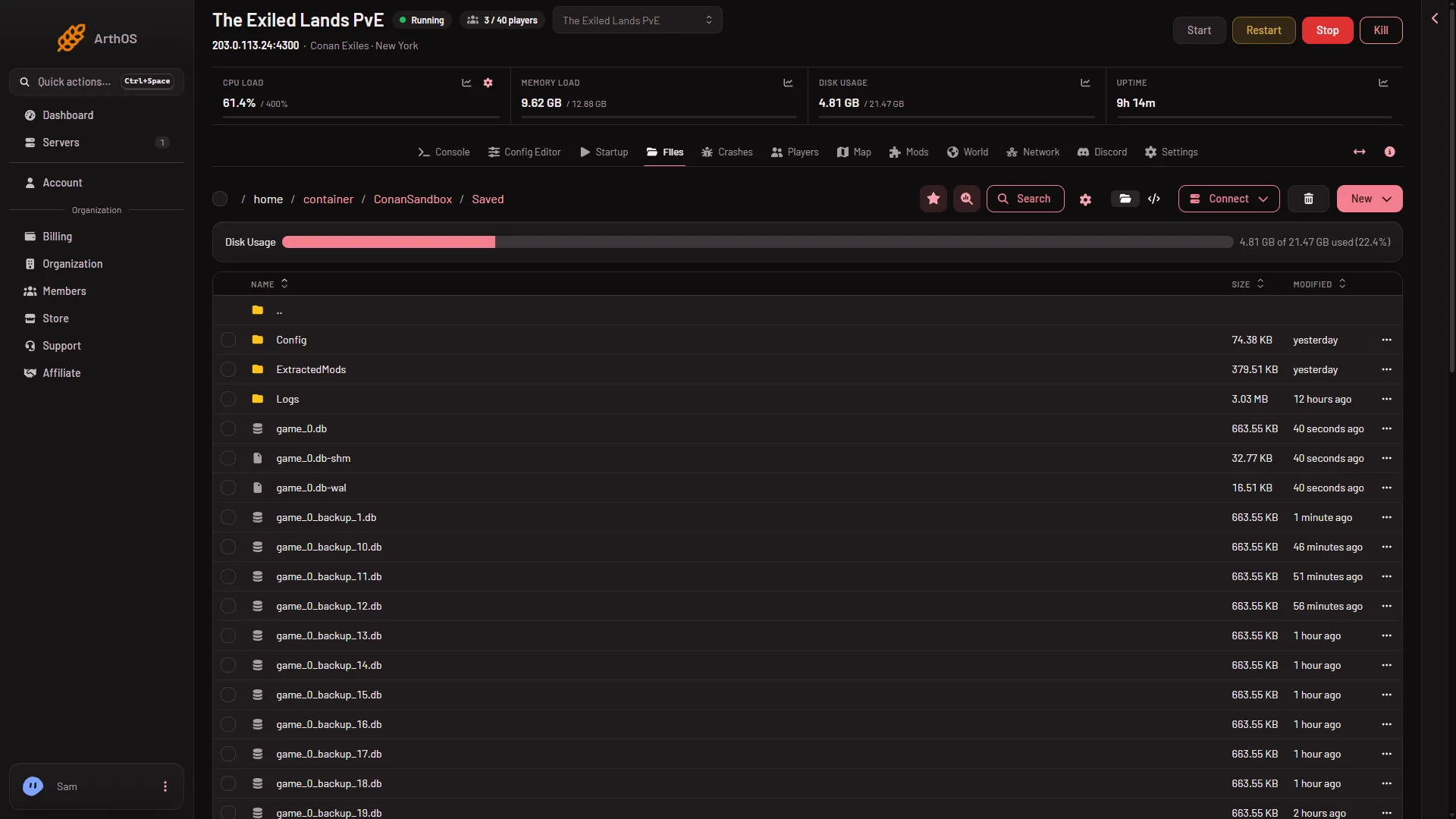
- The world file
The extra files while it runs
While the server runs you also see game_0.db-wal and game_0.db-shm beside it (the picture shows them under the world file). The database writes new changes to these first, then folds them into the main file. They are part of the world while the server is running.
In the same folder the game keeps its own backups, named game_0_backup_1.db, game_0_backup_2.db and so on. See game backups explained.
The name must be lower case
The server runs on Linux, and Linux treats Game_0.db and game_0.db as different files. The game looks for game_0.db in lower case. If you bring a world from elsewhere and the name has capital letters, it is not used. Rename it to all lower case.
Copy the world to your computer
Stop the server first.
- In Files, open
ConanSandbox/Saved. - Open the menu on the
game_0.dbrow and choose Download.
You can also use Connect, then via SFTP, which shows SFTP Details, and copy the file with any SFTP program.
Use a world from elsewhere
With the server stopped, rename the game_0.db that is there so you keep it (and any game_0.db-wal and game_0.db-shm beside it, so they stay together), then upload your file into the same folder with New, then File from Upload. The name must be game_0.db. Start the server. The full steps are in upload a world.
Or use Start a new world, which sets the current world aside for you. See the World page.
If it does not work
- The server will not load the world. The file may be damaged or have the wrong name. Stop the server, then put back one of the game’s backups: see put back a backup.
- A deleted file is missing. A deleted file goes to the Trash button on the Files page, where it can be restored.
- The upload is not used. Check the name is exactly
game_0.db, in lower case, and that the server was stopped when you uploaded.
More about the game: Conan Exiles servers.
Sources: exiles-enhanced.inflexion.io: Linux