
















The whitelist is a list of players. When you turn on Only whitelisted players, only the players on the list can join. Everyone else is turned away. You manage it on the Players page, in the card Whitelist.
Funcom’s own text for the setting is “Flagging this means that only whitelisted players can join the server.” Add yourself and your players before you turn it on.
Add a player
There are two ways.
From a row. Open the menu Actions for (name) on a player in the list of characters or in On now, and choose Add to the whitelist. The row then carries the tag Whitelisted.
By id. Use this for someone who has not joined yet.
- Open the card Add a player by id.
- Type the id in Player id. It is a SteamID64, such as
76561190000000101, or the user id the game lists. - In Add to, choose The whitelist.
- Choose Add.
To find an id, see add to the whitelist by id.
Remove a player
In the card Whitelist, choose Remove beside the name. Or use Take off the whitelist in the row menu.
If the list is empty, the card says “Nobody is on the whitelist.”
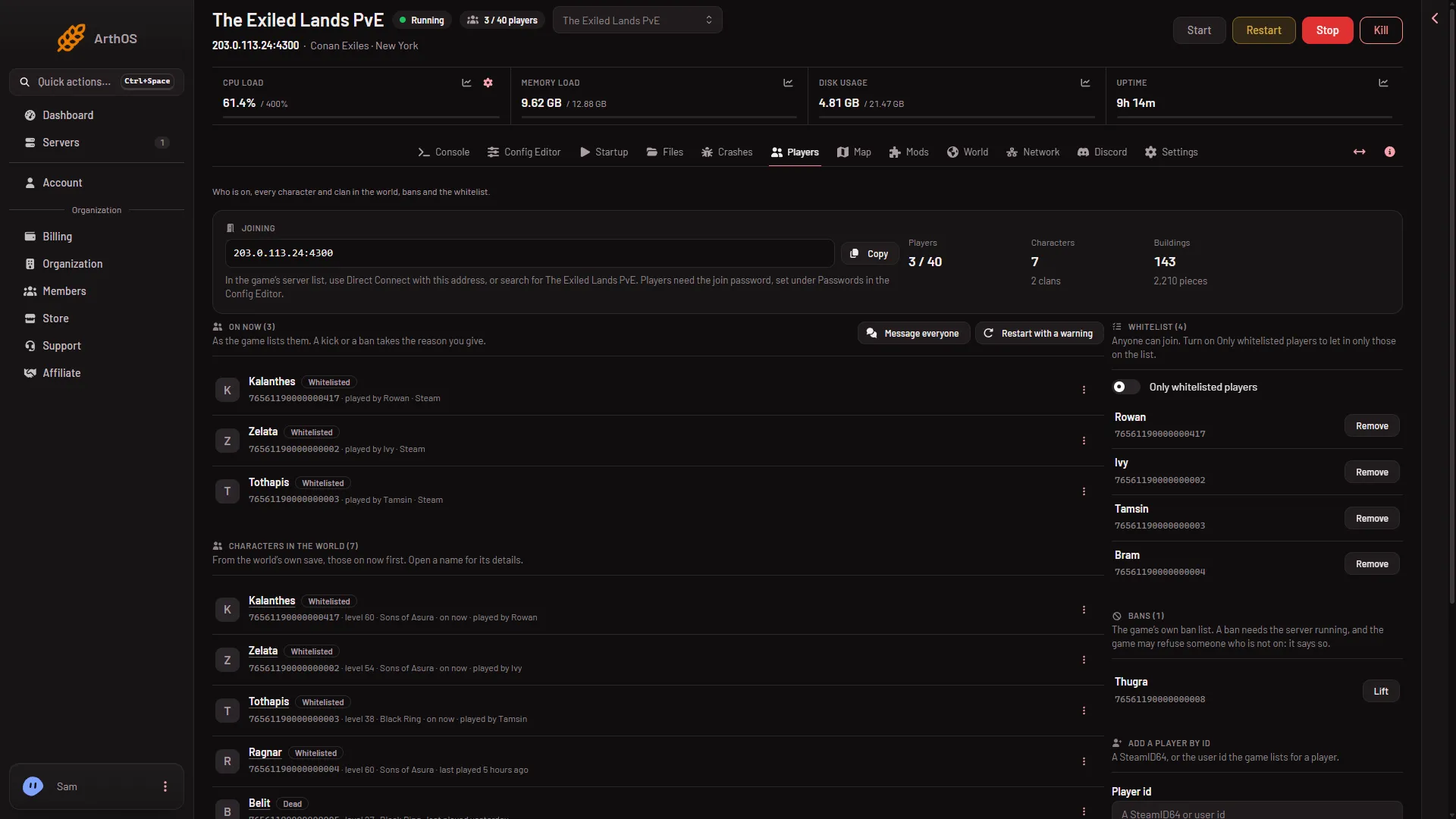
- The Whitelist card
- Only whitelisted players switch
Turn it on
- In the card Whitelist, turn on Only whitelisted players.
- The panel asks “Only let whitelisted players join?” It warns that players not on the list are turned away, and tells you how many are on it now.
- Choose Only whitelisted players to agree.
When it is on, the card says “Only players on the whitelist can join.” When it is off, it says “Anyone can join. Turn on Only whitelisted players to let in only those on the list.”
Turning it off changes the card text to the “Anyone can join” line.
When it takes effect
- Server running. The panel sends the change to the game and shows the game’s answer. The card text changes to match.
- Server offline. The panel changes the settings and the list files itself. The game reads them at its next start. The page says so: “The game reads this at its next start.”
The list is the file ConanSandbox/Saved/whitelist.txt (format under By hand). The game reads this file and the ban list at start. See the ban list and the blacklist file.
By hand
Only do this with the server stopped; the game reads both files at its next start.
- In
ConanSandbox/Saved/Config/LinuxServer/ServerSettings.ini, under[ServerSettings], setEnableWhitelist=True(orFalse). - In
ConanSandbox/Saved/whitelist.txt, put oneid:nameon each line. The panel writesUnknownas the name for a player the game has not seen.
On a running server the panel sends the game SetServerSetting EnableWhitelist True and the commands WhitelistPlayer and UnWhitelistPlayer. The panel does this for you.
Who can do it
A role that allows moderating players. If you cannot change the whitelist, ask the owner of the server.
If it does not work
- A friend is turned away. They are not on the list, or the id is wrong. Check the card Whitelist.
- You locked yourself out. Add your id first. If the server is offline, you can add it and turn the switch off, and the game reads that at the next start.
- The page says the game is not answering. The server is still loading. It answers about half a minute after the start.
More about the game: Conan Exiles servers.