
















The World page is where you look after the world itself: the file, the game’s own backups, the Isle of Siptah and the web addresses mods may reach. It is a tab on the server page, next to Players, Map and Mods.
Stop the server first
Most things here change the world, and the game keeps its world open while it runs. A note at the top says: “Stop the server to start a new world, put a backup back or switch the Isle of Siptah: the game keeps its world open while it runs.”
If you try while it runs, the panel refuses and tells you to stop the server first. Stop it with the Stop button at the top of the server page, then come back. A stop saves the world. On a world that has been played it takes about 40 seconds. On a brand new world the first stop can take close to 4 minutes, so wait for it to finish.
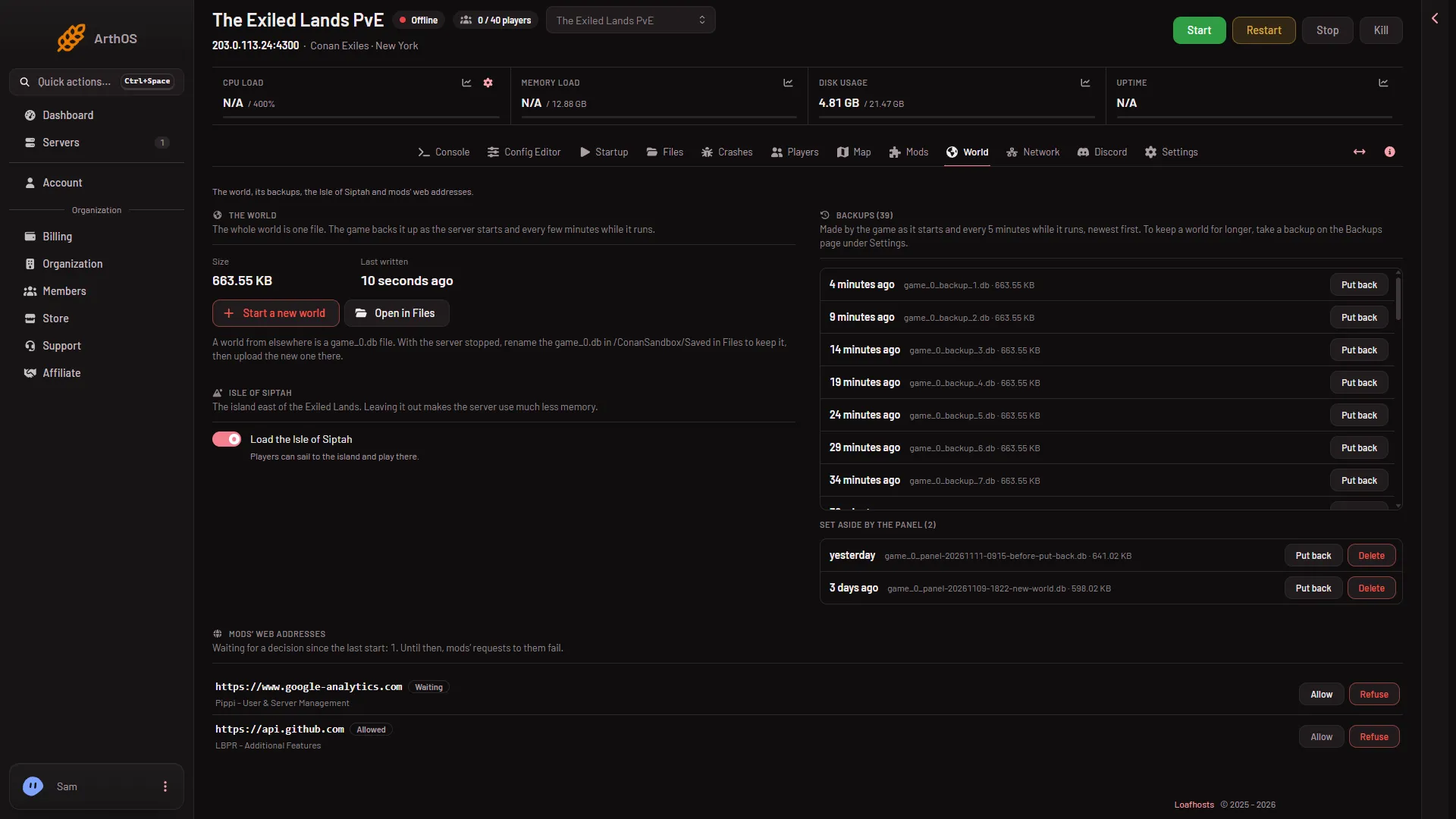
- The world
- Start a new world
- The game's backups
- Isle of Siptah switch
- Mods' web addresses
The page has the world (1) with its Start a new world button (2), the game’s backups (3), the Isle of Siptah switch (4) and the mods’ web addresses (5). The sizes, times and addresses in the picture are demo values.
The world
This card shows the world file’s Size and when it was Last written. The whole world is one file. The card has two buttons:
- Start a new world sets the world you have now aside and lets the game make a new one at the next start. Every character, base and thrall starts over. The old world is kept on this page and can be put back.
- Open in Files takes you to the folder that holds the file. See the world file.
If the card says Not made yet, the game has not made a world. It makes one at its first start.
Backups
The game copies the world each time the server starts and every 5 minutes while it runs. They are listed here, newest first. Put back plays a chosen backup from the next start. The panel sets the current world aside first, so you can undo it. See put back a backup.
Worlds the panel set aside are listed under Set aside by the panel. Each has Put back and Delete. Delete removes it for good. Only these set-aside worlds have Delete here. To remove one of the game’s own backups, open Open in Files and delete the file in the ConanSandbox/Saved folder; a file deleted in Files goes to the Trash and still uses disk until it is removed from there.
To keep a world longer than the game’s own copies, take a backup on the Backups tab inside Settings.
Isle of Siptah
The switch Load the Isle of Siptah controls the island east of the Exiled Lands. Leaving it out makes the server use much less memory. It applies from the next start. See Isle of Siptah on or off.
Mods’ web addresses
A mod that reaches the internet needs each address it uses allowed. The game asks at its start, and this card lists what each mod asked for, with Allow and Refuse. A decision applies from the next start. Until then the mod’s requests fail. A mod with no decision still loads. It just cannot reach the internet. This card can be used while the server runs.
If it does not work
- A button is refused. The server is running. Stop it, wait for it to go offline, and try again.
- You cannot open the page. Your role on the panel may not allow reading or changing files.
- The world card says Not made yet. Start the server once. The game makes the world.
More about the game: Conan Exiles servers.
Sources: exiles-enhanced.inflexion.io: Regions, exiles-enhanced.inflexion.io: Mod http