
















The Discord page does two things for a Factorio server. It keeps one status message in a channel up to date, and it posts when the server starts, stops, crashes or finishes a backup. Each works on its own.
Status message
The bot keeps one message in a channel of your Discord server. The message shows:
- the server’s name and the world it runs
- who is on
- a Space Age note when Space Age is on, because players then need the expansion to join
- a Show mods button that lists the mods that are on. Wube’s own four mods are left out of the list, because they come with the game.
Chat is never shown.
Link a channel
- Open the Discord page on your server.
- In Status in Discord (1 in the picture below), choose Add the bot and add it to your Discord server.
- Choose Link your account, so the panel can check that you run that Discord server.
- In Discord, right-click the channel and choose Copy Link.
- Back on the panel, choose Link a channel and paste the link into Channel link or ID.
- Tick Show mods button if you want the button. Decide whether to Show the join address. The panel’s note under it says most servers leave it off because players find the server in the game’s server list. A new Factorio server starts unlisted, so turn it on if your friends should find the address in this channel.
- Choose Link channel.
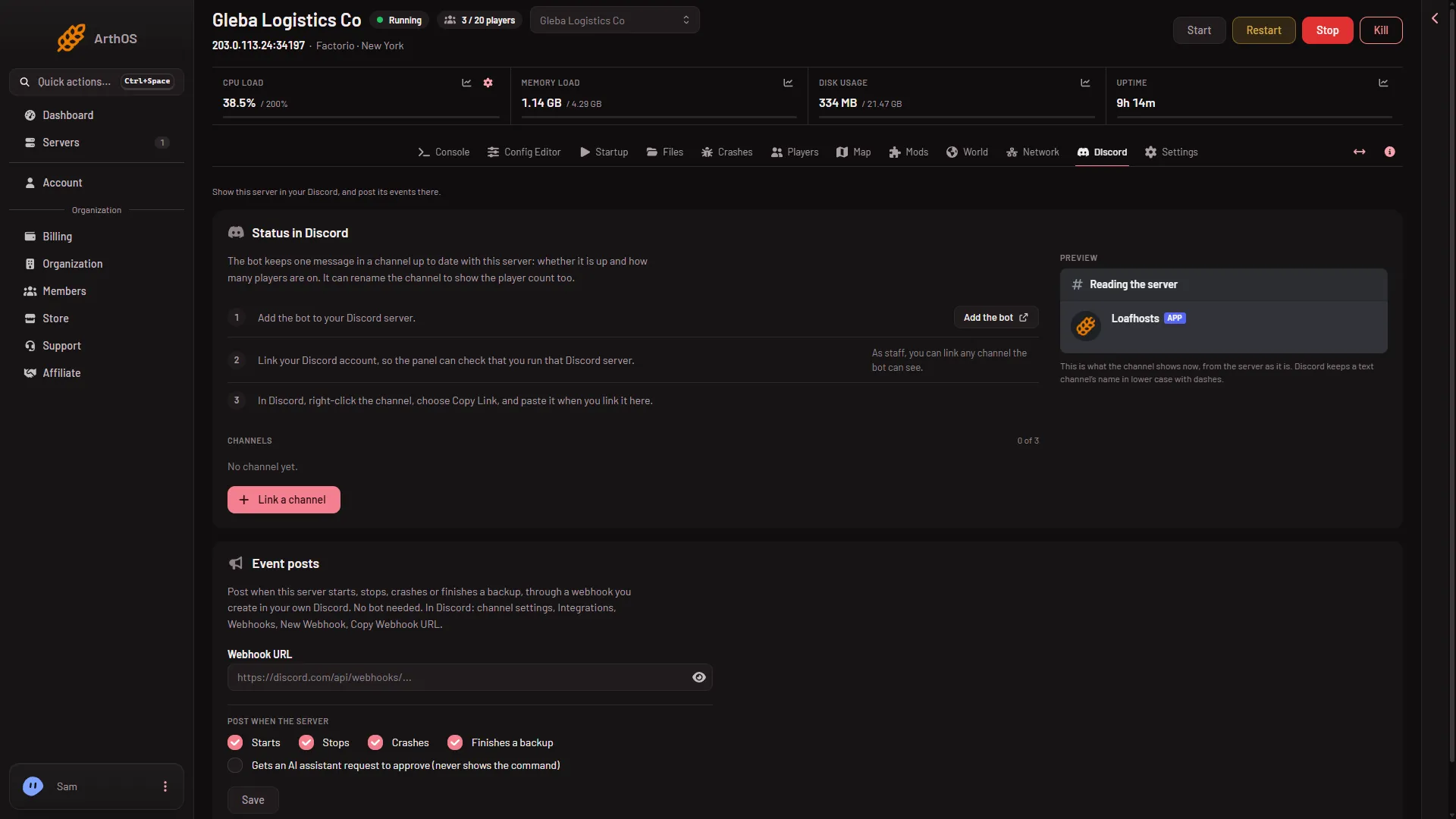
- Status in Discord
- Event posts
The message is posted at once and then updates every minute. Update now refreshes it on demand. You can link more than one channel.
The channel can be renamed to show the server too. Discord allows only a few renames, so the name changes at most every 11 minutes.
To stop, choose Unlink. The message is deleted from the channel and the channel name stays as it is.
If the page says the panel has no Discord bot yet, status channels are off for now.
Event posts
Event posts use a webhook that you create in your own Discord. No bot is needed.
- In Discord, open the channel’s settings, then Integrations, Webhooks, New Webhook, and copy the webhook URL.
- In the Event posts card (2 in the picture above), paste it into Webhook URL.
- Under Post when the server, tick what to post: Starts, Stops, Crashes, Finishes a backup and Gets an AI assistant request to approve.
- Choose Save, then Send a test and check the channel.
There are no posts for a player joining, leaving, being kicked or being banned on a Factorio server, and chat is never posted. To see who is on, use the status message or the Players page.
A start button for players
If you have a wake link, you can add a Start server button to the status message. It is under Standby in Settings: see standby and the wake link.
If it does not work
- Nothing appears in the channel. The bot may not be able to see the channel. Check its rights in Discord, and that you linked the right channel.
- The channel name does not change. The bot needs the Manage Channels right, and Discord limits renames.
- Event posts stopped. The card says “Posting stopped” with the reason. Save a working webhook URL to start again.
- There is no Show mods button. It was left off when the channel was linked. Choose Edit on the channel and tick Show mods button.
- Joins and leaves are missing. The panel does not post them for Factorio. The status message shows who is on.
More about the game: Factorio servers.