
















RCON is the game’s remote console. It lets a program send console commands to a running Factorio server. The panel uses it for the Players page, the map and some actions. Your RCON password is under Passwords in the Config Editor. A new password is used from the next start of the server.
What the panel uses RCON for
Each server has an RCON port next to its game port. The panel connects to it with the RCON password to read who is on, to kick or ban, to send messages and to save the world. You do not need to do anything for this: a new server has a random RCON password from the day it is made.
Two facts about the game’s RCON:
- It answers every command in one reply, however long the reply is.
- Text sent over RCON that is not a command appears in the game chat, from
<server>.
Find the password
- Open the Config Editor on your server.
- Choose Passwords (1).
- Find RCON password (2).
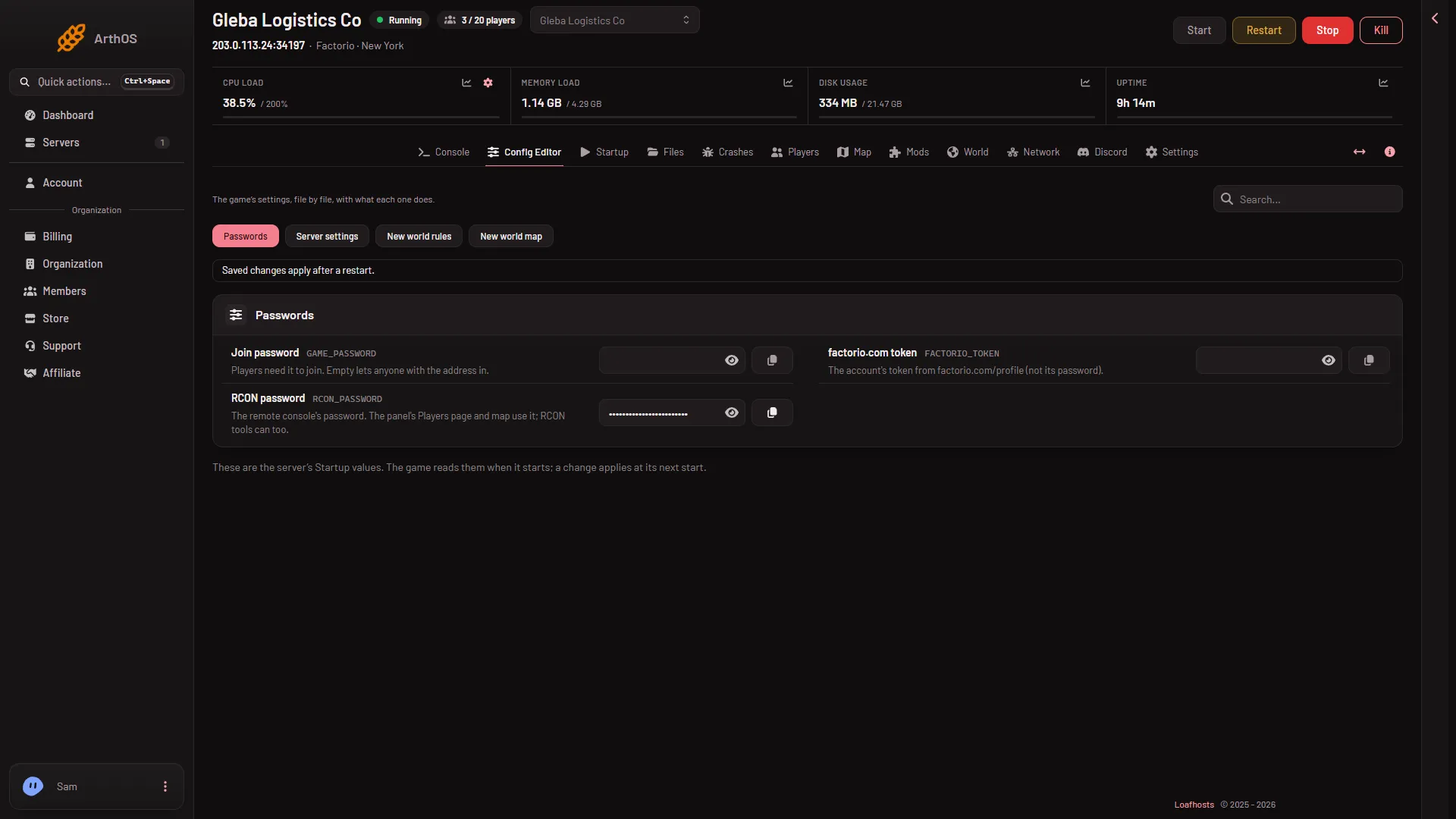
- Passwords
- RCON password
The password is never shown on the Startup page. It lives only under Passwords.
Change the password
- In Passwords, set RCON password to a new value.
- The password must be 12 to 64 characters long, letters and digits only. No spaces or symbols. That is the panel’s rule, not the game’s.
- Save. A bar reads “Unsaved changes: (n)” with Discard and Save. On a running server the save says “Saved. Restart the server to apply the changes.”
- Restart the server with Restart at the top of the server page. This drops everyone who is on, so warn them first with Message everyone on the Players page.
The game is given the password when it starts. Until the restart, the game still holds the old one, so the panel’s own RCON readings may fail. The panel says: “the game refused the panel’s RCON password: it is given to the game when the server starts, so restart the server to use the new one.”
Find the port
The RCON port is set by the panel and you cannot edit it. A Factorio server gets two ports: the game port, then the RCON port. The Network page lists them under Allocations, a table with the columns Hostname, Port, Notes and Created. The game port has a star. No row says what it is for, so the RCON port is the other one, the port after the game port.
The game port is UDP. The RCON port is TCP.
Use RCON from another tool
A program that speaks the game’s remote console can use the address and RCON port from Network and your RCON password. Connecting from outside the panel was not checked on 2.1.24 as of 13 November 2026.
See Lua commands and achievements.
By hand
If you run the game yourself, RCON is opened by two options on its start line: --rcon-port and --rcon-password. The panel’s start line passes both. The 12 to 64 letters and digits rule above is the panel’s, so a game you run yourself may take other passwords.
If it does not work
- The panel says the game refused its RCON password. You changed the password and the server has not restarted since. Restart it.
- The Players page says the server is not answering yet. RCON opens once the world has loaded. The console shows
Starting RCON interfacewhen it is ready. - The password is refused when you save. It is shorter than 12 characters, longer than 64, or has a character that is not a letter or digit.
More about the game: Factorio servers.