






Put the Bukkit build of WorldEdit in the plugins folder of a Paper or Purpur server and restart. Then make yourself an operator, hold a wooden axe, click two corners, and type //set stone to fill the box.
WorldEdit does not run on a plain Vanilla server or on Bedrock. On a Purpur 26.3 server, checked 11 October 2026, the panel offered only two WorldEdit builds, both betas: 7.4.6-beta-02 (marked Newest) and 7.4.6-beta-01.
In the ArthOS panel
You need Paper or Purpur. The Add-ons page header names your software, for example “Purpur 26.3”.
- Open Add-ons, then Plugins.
- Under Find plugins, choose the Modrinth source and type
WorldEditin the search box. - On the WorldEdit card, choose Install. The dialog lists the builds and checks the file against the source before using it. Choose 7.4.6-beta-02 (1), then Install (2). The dialog notes that the file is checked against the source’s checksum.
- When the page says “Installed WorldEdit … Restart the server to load it.”, choose Restart now.
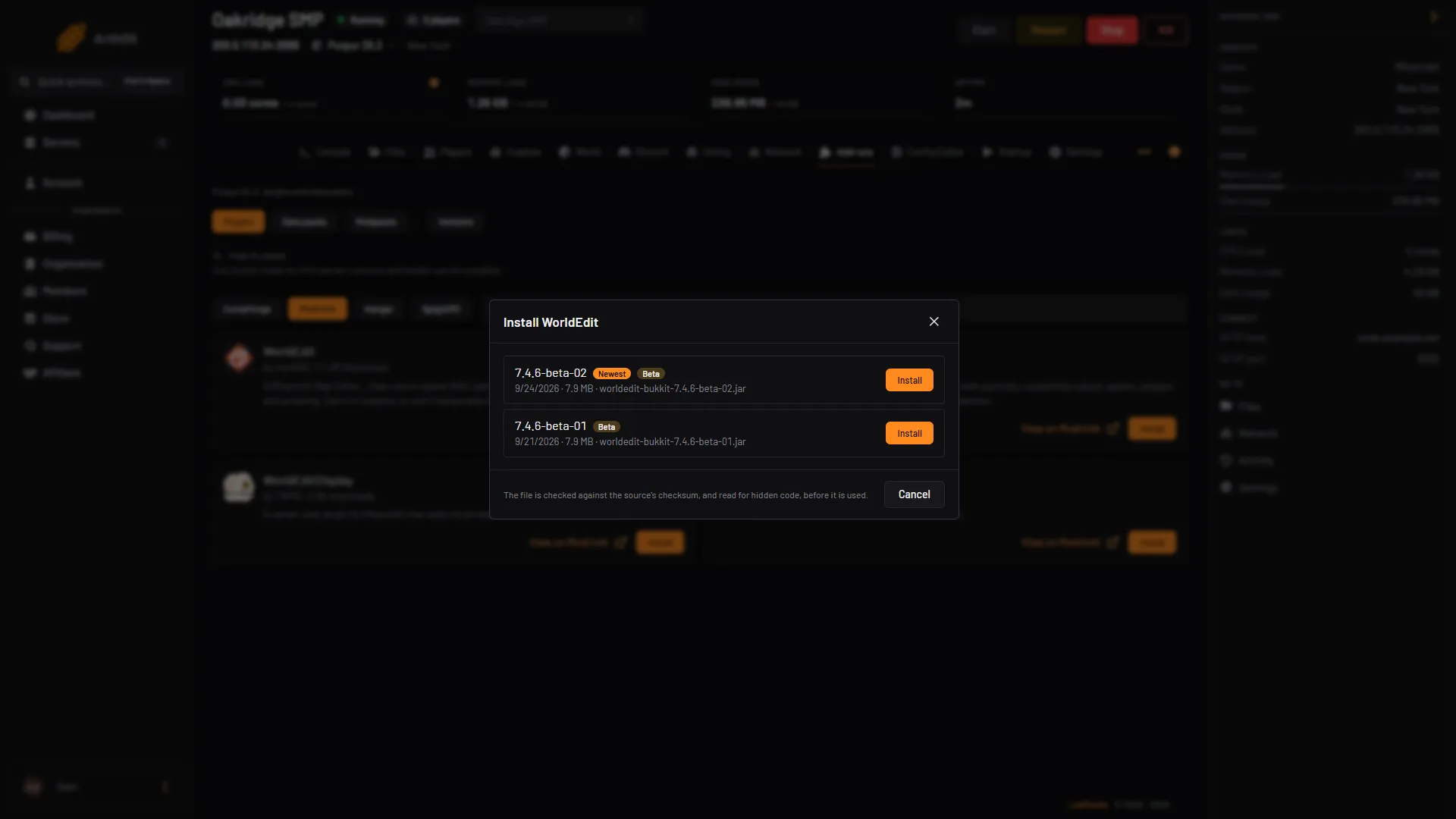
- 7.4.6-beta-02 build
- Install
- Checksum note
The other choice on 26.3 is the newest stable release, 7.4.5, which is made for Minecraft 26.1 to 26.2. A build made for an older version often still works, but it can cause bugs or lag, and the panel does not offer it on 26.3, so you upload it yourself (see By hand). Either way, take a backup first and watch the Console after the restart.
If the Install dialog says “No build of this is made for this server’s version and loader.”, your server runs a version WorldEdit has no build for. Check the version under Versions, or use a build made for an older version by hand, with the same risk of bugs or lag.
Make yourself an operator
By default nobody can use WorldEdit. The simplest fix is to be an operator. Open Players, type your name in the Minecraft name box and choose Make operator. See operators. For other players, give them the permission nodes in a permissions plugin such as LuckPerms. worldedit.* gives everything.
Use it in game
Type these in game chat. WorldEdit commands start with two slashes.
- Type
//wand. You get a wooden axe. - Left click a block with the axe to set the first corner. Right click another block for the second corner. Or stand somewhere and type
//pos1, then move and type//pos2. - Type
//set stoneto fill the box with stone. Use//set airto clear it, or//replace dirt grass_blockto swap one block for another. - Type
//copyto copy the box. Stand where you want it and type//paste. - Made a mistake? Type
//undo. Add a number to undo more://undo 5.//redoputs it back.
The paste is placed relative to where you stood when you copied. If you copied standing on top of a castle, the paste lands with you on top of the new castle. WorldEdit keeps your last 15 actions by default.
The compass is the navigation wand: left click with it to jump to the block you look at, right click to pass through a wall.
By hand
- Take a backup.
- Download the Bukkit build from Modrinth. Pick the file made for your Minecraft version. If there is none, the newest one made for an older version may still work, but it can cause bugs or lag.
- Upload it to the
pluginsfolder at the server root. In Files use Upload, then Upload from computer. - In Add-ons, Plugins, choose Scan for tampering. It checks every jar in the
pluginsfolder for hidden code, including the one you uploaded. - Restart the server. Type
pluginsin the console. WorldEdit should be green. If the server lags or the Console shows errors naming WorldEdit, turn it off in Add-ons, Plugins, Manage all and restart.
If it does not work
- “Unknown command” or nothing happens. You are not an operator and have no WorldEdit permission. Make yourself an operator and try again.
- The plugin is red in
plugins. Openlogs/latest.logand read the first error. Usual causes: a Fabric or NeoForge jar was used, or the jar is for a different Minecraft version. - It loads, but the server lags or edits misbehave. A beta, or a build made for an older version, can cause bugs or lag. Undo with
//undo, turn the plugin off in Manage all, and wait for a release made for your version. //setsays you have not selected a region. Set both corners first. The axe only works while you hold it.- WorldGuard says WorldEdit is missing. WorldGuard needs the Bukkit build of WorldEdit next to it. See WorldGuard regions.
More on the game: Minecraft servers.
Sources: worldedit.enginehub.org: Install, worldedit.enginehub.org: Quickstart, worldedit.enginehub.org: Selections, worldedit.enginehub.org: Clipboard, worldedit.enginehub.org: History, worldedit.enginehub.org: Permissions, modrinth.com: Versions