






On Minecraft 26.3 there is no allow-nether line in server.properties any more. Players enter the Nether through portals only while the game rule allow_entering_nether_using_portals is true. To start the Nether or the End from nothing, stop the server and delete that dimension’s folder.
To turn the Nether off, switch the rule Off (steps below), or type gamerule allow_entering_nether_using_portals false in the Console. This stops portals into the Nether. It does not delete the Nether.
Turn Nether portals on
A game rule is a setting that belongs to one world. This one is true by default (Minecraft Wiki).
In the ArthOS panel
With the World tab:
The rule is in the Rules list in the World tab (open a chunk, then choose Rules). The world must exist, so start the server once first.
- Choose the World tab and click a chunk on the region map. It opens in 3D.
- In the side panel, choose Rules. Type
netherin Search rules (1). - Find the row Allow entering nether using portals (2) and turn its switch On.
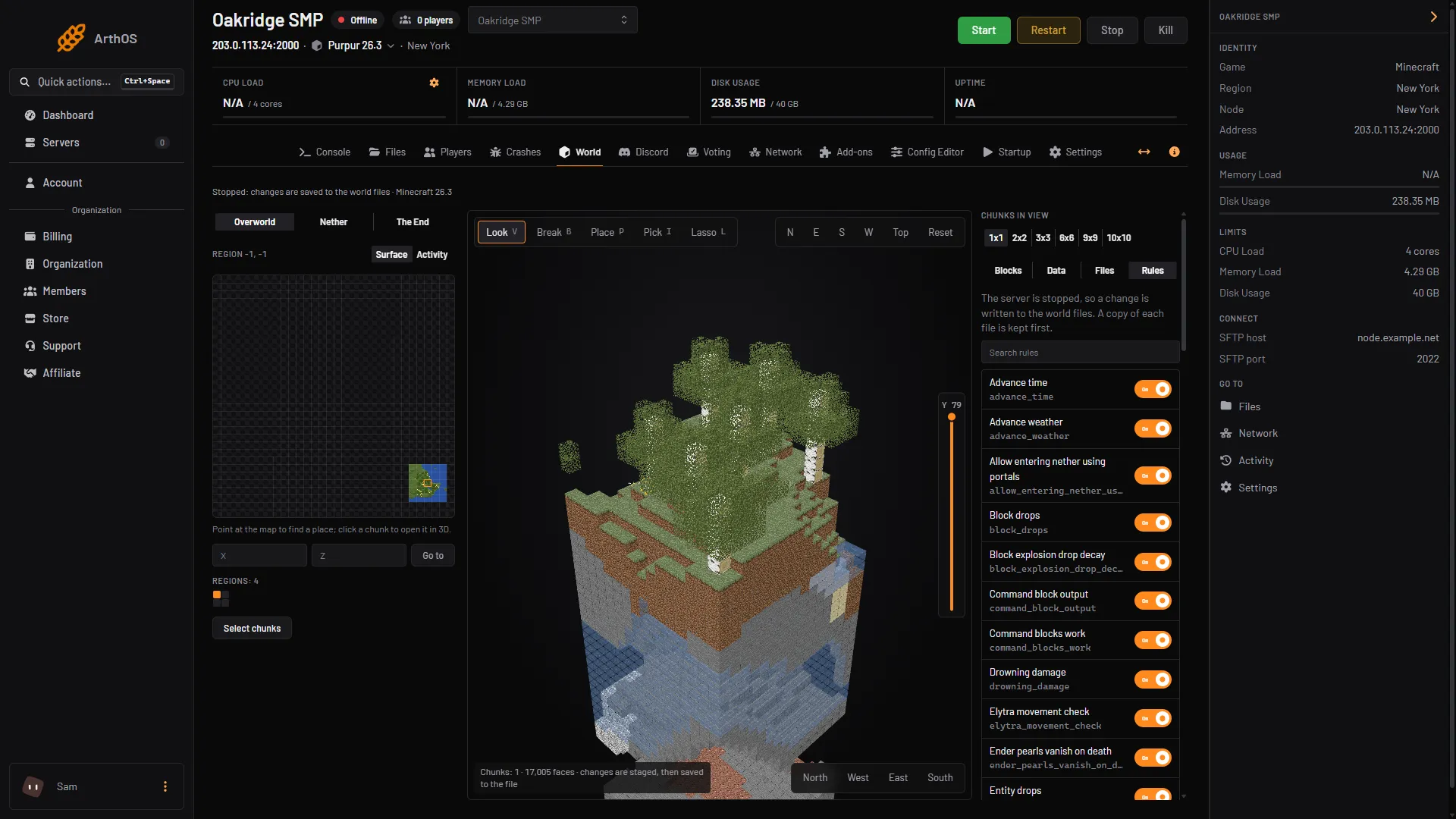
- Search rules
- Allow entering nether using portals
With the server stopped, the tab says “The server is stopped, so a change is written to the world files. A copy of each file is kept first.” The switches still work once the world exists. See turn PvP on or off, which uses the same tab.
With the Console (the server must be running):
- Open your server and choose Console.
- Type
gamerule allow_entering_nether_using_portals. The reply tells you whether it is true or false. - Type
gamerule allow_entering_nether_using_portals true. Type no slash.
By hand
In game, an operator types /gamerule allow_entering_nether_using_portals true.
Servers on an older Minecraft version still read allow-nether=false in server.properties. Set it to true and restart. The Minecraft Wiki’s history says the property was replaced by the game rule in snapshot 25w35a. The Config Editor on 26.3 has no allow-nether row.
Turn the End on
The End has no game rule and no server.properties line in the Minecraft Wiki’s lists.
On Paper and its forks, such as Purpur, bukkit.yml has a setting called allow-end. Paper’s documentation says it controls whether end-type dimensions load. To check it:
- Stop the server.
- Open Files and open
bukkit.yml. - Under
settings:, make sure the line readsallow-end: true. - Save and start the server.
Not checked on 26.3 as of 11 October 2026: how allow-end: false shows to a player trying to enter the End.
Reset only the Nether or the End
Use this to make one dimension new again and keep the Overworld.
- Make a backup in Settings, Backups.
- Stop the server. The game keeps the world files in use while it runs.
- Open Files and open the world folder. On Minecraft 26.1 and newer the dimensions are inside it, in
dimensions/minecraft. The Nether isthe_netherand the End isthe_end. - To keep a copy, right-click the folder and choose Download, then Download as .zip.
- Delete the
the_netherorthe_endfolder. - Start the server.
The game builds the dimension again when someone goes there. The panel’s own text for chunks says the game generates deleted ones again “the next time a player comes near”. Not checked on 26.3 as of 11 October 2026: a whole dimension deleted this way.
The End’s folder also holds the record of the dragon fight, in data/minecraft/ender_dragon_fight.dat (Minecraft Wiki). Deleting the folder removes that record. Not checked on 26.3 as of 11 October 2026: what the dragon does afterwards.
Not checked on 26.3 as of 11 October 2026: where a player who logged out inside the dimension you deleted appears when they join. Ask players to leave it before you stop the server.
Older layouts
Before 26.1, vanilla keeps the Nether in DIM-1 and the End in DIM1, both inside the world folder. Older Paper keeps them in world_nether/DIM-1 and world_the_end/DIM1. See upload or download a world for the table.
If it does not work
- Players still cannot enter the Nether. Check the rule with
gamerule allow_entering_nether_using_portalsin the Console. It must say true. - The rule is missing from the Rules tab. The world has no saved rules yet. Start the server once.
- There is no
allow-netherrow in the Config Editor. On 26.3 the setting is the game rule above, so searching the Config Editor for “nether” finds nothing. gamerulesays the rule is unknown. Your server is on an older version. The rule was calledallowEnteringNetherUsingPortalsfrom snapshot 25w35a until 25w44a, and did not exist before. On the oldest versions useallow-netherinserver.properties.- The dimension did not change. You deleted the wrong folder, or the world uses an older layout. Check the layouts above.
More about the game is on the Minecraft page.
Sources: minecraft.wiki: Game rule, minecraft.wiki: Server.properties, minecraft.wiki: Java Edition level format, docs.papermc.io: Bukkit configuration