






Better MC (BMC) is a “vanilla plus” modpack, made as several editions. Each edition is built for one Minecraft version and one mod loader, so you first pick the edition, then install it in the panel under Add-ons, then Modpacks. Players must use the same edition and version.
Pick an edition
The editions below are listed on their CurseForge pages, read on 11 October 2026. The author is LunaPixelStudios.
| Edition | Minecraft | Loader | Newest file | Server pack listed |
|---|---|---|---|---|
| BMC6 | 26.1.2 | NeoForge | Not read | Not read |
| BMC5 | 1.21.1 | NeoForge | v53, 8 September 2026 | Yes, v53 |
| BMC4 | 1.20.1 | Forge | v62hf, 9 October 2026 | No |
| BMC3 | 1.21.1 | Fabric | v45, 7 May 2026 | Yes, v45 |
| BMC2 | 1.20.1 | Fabric | v40, 24 January 2026 | Yes, v40 |
BMC1 also exists for Forge on 1.16.5 (v62, June 2025) and for Fabric on 1.19.2 (v20, November 2023). The panel’s search on 11 October 2026 also listed Better MC [BMC6], built for NeoForge on Minecraft 26.1.2. No edition is built for Minecraft 26.3. Whichever you choose, the server runs that older Minecraft version, not 26.3.
BMC5 and BMC4 are the editions with recent updates on their CurseForge pages. BMC4 lists 350+ mods and 100+ quests. BMC5 lists 320+ mods.
Which to choose
- BMC5 has a server pack and the panel gave a memory figure for it (about 10 GB).
- BMC4 is the newest file (9 October 2026) and lists the most mods, but its page lists no server pack.
- BMC6 is the only one built for a newer Minecraft (26.1.2), but its server pack and date were not read.
- The panel replaces the server software for any of them. Choose by the Minecraft version your players want.
Memory
The author gives no memory figure on these pages. The panel does its own check. For BMC5 v53 its plan said the pack usually needs about 10 GB of memory. The panel’s plan for BMC4 was not read; read yours before you confirm. If your plan shows a figure above your server’s memory, pick a larger size first. If the server stops with an out-of-memory error, see out of memory.
In the ArthOS panel
Take a backup if the server has a world you want to keep.
- Open Add-ons, then choose Modpacks (1).
- Under Find a modpack, choose CurseForge (2) and type the edition in the search box (3), for example
Better MC. - Choose the result whose name has the edition tag: Better MC [FORGE] BMC4 (4) or Better MC [NEOFORGE] BMC5.
- Choose Install, then pick the newest version, unless your players use an older one. A version marked “has a server pack” has one from the author.
- Read the plan. It lists the loader, the Minecraft version, the Java version and how many files it downloads. For BMC5 v53 it read: NeoForge 21.1.250 for Minecraft 1.21.1 on Java 21, 283 files (689.5 MB), with 99 client-only files left out.
- Leave Start a new world ticked, then choose Install. A backup is taken first, so this can be rolled back.
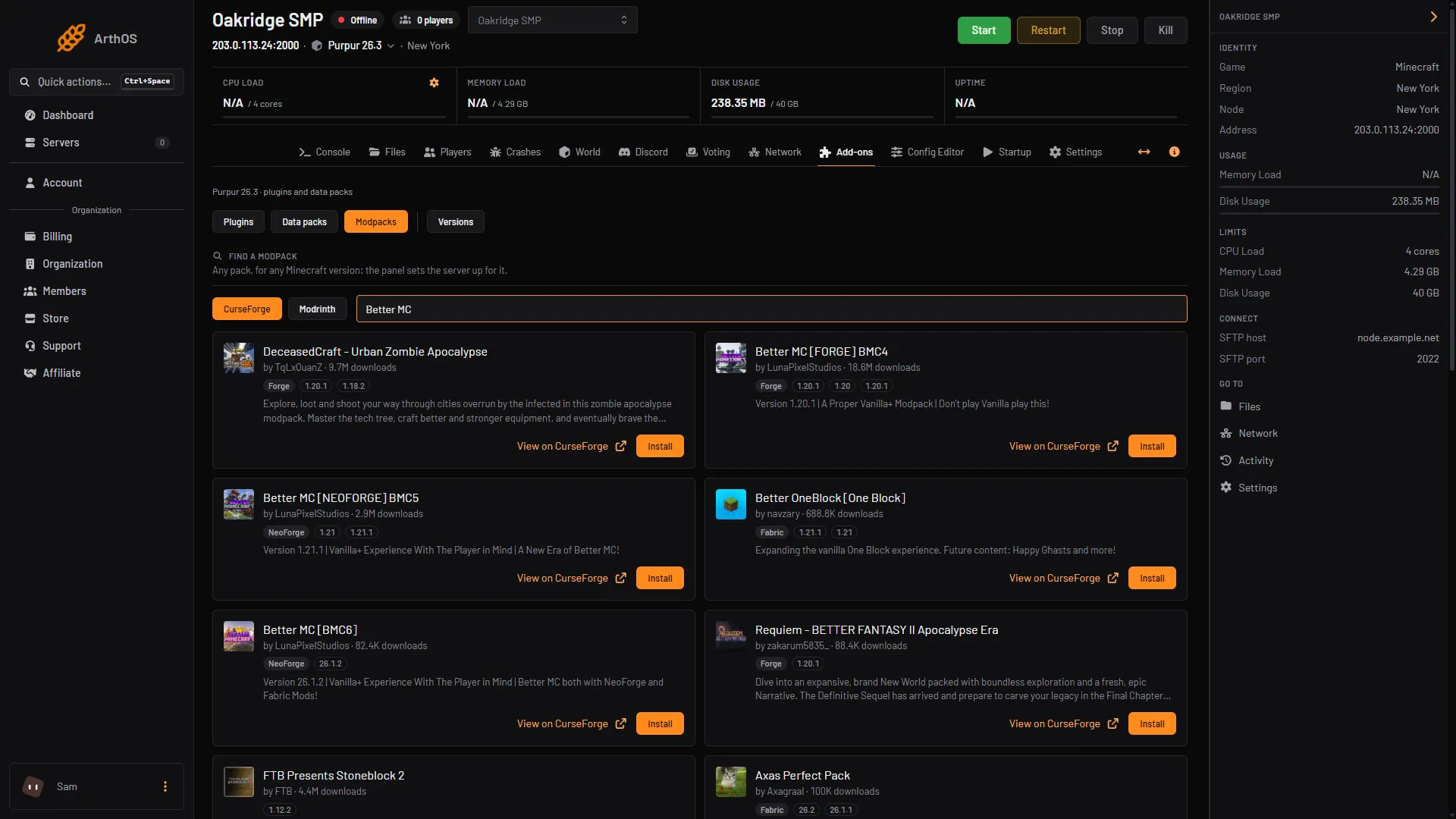
- Modpacks tab
- CurseForge
- Search box
- BMC4 result
The panel checks every file against the checksum the pack names. If a file cannot be fetched, the page lists it with a Get it link. Download it, upload it to the folder shown and choose Check again. The full steps are in install a modpack.
The pack needs the loader and Minecraft version of the edition you chose (for BMC5, NeoForge on 1.21.1). You do not have to set that up: the panel replaces the server software for you. Not checked on 26.3 as of 11 October 2026: a finished Better MC server starting and running.
When the install ends, start the server and watch the Console. Then open Players. The files decide whether the whitelist is on, so add your players or turn it off.
Players need the same edition
Each player installs the same edition and version in their own launcher, such as the CurseForge app. The edition sets the Minecraft version and the loader for them. For example, a BMC5 server needs players on BMC5 for 1.21.1 with NeoForge. A player on BMC4 cannot join it.
The pack’s description says it has “built-in, free world sharing”. Not checked as of 11 October 2026: how that feature behaves on a server.
If it does not work
- A file is listed with a Get it link. Download it, upload it to the folder shown and choose Check again.
- The plan warns about memory. Pick a larger size.
- The server stops while it starts. Read the first error in the Console or in Crashes.
- A player cannot join. Compare their edition, version, loader and Minecraft version with the server’s. See install a mod for what a player’s launcher needs.
- You added a mod and it broke the server. Turn it off in Manage all and restart. Pack files and your own mods have to match the loader and Minecraft version.
More on the game: Minecraft servers.
Sources: curseforge.com: Better mc neoforge bmc5, curseforge.com: Better mc forge bmc4, curseforge.com: Better mc fabric bmc3, curseforge.com: Better mc fabric bmc2, api.cfwidget.com: Better mc forge bmc1, api.cfwidget.com: Better mc fabric bmc1, modrinth.com: Better mc neoforge bmc5