






Use BlueMap for a live web map on Minecraft 26.3. Its newest build, 5.29, lists 26.3 on Modrinth. Dynmap’s newest build is made for Minecraft 1.21.4 and older. Both maps need a web port of their own, besides the port players join on.
A web map draws your world as a picture players open in a browser. It is a plugin, so your server must run Paper or Purpur.
Which one for your version
| BlueMap | Dynmap | |
|---|---|---|
| Look | 3D models of the world | Flat tiles, like an online map |
| Newest build checked | 5.29, 10 October 2026 | 3.7-beta-8, 15 January 2025 |
| Minecraft versions it lists | 26.1.1 to 26.3 | up to 1.21.4 |
| Default web port | 8100 | 8123 |
| Settings folder | plugins/BlueMap | plugins/dynmap |
The versions are from each project’s Modrinth page and the Dynmap README, read on 11 October 2026. On a 26.3 server the panel’s Modrinth search for Dynmap says “Nothing found.”, because Modrinth has no Dynmap build for 26.3. BlueMap shows up with an Install button. You can upload its 1.21.4 build by hand, but an older build can cause bugs or lag. See when a plugin has no build for your version. Not checked on 26.3 as of 11 October 2026: Dynmap on 26.3.
The extra web port
BlueMap’s installation page lists “any additional port that you can use, besides the one that is used by the minecraft-server” as a prerequisite. A Loafhosts server starts with one port, the game port. Here is what the panel allows.
- Open Network, then Allocations. The page says “N of M maximum allocations assigned.” (1) An allocation is a port on your server’s address. The tabs on this page are Allocations, Protection, Domains and Connections.
- Add (2) creates one more port on the same address. You cannot type the number: the panel picks a free port from the range set for Minecraft. The server publishes it at the next start, so restart after adding. The new port appears as a row (3).
- When N equals M, the panel refuses to add another. M depends on your server (it was 5 on the server shown). The Resize page does not list ports. Ask support whether your server can have another port.
- If no port is free in the range, the panel says so.
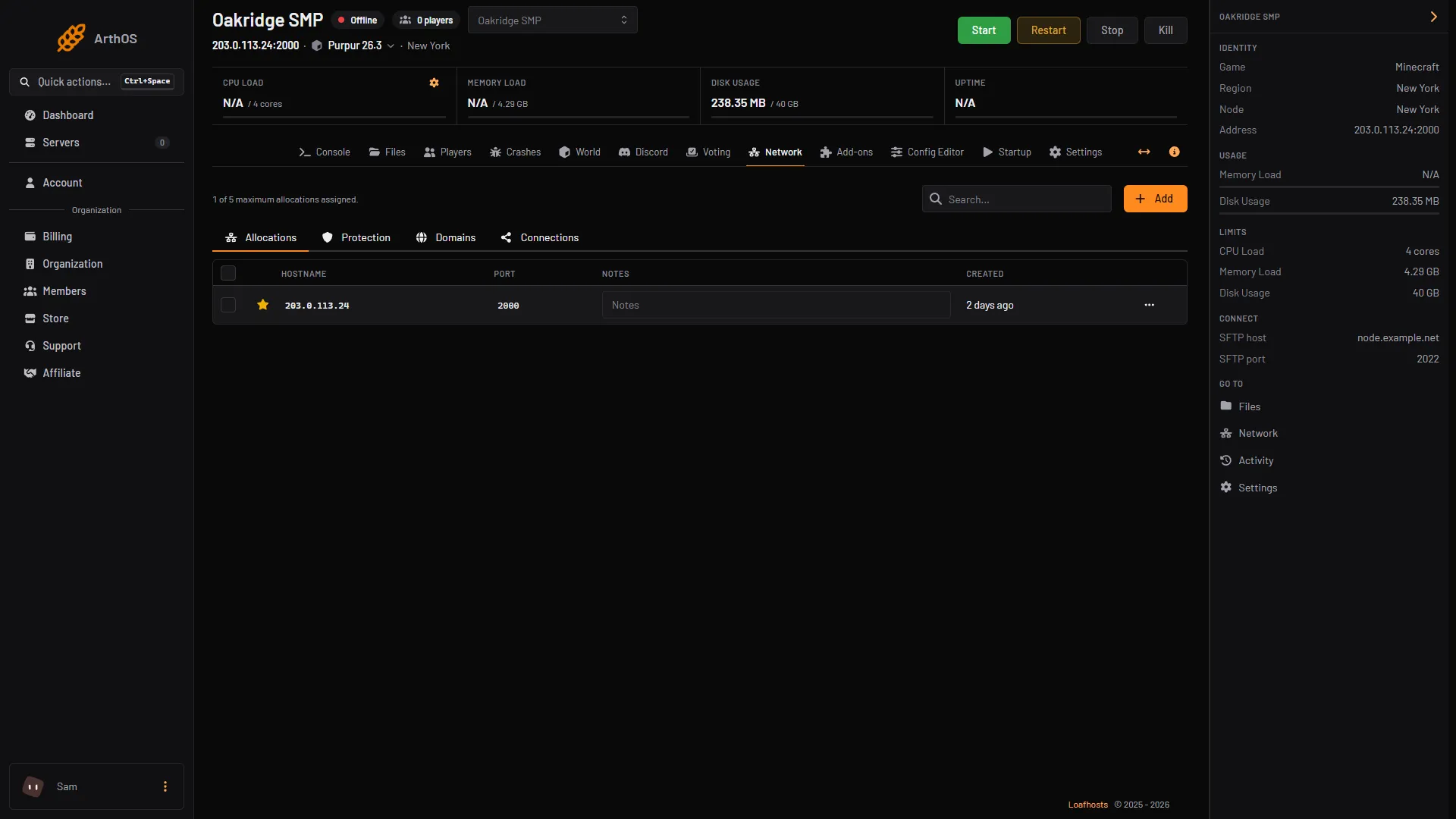
- The allocation count
- Add
- The port's row
Not checked on 26.3 as of 11 October 2026: how many ports a Minecraft plan allows, and whether the new port can be reached from outside. The panel’s own Voting setup adds a port by itself. Keep that one for voting.
Set up BlueMap in the ArthOS panel
- Add a port first (see “The extra web port” above) and restart. If your server is at its limit, the panel refuses to add one, and you cannot use BlueMap’s web page until you have a free port.
- Open Add-ons, then Plugins (1). Under Find plugins choose Modrinth (2), type
BlueMapin the search box (3) and choose Install (4). Pick the build marked Newest. The picture shows another plugin’s result; BlueMap’s card looks the same.
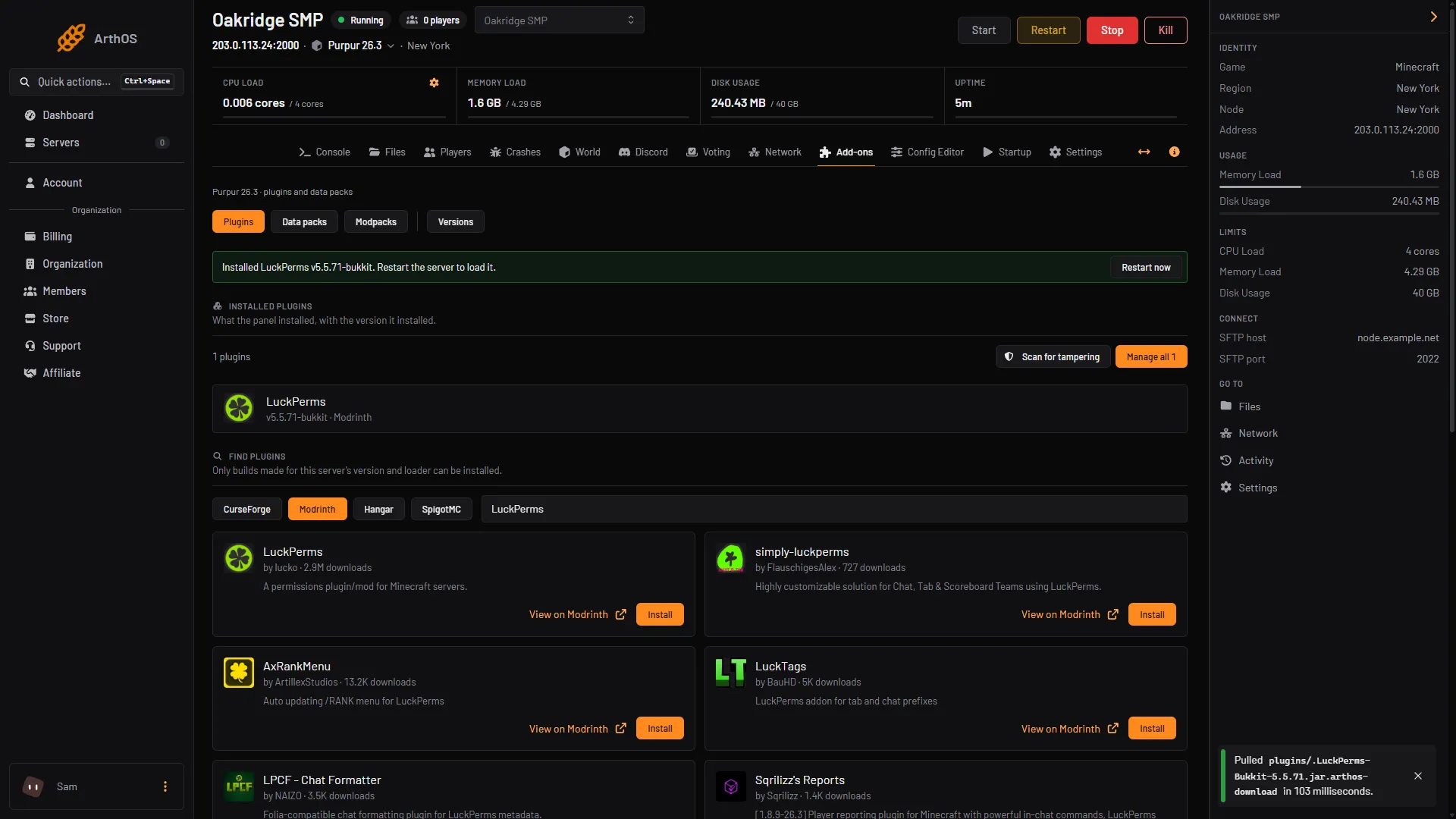
- Plugins
- Pick Modrinth
- Search for BlueMap
- Install
- Choose Restart now. BlueMap writes its settings in
plugins/BlueMapand sets up one map for each world it finds. - In Files, open
plugins/BlueMap/core.confand changeaccept-downloadtotrue. BlueMap’s page says this means you accept Mojang’s End User License Agreement (EULA), you own a Minecraft Java Edition licence, and BlueMap may download a client file from Mojang to draw the blocks. It does not work without it. - Open
plugins/BlueMap/webserver.confand changeportto the port you added. - Type
bluemap reloadin the Console. - In a browser, open
http://plus your server address, a colon and that port. The address is on the Network page. - Type
bluemapin the Console to see how far the first render has got.
BlueMap keeps the map up to date by itself. Other Console commands: bluemap stop and bluemap start pause and resume rendering, bluemap freeze <map-id> stops updates to one map, and bluemap troubleshoot looks for problems.
Render settings and memory
Each map has a file in plugins/BlueMap/maps. From BlueMap’s maps page:
remove-caves-below-y: leaves out hidden blocks below this height. The default is55. A change needs a new render.enable-hires:falsegives a faster render and much smaller files, but no full 3D models when you zoom in.min-inhabited-time: above0draws only chunks that players have visited.
In core.conf, render-thread-count sets how many threads draw the map. A higher number can be faster and could slow the machine.
BlueMap’s site says it “has been proven to work with just 512MB of assigned memory”, and that more render threads need more. It also says BlueMap uses spare memory as a cache and gives it back when the server needs it. Watch Memory Load in the panel’s header during the first render. See out of memory.
Dynmap, on a server it supports
On Minecraft 1.21.4 or older:
- Install
Dynmapfrom Add-ons, Plugins, Modrinth. - In
plugins/dynmap/configuration.txt, setwebserver-port:to your port. The default is8123. - Restart, then open
http://plus your address, a colon and the port. - Type
dynmap fullrenderin the Console. Without a player it starts at the centre of the world.dynmap pause allanddynmap pause nonestop and resume rendering.
The default file uses the hires templates. Its own comment says these can take a very long time for the first full render. timesliceinterval paces a full render to ease the load. No memory figure for Dynmap is on the pages read.
By hand
Download the plugin from its own page (BlueMap from Modrinth or GitHub, Dynmap from Modrinth or SpigotMC) and put the jar in plugins. Edit the files above, restart, and open the web port in your firewall. BlueMap’s built-in web server can be configured further (see BlueMap’s Webserver page, not covered here). BlueMap needs Java 25 or newer, which Minecraft 26 servers already use.
If it does not work
- The page does not open. Check the port in
webserver.conforconfiguration.txtmatches the Network page, that you restarted after adding it, and that the address starts withhttp://. - BlueMap shows no map.
accept-downloadis probably stillfalse. Read the start of the Console for a BlueMap message. - The map is half drawn. A big world takes a while. Type
bluemapto see progress. - Players lag during the render. Lower
render-thread-count, or typebluemap stopuntil a quiet time. See fix lag.
More on the game: Minecraft servers.
Sources: bluemap.bluecolored.de: Installation.html, bluemap.bluecolored.de: Core.html, bluemap.bluecolored.de: Webserver.html, bluemap.bluecolored.de: Maps.html, bluemap.bluecolored.de: Commands.html, bluemap.bluecolored.de: RAM.html, modrinth.com: Versions, github.com: Dynmap, raw.githubusercontent.com: Configuration.txt, github.com: Commands, modrinth.com: Versions