






To change the difficulty, open the Config Editor, set Difficulty to Peaceful, Easy, Normal or Hard, choose Save, and restart. To change it right now without a restart, type difficulty hard (or another name) in the Console. Do both if you want it to last: the command alone is lost when the server restarts.
What each difficulty changes
The Minecraft Wiki describes four levels. The default on a new server is Easy.
| Difficulty | What changes |
|---|---|
| Peaceful | Hostile mobs do not spawn naturally, and the ones that do spawn go away at once. The ender dragon and shulkers deal no damage. Players regain health quickly and the hunger bar never drops. |
| Easy | Hostile mobs spawn and deal about half the damage they do on Normal. Hunger can drain a player down to 10 health, but not lower. |
| Normal | Hostile mobs deal standard damage. Hunger can drain a player down to 1 health. |
| Hard | Hostile mobs deal about one and a half times Normal damage. Hunger can kill a player. Zombies can break through wooden doors and can call reinforcements. |
Difficulty also changes raids and villagers. The wiki lists the full detail on its Difficulty page.
In the ArthOS panel
You can change it any time; nothing is lost.
- Open your server and choose Config Editor. The Config Editor works with the server stopped or running.
- Type “difficulty” in Search… (1).
- In the World group, open Difficulty (2) (“How hard the world is.”) and choose
peaceful,easy,normalorhard. - Choose Save. On a running server a banner says “Saved changes apply after a restart.”
- Restart the server. If it was stopped, just start it. The new difficulty is loaded at the start.
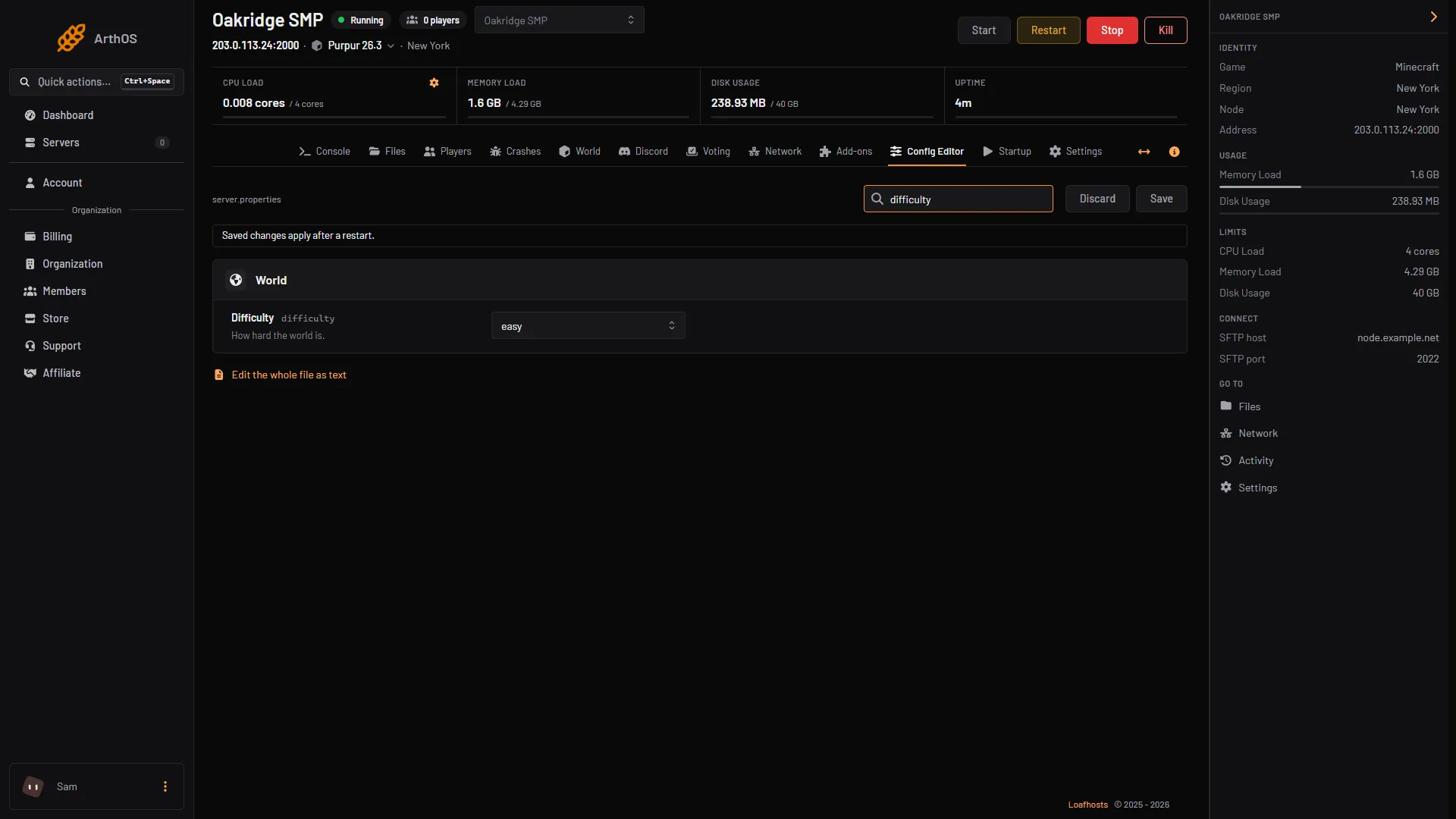
- Search for difficulty
- Choose the difficulty
To change it at once for the running game, also open the Console and type difficulty hard (use your own level). Type difficulty with no name to read the current one: the game answers “The difficulty is Hard”.
By hand
- Stop the server and open
server.propertiesin Files. - Set
difficulty=hard, orpeaceful,easyornormal. The wiki says a number from 0 to 3 is accepted and converted to the name: 0 peaceful, 1 easy, 2 normal, 3 hard. - Start the server.
Commands: in the server console, type difficulty hard. In game chat, an operator types /difficulty hard. See operators.
Why the command alone does not last
The Minecraft Wiki says that on a multiplayer server a difficulty set by command lasts only until the server restarts. On restart the game reads difficulty from server.properties again. That is why you set the row as well. Not checked on 26.3 as of 11 October 2026: this restart behaviour on a Loafhosts server. If it still goes back after a restart, see difficulty resets to peaceful.
If it does not work
- The difficulty is back to the old value after a restart. You used only the command. Set Difficulty in the Config Editor and save.
- Saved, but nothing changed. The server was not restarted. Restart it, or type the command for now.
- The command does nothing on a hardcore server. Hardcore locks the difficulty to Hard. The wiki says the difficulty does not change even when the command reports success. See hardcore mode.
- A world plugin sets its own difficulty. The guide linked above explains the plugin check.
More on the game: Minecraft servers.
Sources: minecraft.wiki: Difficulty, minecraft.wiki: Difficulty, minecraft.wiki: Server.properties, minecraft.wiki: Hardcore