






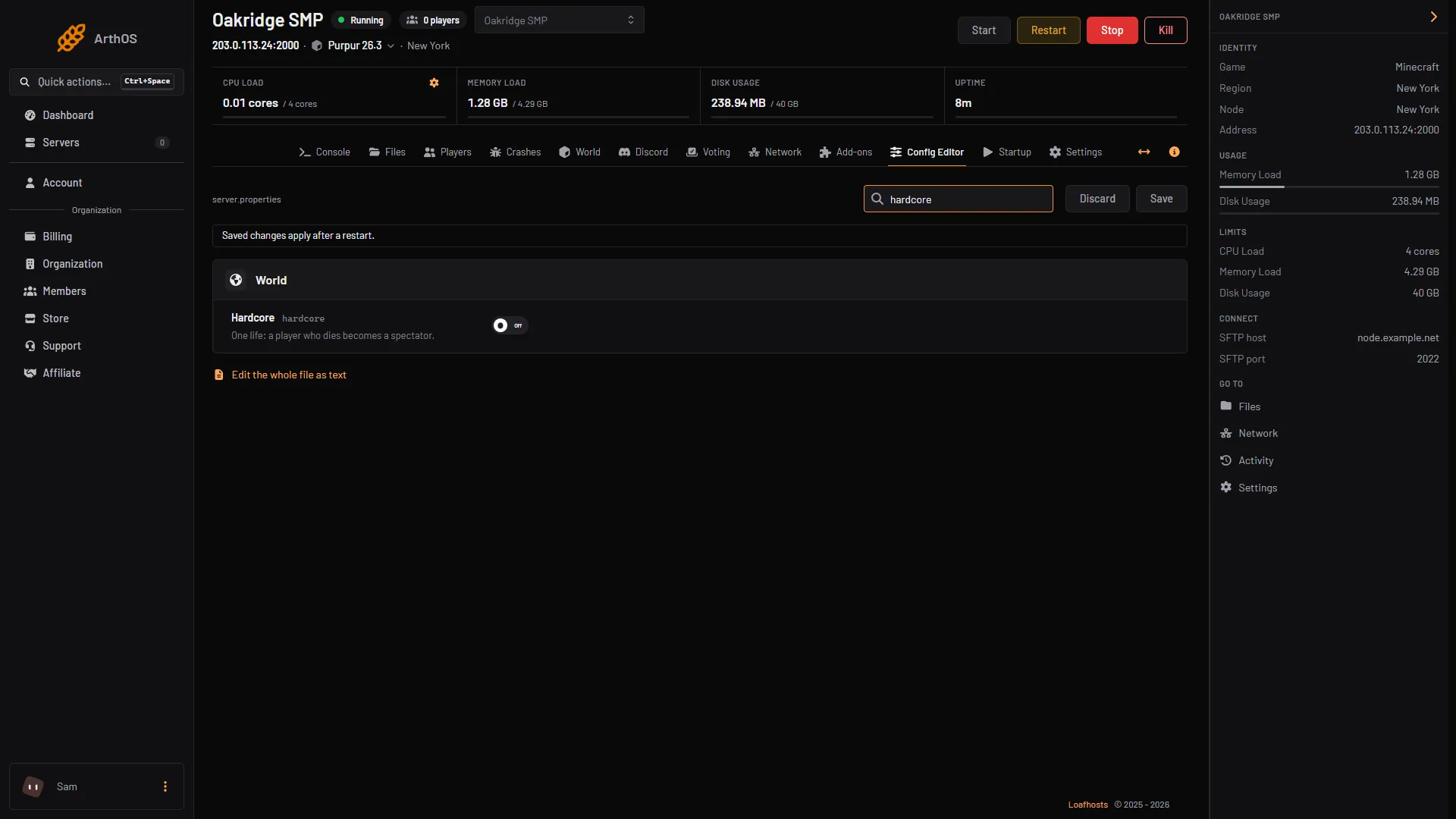
Hardcore mode gives every player one life. A player who dies becomes a spectator. To turn it on, switch Hardcore on in the Config Editor and then start a new world, because the setting is meant for a world that is being created.
hardcore covers the whole server. If you want a hardcore world beside a normal one, you need a second server.
The Minecraft Wiki says the world is also locked to Hard difficulty, and that hardcore cannot be switched on or off for a world that already exists. So decide before the world is made.
What hardcore does
- One life. The Minecraft Wiki says the player is not given the option to respawn. The game offers to spectate the world or to go back to the title screen. The game’s own text for the spectate button is “Spectate World”.
- Spectator mode. A spectator can fly and go through blocks. A spectator cannot interact with the world or pick up items.
- Hard difficulty. The wiki says hardcore worlds are restricted to Hard and that this cannot be changed.
- Everyone. Hardcore belongs to the world, not to a player. In multiplayer all players are in hardcore. The wiki says the world’s hardcore flag is saved in
level.dat.
The panel’s help for the row says the same in short: “One life: a player who dies becomes a spectator.”
In the ArthOS panel
Set it before the world exists. This takes a backup and a new world, so read all the steps first.
- Take a backup of the server. See the backups guide.
- Open Config Editor (it works with the server stopped) and type “hardcore” in Search… (1).
- Switch Hardcore (2) on.
- Choose Save (3). The banner says “Saved changes apply after a restart.” Do not restart yet; the restart comes after the new world is set up.
- Search for hardcore
- Hardcore switch
- Save
- Make the new world. Follow reset the world: either give World folder a new name (the old world stays on disk) or delete the world folder. Set World seed and World type at the same time if you want a particular map.
- Start the server. The game builds the new world in hardcore.
Bring a player back after a death
A spectator can be put back in another game mode by an operator. The wiki says server operators can use the /gamemode command on themselves or on another player. In the Console type gamemode survival <name> with no slash. See change a player’s game mode. Not checked on 26.3 as of 11 October 2026: what hardcore does with a player set back to survival.
By hand
- Stop the server.
- Open
server.propertiesin Files, or in the folder of your own server. - Set
hardcore=true. The wiki describes the key as “Whether to enable hardcore mode on created worlds.” - Delete the world folder or change
level-nameso that the server makes a new world. See reset the world. - Start the server. A change to
server.propertiesneeds a restart.
If it does not work
- You want hardcore for one world only.
hardcorecovers the whole server, so a hardcore world beside a normal one needs a second server. - Players respawn as usual. The world was made before you set Hardcore. The setting is for worlds that are being created. Make a new world as above. Not checked on 26.3 as of 11 October 2026: what the game does when
hardcore=trueis set on a world that already exists. - Difficulty will not change. In hardcore the world is locked to Hard. Turn hardcore off in a new world to get the other difficulties back.
- The switch is on but nothing changed. You did not restart after Save. The panel says saved changes apply after a restart.
- A player wants another chance. Use
gamemodeas above, or make a new world.
More on the game: Minecraft servers.
Sources: minecraft.wiki: Server.properties, minecraft.wiki: Hardcore, raw.githubusercontent.com: En us.json