












Each world on a Palworld server keeps its own characters. If players start again with new characters, they are most likely in a different world from the one they played, or the world came from somewhere else. The old characters are not deleted. They stay with the old world.
Why it happens
A world moved from a co-op game or another server
A co-op world is a world you hosted from the game’s own menu. The bases, the Pals at bases and the world itself come with it. The characters do not. Players who played it somewhere else get new characters here. The World page says so: “moving characters is not done yet.”
Server mods turned on or off
Turning server mods on or off changes how the server runs. The world, settings and passwords carry over, but the characters do not: each player starts a new character. This is true in both directions. Characters made with mods on do not carry back when you turn mods off.
A new world is playing
If someone chose Start a new world, or played a different world, the characters of the old one are not there. The new world starts empty.
The world’s name points at a folder that is not there
The game names a world’s folder when it makes the world. The World page chooses which world loads. If DedicatedServerName in GameUserSettings.ini names a folder that does not exist, the game makes a new, empty world with that name at its first save, about a minute after the server starts.
One player died in Hardcore
Hardcore does not reset everyone. Only a player who died starts again, and cannot come back as that character. Whether they may make a new one is set by New character after a hardcore death. See Palworld Hardcore mode.
Find out which one it is
-
Open the World page.
-
Under Worlds, find the world with the In play tag (1). In play means the world the server loads at every start. Each world shows how many characters it holds, for example
characters: 4. -
If another world has the characters you expected, that world is not in play. Stop the server, then choose Play this world (3) on it. Play this world is greyed out while the server runs. Start the server again.
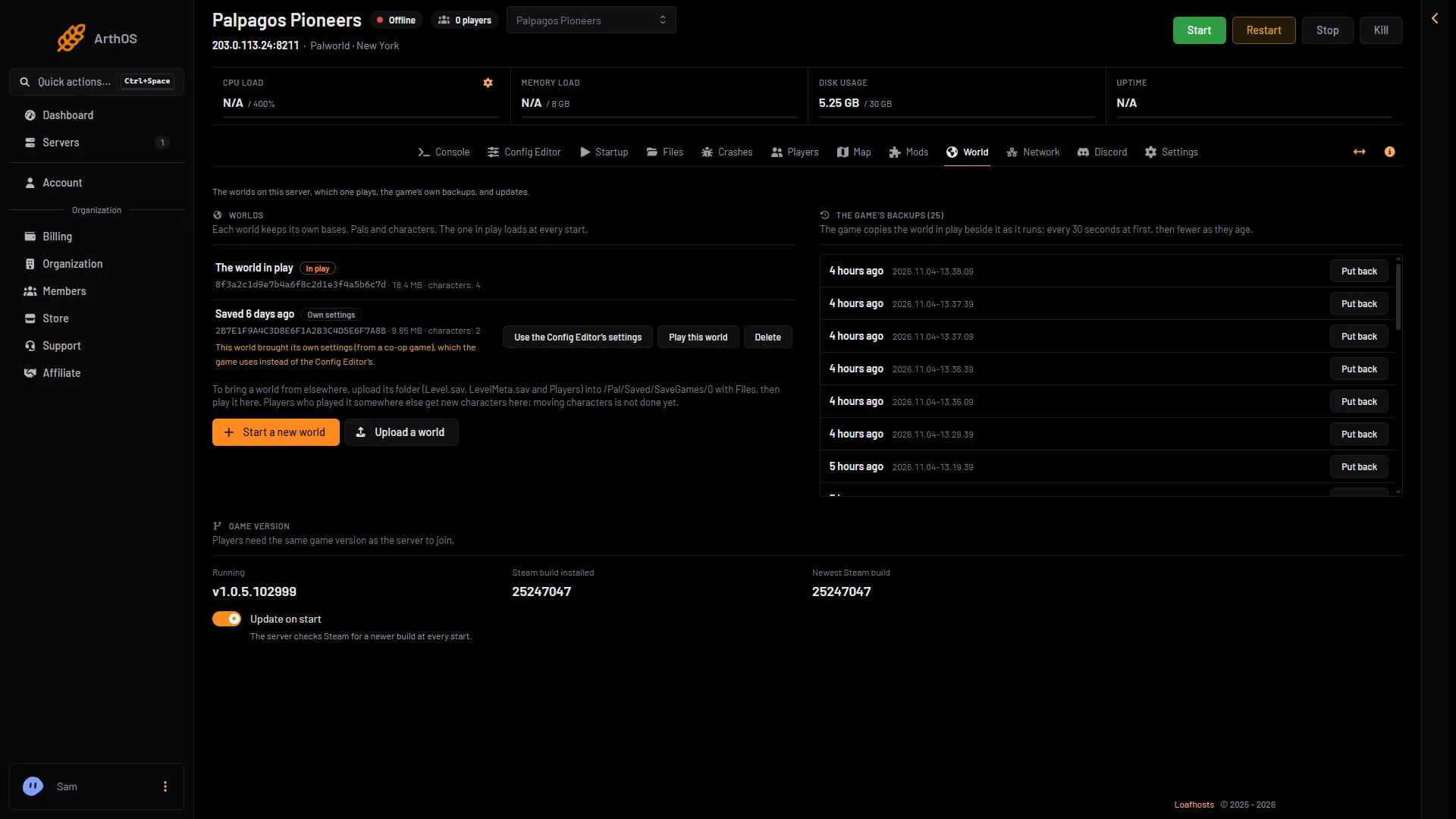
- The world in play
- A co-op world
- Play this world
-
If you just turned server mods on or off, open the Mods page. When server mods are off, it shows Server mods are off (1) and the number of characters in the world as it is now (2).
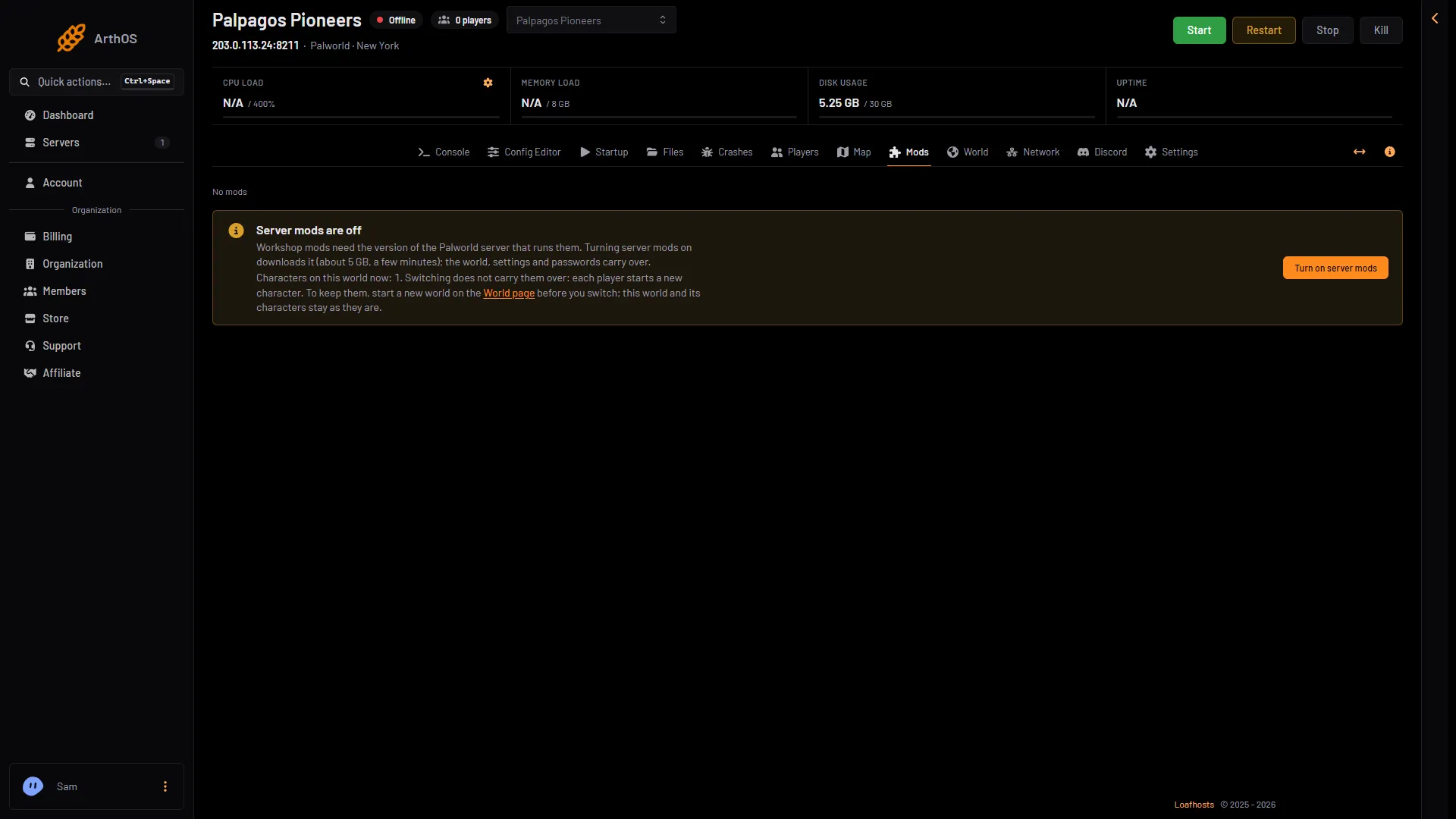
- Server mods are off
- Characters that do not carry over
Get the old characters back
- After a mods switch. The old world stays as it was, with its characters. Not checked on 1.0.5 as of 4 November 2026: whether the old characters work again after you switch back.
- After a wrong world. Play the right world on the World page, as above. Nothing was deleted.
- After a world from another place. The characters stay in the world files they came from. They are not moved to the server.
By hand
The worlds are folders in Pal/Saved/SaveGames/0/, each with a Players folder. The one that loads is set in Pal/Saved/Config/LinuxServer/GameUserSettings.ini. With server mods on, that file is in another folder under Pal/Saved/Config. Open Config in Files and use the folder that holds it. Stop the server before you edit it. The game writes the file again when it stops.
[/Script/Pal.PalGameLocalSettings]
DedicatedServerName=0FE3A96E5CA44666BB2B74374AD9CE8B
Use the id of the folder you want, copied exactly.
Avoid it next time
Before you turn server mods on or off, start a new world on the World page first. Then switch. The Mods page says it the same way: “To keep them, start a new world on the World page before you switch; this world and its characters stay as they are.” The old characters stay in the old world, and players still start new ones in the new world.
A world from a co-op game: expect new characters. Tell players before you move it.
If it does not work
- Play this world is greyed out. Stop the server first. World changes apply only while it is stopped, and they load at the next start.
- The old world is missing from the list. It may have been deleted. Delete removes a world with its bases, Pals, characters and backups. Panel backups of the server are not touched, so you can restore one from Settings, Backups. Restore puts back every file of the backup, not only the world.
- The Mods page says nobody has played yet. Then no character is lost by switching.
More about the game: Palworld servers.
Sources: docs.palworldgame.com: Configuration, docs.palworldgame.com: Mod