












Two settings decide how the Global Palbox works on your server. Send Pals to the Global Palbox is On by default, so players can store their Pals. Bring Pals from the Global Palbox is Off by default, so Pals from other worlds cannot come in. Both apply at the next start.
What the Global Palbox is
The Global Palbox is a structure players build. The Palworld wiki says it “is a Pal management structure used to store and reconstruct Pals across different worlds.” A player uploads a copy of a Pal’s genetic data. That data can then rebuild the Pal in another save or world.
The wiki says reconstructed Pals keep their gender, name, level, skills and more. It also lists limits: they drop a Scrapped Tissue Sample when butchered, and they cannot be used as sacrifices in Pal Condensation. Only one reconstructed copy of a Pal can exist per save.
The two settings
- Send Pals to the Global Palbox (
bAllowGlobalPalboxExport). Pocketpair: “Allow saving to the Global Palbox.” The panel’s help: players can store Pals from this world in their Global Palbox. Default: On. - Bring Pals from the Global Palbox (
bAllowGlobalPalboxImport). Pocketpair: “Allow loading from the Global Palbox.” The panel’s help: players can bring Pals from other worlds into this one. Default: Off.
The defaults are the ones a new server starts with on the 1.0.5 server file.
Why you may keep import off
With import on, players can bring in Pals made in other worlds. Those Pals keep their level and skills, and you do not control how they were raised. A server owner who wants every Pal earned on this world keeps import off. A server for friends who move between worlds may turn it on.
Export is separate. It lets players take their own Pals out of your world. Turn it off if you want Pals from this world to stay in this world.
In the panel
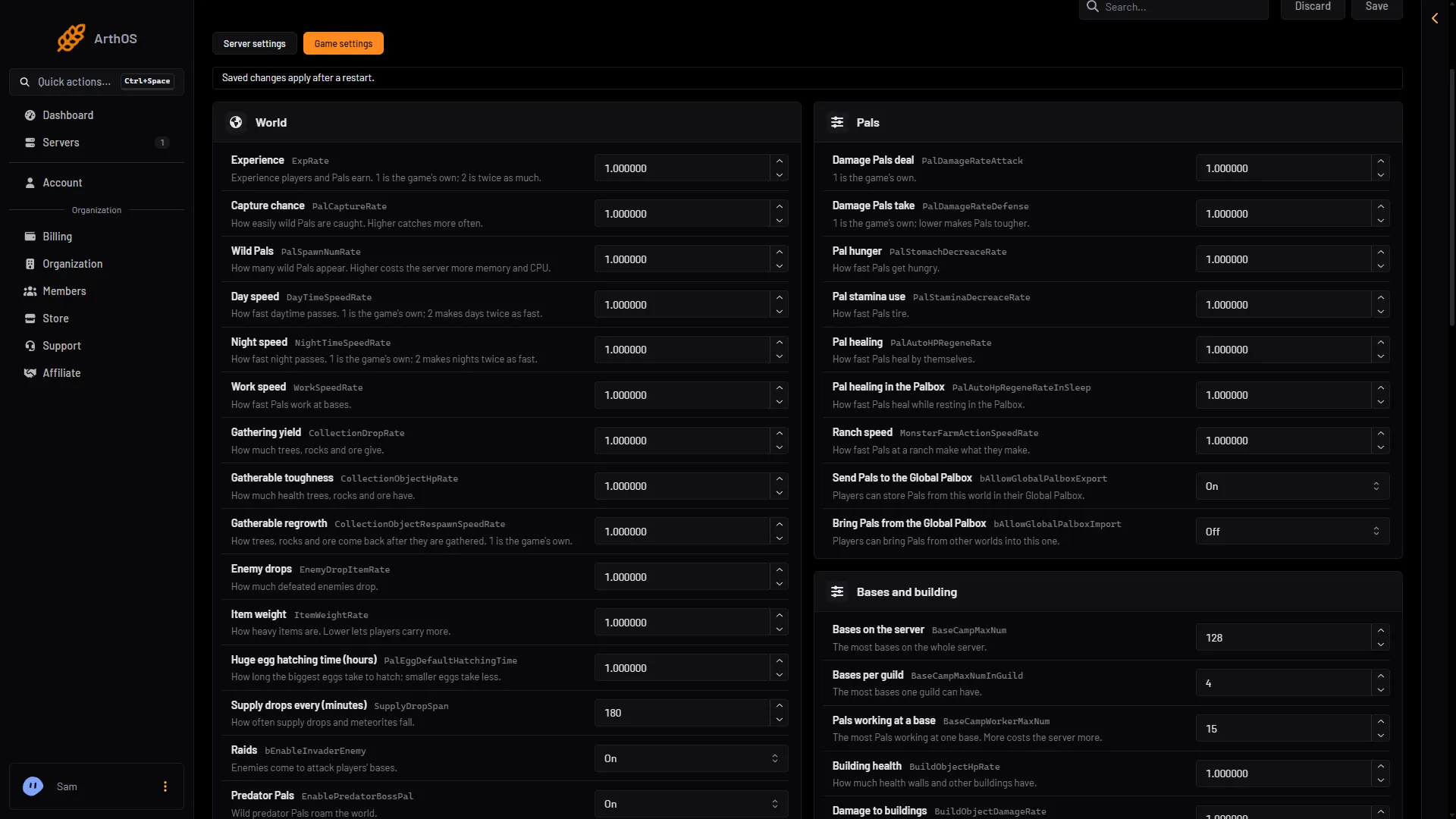
- Send Pals to the Global Palbox
- Bring Pals from the Global Palbox
- Open the Config Editor page.
- Choose the source Game settings.
- Open the group Pals.
- Set Send Pals to the Global Palbox (1 in the picture) and Bring Pals from the Global Palbox (2) to On or Off.
- Save.
If the server is running, the panel shows “Saved, waiting for the next restart: (names).” Choose Restart now to apply it, after warning players. A restart disconnects everyone. If the server is stopped, the change is written at once.
By hand
The file is Pal/Saved/Config/LinuxServer/PalWorldSettings.ini. With server mods on, these two files are in another folder under Pal/Saved/Config. Open Config in Files and use the folder that holds them, or use the Config Editor, which always finds them. Edit the file only while the server is stopped. Inside the one OptionSettings=(...) line, change these pairs and keep the commas between them:
bAllowGlobalPalboxExport=True,bAllowGlobalPalboxImport=FalseThese are the defaults.
If it does not work
- Players still cannot bring Pals in. The server has not restarted since you saved, or import is still Off.
- The rows are missing. Make sure the source is Game settings, not Server settings.
- The settings are ignored. A world with its own
WorldOption.savignores the Config Editor’s settings for the settings that file holds. See the WorldOption.sav guide.
More about the game: Palworld servers.
Sources: docs.palworldgame.com: Configuration, palworld.wiki.gg: Global Palbox