









Every account on a Project Zomboid server has one access level. The levels run from user, the plain level, up to admin. You set a level with setaccesslevel or from the Players page.
The levels
PZwiki lists these levels for setaccesslevel, in this order:
| Level | Meaning |
|---|---|
user | A normal player. No powers. |
priority | Listed between user and observer. PZwiki gives no list of powers. |
observer | A staff level. PZwiki gives no list of powers. |
gm | A staff level. PZwiki gives no list of powers. |
moderator | A staff level. PZwiki gives no list of powers. |
admin | Every power. |
The order is the order of the list, not a ranking. The panel’s own help line under the Access level list says: “The game’s own levels, from user (no powers) to admin (every power).”
PZwiki does not say what priority, observer, gm and moderator may each do, so this guide does not either. The server’s ini also names an “overseer” level in a radio setting; the game’s accounts list and the panel’s Access level list have no overseer. The game’s own help in chat (/help) lists the commands your account can use.
There is also a level banned. The panel uses it for a ban. The game’s account list on a Loafhosts server holds these levels: banned, user, priority, observer, gm, moderator, admin. There is no level none.
Set a level
In the ArthOS panel
- Open the Players page.
- On the player’s row, open the three-dot menu and choose Access level.
- In the Access level list, pick the level, for example
moderator(box 1) oradmin(box 2). - Choose Set level.
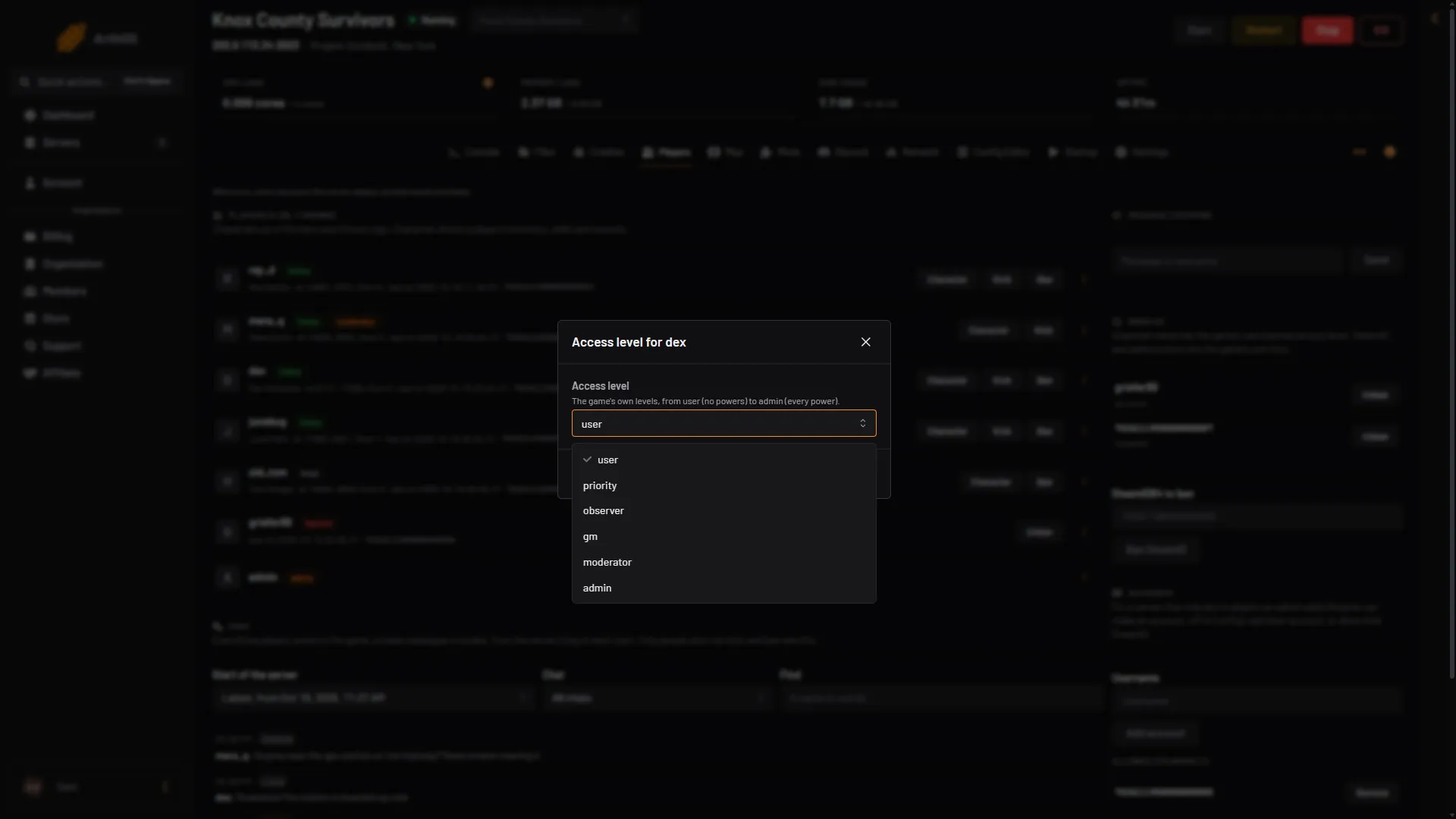
- moderator
- admin
The level of a staff account shows on its row.
With a command
In the Console page (no slash) or in the game chat as an admin (with a slash):
setaccesslevel "username" "moderator"The game answers “done” for a name that does not exist. Check the Players page afterwards.
Banned players and staff levels
The panel’s Ban sets the level banned. The game refuses to ban a staff level: it answers “This user can’t be banned”. The panel will not ban a staff level either. Set the player to user first, then ban them. Unban sets the level back to user.
See ban and kick players.
Changes take effect
A level changes when the game runs the command. The player may need to rejoin to see their new powers. Not checked on Build 42.21 as of 18 October 2026.
If it does not work
- The level did not change. The name must match the account exactly. Look on the Players page. Use one of the six in the list above.
- You cannot see Access level. Your panel role needs permission to change access levels.
More about the game: Project Zomboid servers.
Sources: pzwiki.net: Admin commands