









Admin commands are typed as an admin, in the game chat with a slash in front (/players) or in the Console page of the panel without the slash (players). Type /help to list every command, or /help additem for one command. More about the game: Project Zomboid servers.
Names in a command go in double quotes. Item names are case sensitive: Base.Axe works, base.axe does not.
In the ArthOS panel
Open the Console page of your server. Type the command in the box without the slash and press Enter. The reply of the game shows in the console.
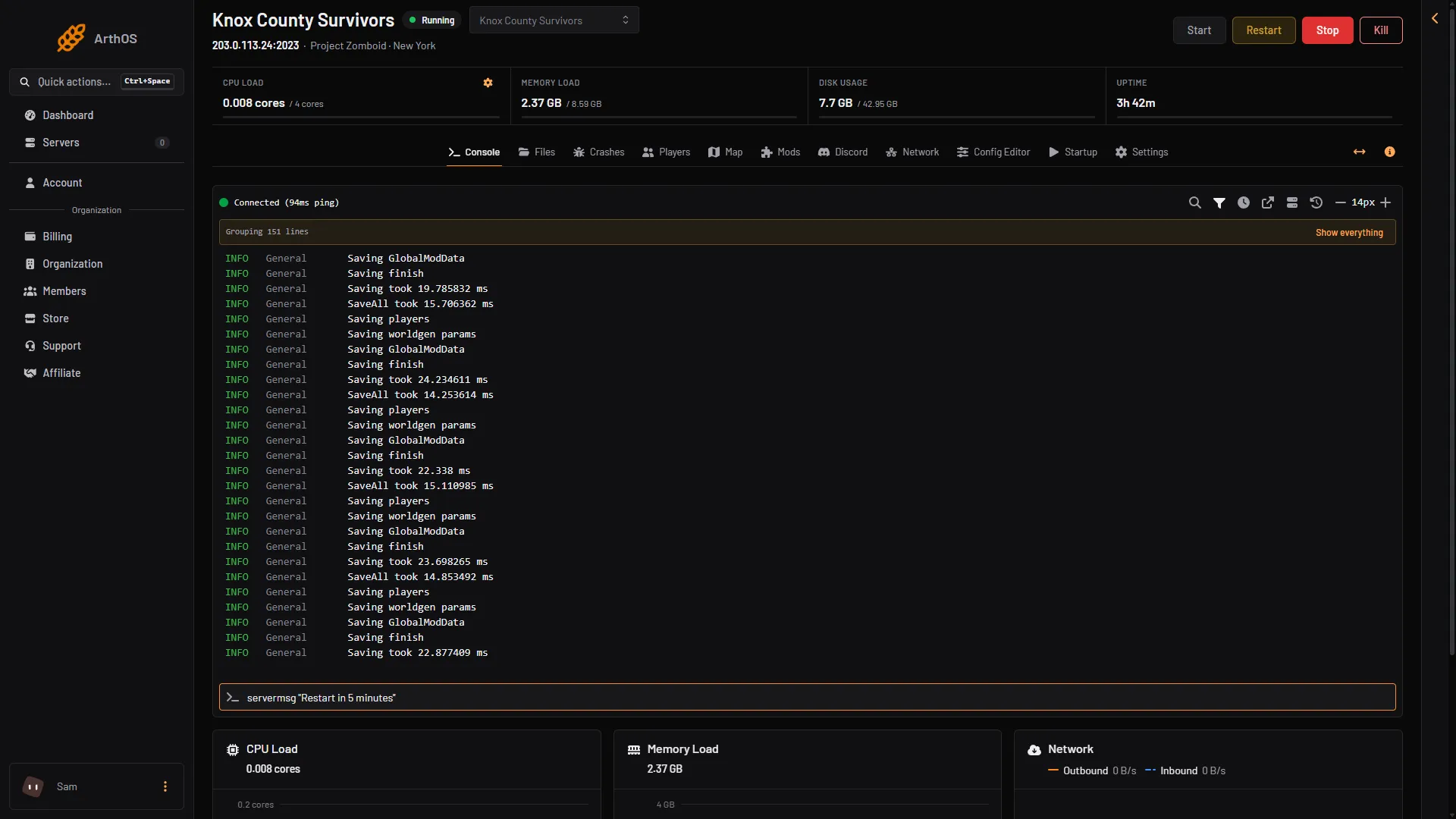
- Type the command here
Many commands have a button on the Players page, so you do not need to type them. The table shows which.
The commands
| Command | What it does | Example | Players page |
|---|---|---|---|
help | Lists all commands, or the help for one. | /help additem | |
players | Lists connected players. | /players | Players list |
servermsg | Sends a message to everyone online. | /servermsg "Restart in 5 minutes" | Message everyone |
save | Saves the world. | /save | |
quit | Saves and stops the server. | /quit | |
kickuser | Kicks a player. Add -r for a reason. | /kickuser "rj" -r "spam" | Kick |
banuser | Bans a player. Add -ip to ban the address too, -r for a reason. | /banuser "rj" -ip -r "spawn kill" | Ban (see below) |
unbanuser | Unbans a player. | /unbanuser "rj" | Unban |
banid, unbanid | Bans or unbans a SteamID. | /banid 76561190000000000 | Ban SteamID |
banip, unbanip | Bans or unbans an address. | /banip 203.0.113.5 | Unban (for address bans in Bans (N)) |
voiceban | Block voice from user. | /voiceban "rj" -true (or -false) | |
addkey | Give a key to a player. | /addkey "rj" "7295" "Gift Key" | |
removeitem | Remove items from yourself. | /removeitem Base.Axe 5 | |
chopper | Place a helicopter event on a random player. | /chopper | |
gunshot | Place a gunshot sound on a random player. | /gunshot | |
setaccesslevel | Sets a player’s access level. | /setaccesslevel "rj" "moderator" | Access level |
adduser | Adds an account, for a server that only lets in players an admin adds. | /adduser "rj" "password" | Add account |
removeuserfromwhitelist | Removes an account. | /removeuserfromwhitelist "rj" | Remove account |
setpassword | Changes a player’s password. | /setpassword "rj" "newpassword" | |
addsteamid, removesteamid | Adds or removes an allowed SteamID. | /addsteamid "76561190000000000" | Allow SteamID |
additem | Gives an item. Without a name you get it yourself. The count is optional. | /additem "rj" Base.Axe 5 | Give item |
addxp | Gives XP in a skill. | /addxp "rj" Woodwork=2 | Give XP |
addvehicle | Spawns a vehicle at a player or at x,y,z. | /addvehicle "Base.VanAmbulance" "rj" | Bring a vehicle |
teleportplayer | Moves a player to another player. | /teleportplayer "rj" "toUser" | Send to a player |
teleportto | Moves you to coordinates. | /teleportto 10000,11000,0 | Send to a place |
godmodplayer | Makes a player invincible. | /godmodplayer "rj" -true | God mode |
invisibleplayer | Zombies cannot see the player. | /invisibleplayer "rj" -true | Invisible |
noclip | Lets a player pass through walls. | /noclip "rj" -true | No-clip |
createhorde | Spawns a horde near a player. | /createhorde 150 "rj" | |
startrain, stoprain | Starts rain (strength 1 to 100) or stops it. | /startrain 50 | |
startstorm, stopweather | Starts a storm (length in game hours) or stops the weather. | /startstorm 2 | |
showoptions | Shows the server options and their values. | /showoptions | |
changeoption | Changes one server option. | /changeoption PVP "false" | |
reloadoptions | Reloads the server ini and sends it to players. | /reloadoptions | |
reloadlua, reloadalllua | Reloads one Lua file, or all of them. | /reloadlua "filename" |
The in-game buttons (Give item and the rest) work for online players only.
Commands the wiki marks
godmodandgodmodplayercarry a “Bug” flag on PZwiki.godmodplayeranswered correctly on Build 42.21 on a Loafhosts server.addtosafehouse,kickfromsafehouse,list,removeandworldgenare marked “WIP” (work in progress). Do not rely on them.createhorde2andremovezombieshave no description on the wiki.
PZwiki lists no /grantadmin command. Use setaccesslevel: see make yourself admin.
Bans and the Players page
Ban on the Players page sets the access level banned and kicks the player if they are online. The game refuses to ban a staff level, so set that player to user first.
If it does not work
- Nothing happens in chat. Your account must be an admin, and the command starts with a slash.
- The game says the item does not exist. Check the case:
Base.Axe. - The game says “done” for a name that does not exist. It does that for
setaccesslevel,removeuserfromwhitelist,unbanuserandunbanid. Check the name on the Players page. - A change to an option does not show. Use
reloadoptions, or restart the server.
PZwiki’s list was last updated for Build 42.20.2. Not checked on Build 42.21 as of 18 October 2026 for the commands the replies above do not cover.
Sources: pzwiki.net: Admin commands, pzwiki.net: Dedicated server