









No. Mods made for Build 41 do not load on a Build 42 server. PZwiki says mods can be specific to a game version and old mods are likely not to work on new ones. A mod needs a Build 42 version. If it has none, run a Build 41 server instead.
How a Build 42 mod is laid out
A Workshop item holds one or more mods. Each mod has its own folder. In Build 42 the mod folder has these parts:
common: files that every version uses, such as models and textures. It has amediafolder.- A version folder such as
42: the files for that game version, includingmod.info. A mod can have several, for example42and42.1.
The game loads common first. Then it loads the version folder closest to the game’s version, which replaces any common file with the same name. PZwiki says a mod needs at least a version folder or a common folder to be recognised.
A Build 41 mod keeps its media folder straight inside the mod folder. PZwiki notes that one mod folder can carry both layouts, because they do not clash.
mod.info holds the mod’s id, and can list require (mods it needs), incompatible, loadModAfter and loadModBefore.
Tell if a Workshop item supports Build 42
Only the Workshop page and the author tell you.
- Open the item’s page. Read the title and the description. Authors often write the build in the title, for example
B42or[Only for B41]. - Read the comments for reports from players on the build you run.
- When you browse the Workshop, the category list has Build 40, Build 41 and Build 42.
A missing tag is not proof either way. The Mods page also checks for you.
What the Mods page says
On a Build 42 server, the Mods page says “Mods are read for Build 42.” The panel looks inside each Workshop item for the mod files of that build. When you add an item:
- An item with no version for the server’s build shows “It has no version for this server’s game build, so it cannot load.”
- An item that has files for both builds shows how many more are for the other build, and says they are not loaded.
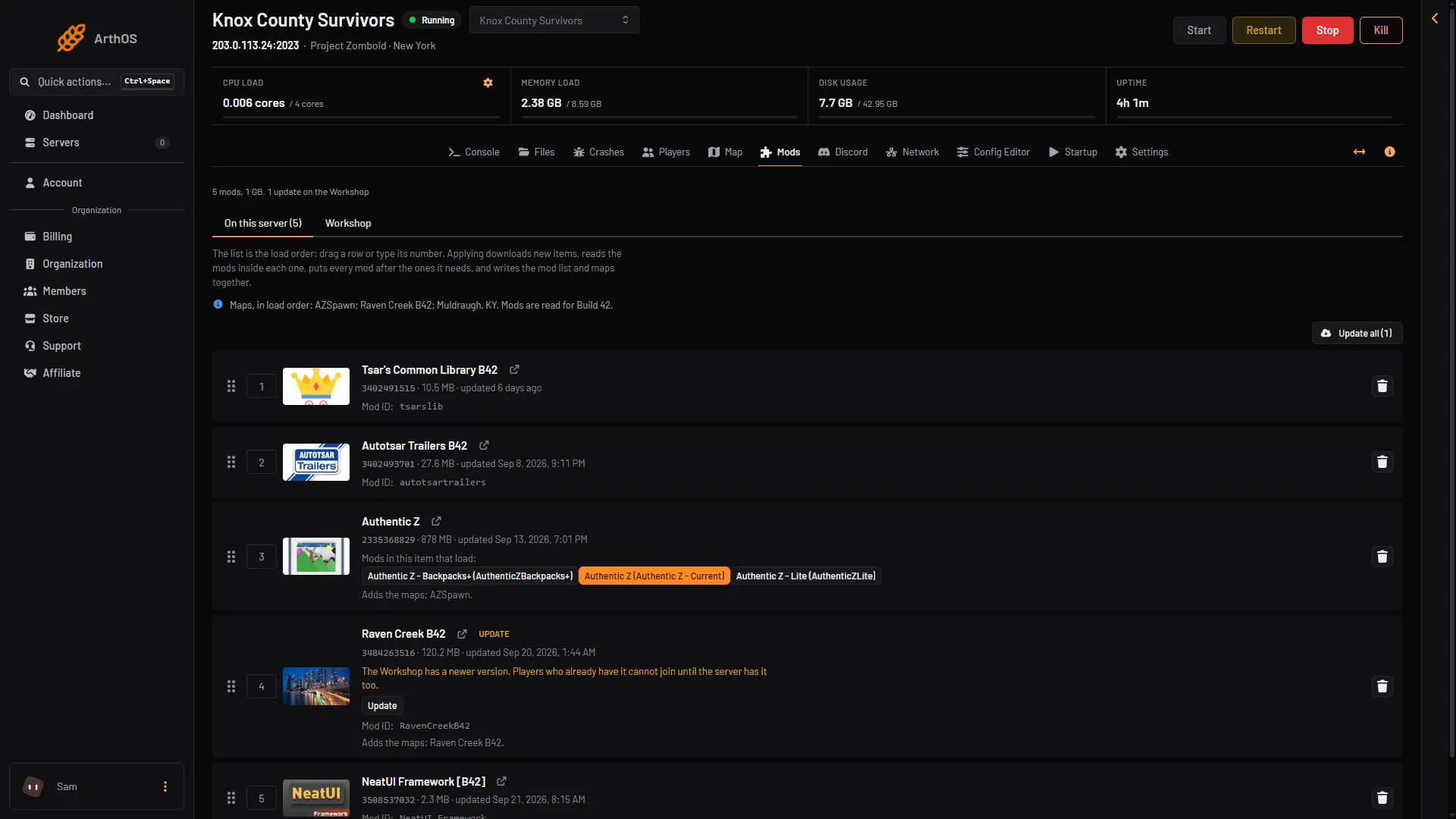
- Maps and build line
Take such an item off the list. See update mods for removing one.
Build 41 servers
A server can run Build 41 instead. On the Startup page, Steam Beta Branch [requires reinstall] set to legacy41 selects Build 41. Type legacy41; the example in the hint is an older branch name. What the Mods page says on a Build 41 server: not checked on Build 42.21 as of 18 October 2026. See Build 41 servers.
If it does not work
- The server starts but a mod does nothing. The mod may be made for the other build. Check its Workshop page.
- The server will not start after adding a mod. Open Crashes. See mod errors.
More about the game: Project Zomboid servers.
Sources: pzwiki.net: Mods, pzwiki.net: Mod structure, pzwiki.net: Dedicated server, steamcommunity.com: Workshop