









Open the Players page and scroll to Chat. It lists every message players wrote in the game, private messages included, one start of the server at a time. Only people who can kick and ban players can see it. More about the game: Project Zomboid servers.
Read the chat in the panel
- Open the Players page.
- Scroll below the player list to Chat.
- In Start of the server, pick a start. The first entry reads “Latest, from” and a date. Older starts are listed by date.
- In Chat, keep All chats or pick one: General, Private, Local, Faction, Safehouse, Radio or Admin.
- To search, type a player’s name or some words in Find.
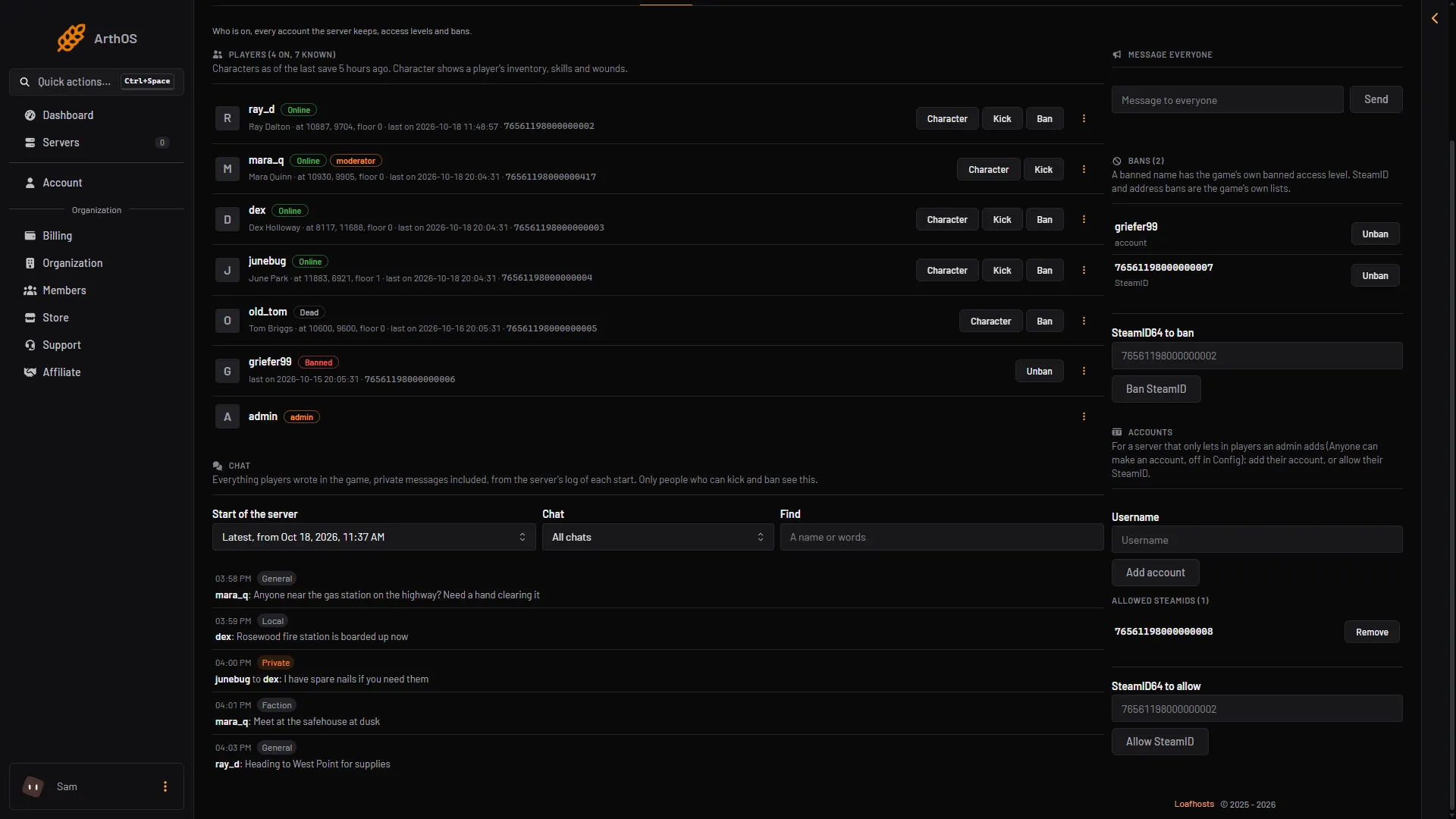
- Start of the server
- Chat list
- Find
- A private message
A private message shows who it was written to. A message marked “Not delivered” was written, but the server did not pass it on, for example because chat was switched off or the player was muted.
Times in the panel use your browser’s clock. The log files use UTC.
“No chat log yet” means the game has not written a log. It writes one each time the server starts. On a very busy start the panel says “Older messages of this start are left out”. Use the filters to pick fewer messages.
What the chats are
The game has separate chats. Players pick one with a slash in the chat box.
- General (
/all): everyone online. - Local: people on screen. This covers
/s(say) and/y(yell). - Private (
/w): a whisper between two players. - Faction (
/f) and Safehouse (/sh): the members of one. - Radio (
/r): a transcript of radio broadcasts. - Admin (
/a): talk to an admin. - Server: the game’s own chat for the server. The Chat list in the panel does not offer it on its own.
A server can turn chats off with the ChatStreams line in its settings, and Global chat in the Config Editor turns off everyone-chat (the help says: “Off, players can only talk to people nearby”).
The log files
The game writes the same messages to a file, one per start of the server. Open Files and go to the .cache folder, then Logs.
- The file for the latest start is called
<date and time>_chat.txt, for example2026-10-18_15-37_chat.txt(third box in the picture below). - At the next start, the game moves older logs into a folder called
logs_<date>.
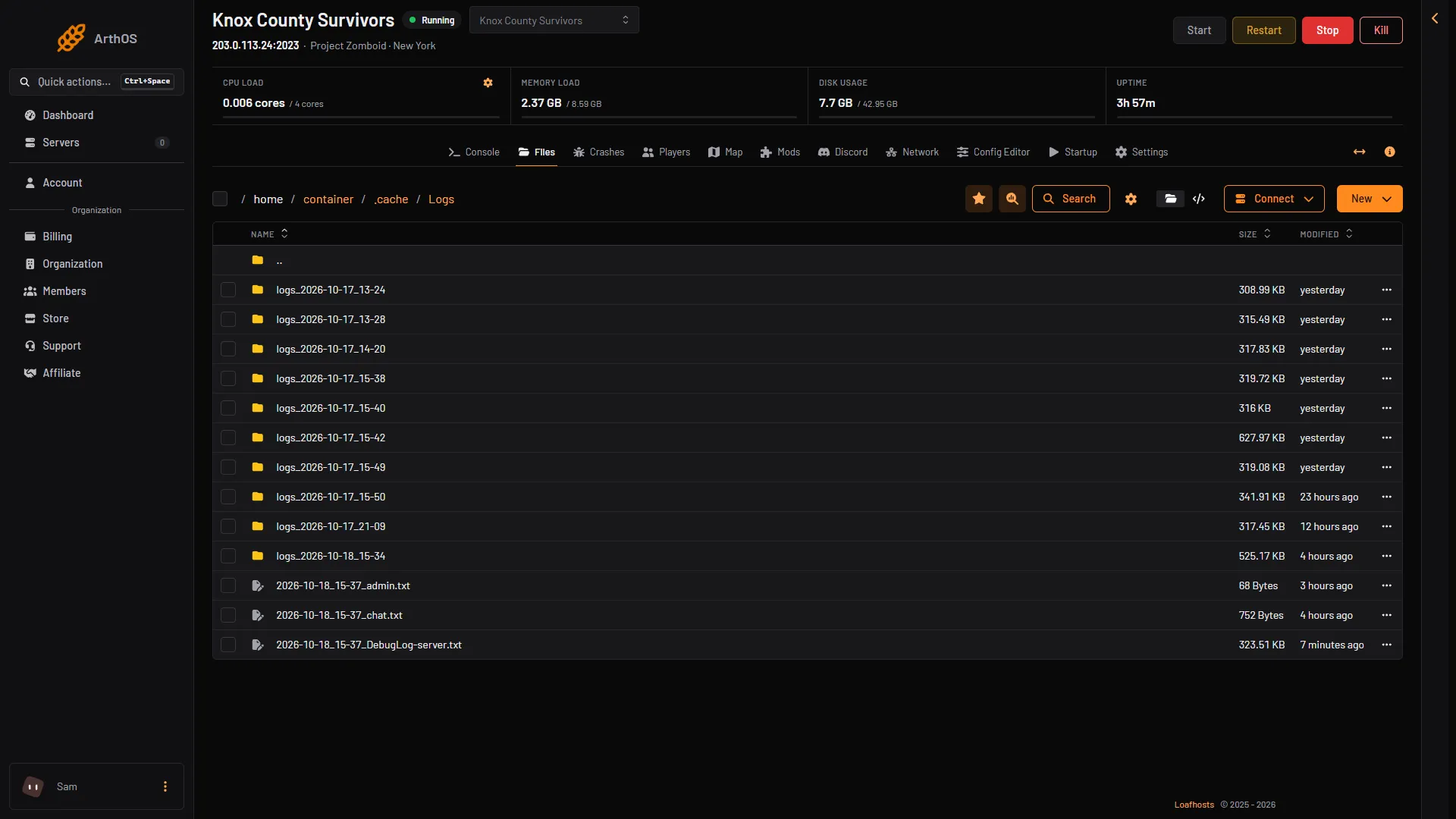
- An earlier start
- Server log
- Chat log
Each message is one line in this shape:
[18-10-26 14:30:54.590][info] Got message:ChatMessage{chat=General, author='Sam', text='hello'}.
The first part is the date (day, month, year) and time in UTC. chat= names the chat: General, Private, Local, Faction, Safehouse, Radio, Admin chat or Server. A second line, “sent to chat (id = N) members”, shows when the server passed it on.
A private chat starts with a line such as Player 'A' attempt to start whispering with 'B'. That line tells you who is in it. Not checked on Build 42.21 as of 18 October 2026: a real whisper line. The shape above comes from the game’s code.
The same folder holds _user.txt (who joined; it appears once a player has joined), _admin.txt (one line per admin action) and _cmd.txt. For the others see Project Zomboid server logs.
If it does not work
- There is no Chat section. Your role may not allow moderating players.
- “Nobody wrote in chat during this start.” Pick another start in Start of the server.
- “No message matches.” Clear Find, or set Chat back to All chats.
- A message is missing. It may be in an older start. Pick that start, or look in the
logs_<date>folder.
Sources: pzwiki.net: Server settings