









The server ran out of memory because the world, the players and the mods needed more than it has. Give the server more memory, use fewer heavy mods, or lower the zombie population. The Crashes page tells you which of two memory problems you had. The game’s memory limit is -Xmx in ProjectZomboid64.json, in the server’s top folder.
The two findings
Open the Crashes page and pick the start that went wrong. Under What the panel can tell you will see one of these.
- The game ran out of Java memory. The game keeps its own working memory, called the Java heap. The game said it was full.
- The server ran out of memory and was stopped. The server used all the memory it has, so the system stopped it before the game could say why. Exit code 137 means the system killed the process, and the start shows Yes under Out of memory.
The fix for both is the same.
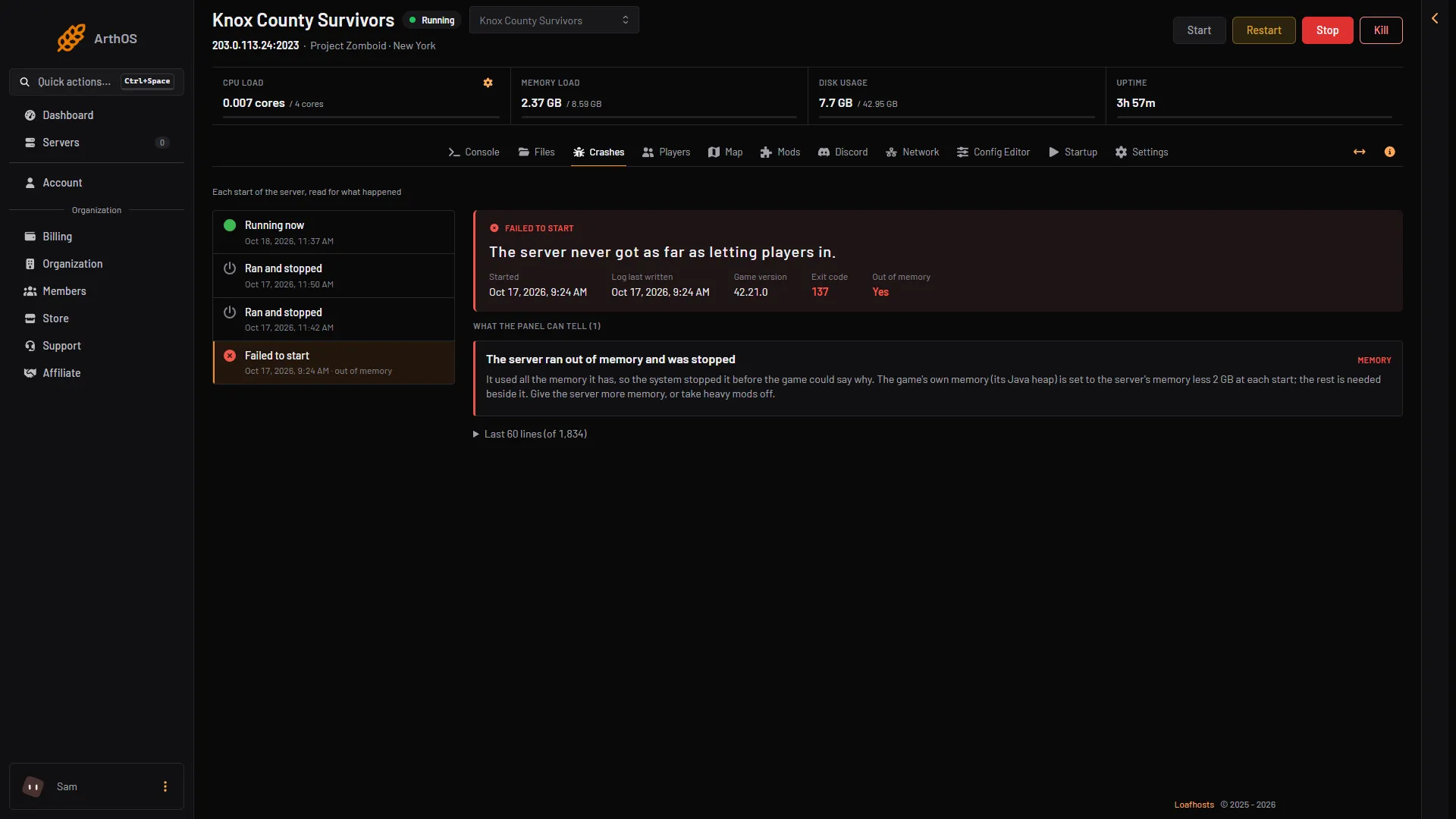
- Exit code 137
- Out of memory
- Finding
This start has an Exit code of 137 (1), Out of memory as Yes (2) and the second finding (3).
How the panel sets the heap
The heap is set by -Xmx in ProjectZomboid64.json. The game ships asking for -Xmx8g, which is 8.59 GB in the decimal units the panel shows.
The game also needs about 1.3 GB beside its heap. So a heap as big as the whole server cannot work. On a staff server with 8.59 GB, an 8g heap was stopped for memory at its first start. A 6 GB heap ran, using about 7 GB in all. Those 6 GB and 7 GB figures were measured at a first start with a 6 GB heap.
Store plans are in decimal GB, so an 8 GB plan shows 8 GB at the top of the server page. The staff server in the pictures shows 8.59 GB because its limit was set in binary units.
At every start, the panel checks -Xmx. If it is higher than the server’s memory less 2.15 GB, the panel lowers it to that figure, written like -Xmx6144m. It never raises it. If you set a heap above the cap, the next start lowers it again.
-Xmx8g is 8.59 GB, so on a server with more than about 10.7 GB of memory the heap stays at the shipped size unless you raise -Xmx by hand. If you do, keep it at or below the server’s memory less 2.15 GB, or the panel lowers it again.
For a sense of size, the Loafhosts staff server with nobody on (an idle server) used about 2.4 GB. More players, mods and zombies need more. The game’s own comment says that above 32 players the map can stream poorly and players fall out of sync.
Fix it
Do one or more of these.
- Give the server more memory. This is the best fix. Open Billing, then Services, then choose Customize on the server’s service (the box is titled “Customize server”). A bigger size pays the difference for the rest of the period and applies once paid. More memory raises the cap. The shipped heap fits once the server shows about 10.7 GB of memory or more. The panel never raises the heap for you, so if it was lowered earlier, raise it by hand afterwards, at most the new memory less 2.15 GB.
- Use fewer heavy mods. Open the Mods page, take off the biggest ones, and choose Apply and restart.
- Lower the zombie population. Open the Config Editor. In the sandbox settings, lower Zombies (
Zombies), or lower Population multiplier (ZombieConfig.PopulationMultiplier) in the group “Zombie config”. Fewer zombies is less for the game to hold. It applies at the next start. - Lower the player limit. In the Config Editor, lower Maximum players (
MaxPlayers). More players use more memory.
Restart the server after any of these.
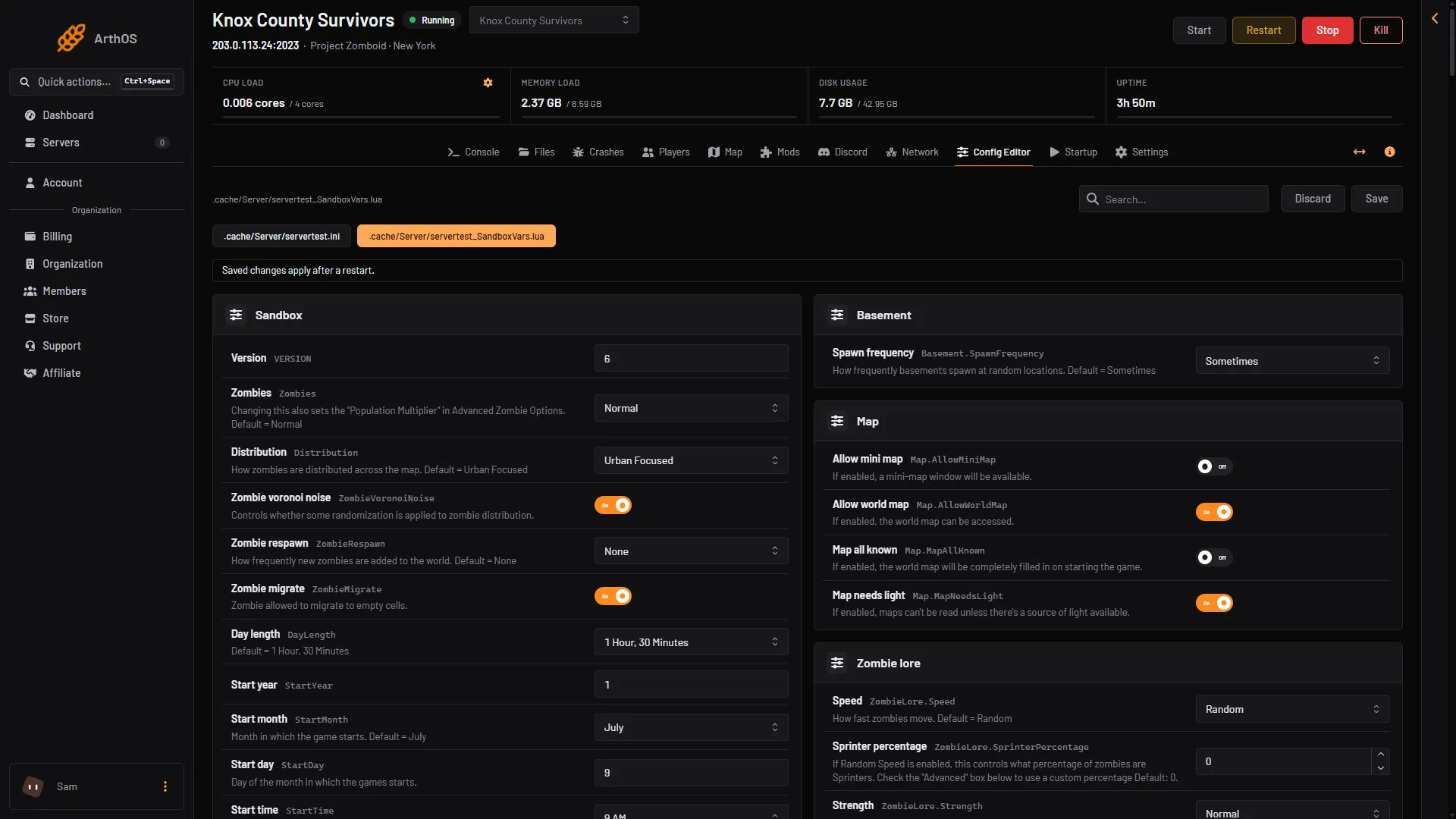
- Sandbox file
- Zombies
Open the sandbox file tab (1) and change Zombies (2).
Edit the heap by hand
You can set a smaller heap yourself. Keep it below the cap.
- Open Files and open
ProjectZomboid64.json. - Find the
-Xmxentry invmArgs, for example"-Xmx8g". - Change the number. On a server with 8 GB, the cap is about 5.85 GB, so
"-Xmx5g"is safe. - Save, then restart the server.
A smaller heap does not give the game more room. It only leaves more for everything beside it. Raise the server’s memory first.
If it does not work
- The heap went down by itself. That is the panel keeping it at the server’s memory less 2.15 GB at each start. It only lowers it.
- It still runs out. The world and mods need more than the heap you have. Take mods off, lower the zombie population, or add server memory.
- No memory finding, but it stopped. See Project Zomboid server crashed.
More about the game: Project Zomboid servers.
Sources: pzwiki.net: Startup parameters, pzwiki.net: Dedicated server