









Open the Crashes page. It lists the last 15 times your Project Zomboid server started, newest first. Each one says how it ended and, where the log shows a cause, what it was and how to fix it.
Read a start
- Open the Crashes page.
- Pick a start from the Starts list. Each row shows how it ended and when it started. The page shows times in your own time zone, while the log files and the
logs_<date>folder names use UTC. - Read the box at the top of the right side. It has a one-line summary, then Started, Log last written, Game version, Exit code and Out of memory.
- Read What the panel can tell. Each finding has a title, a short fix and, below it, the log lines it came from.
- Open the last 60 lines box to see the end of the log. Warnings are left out.
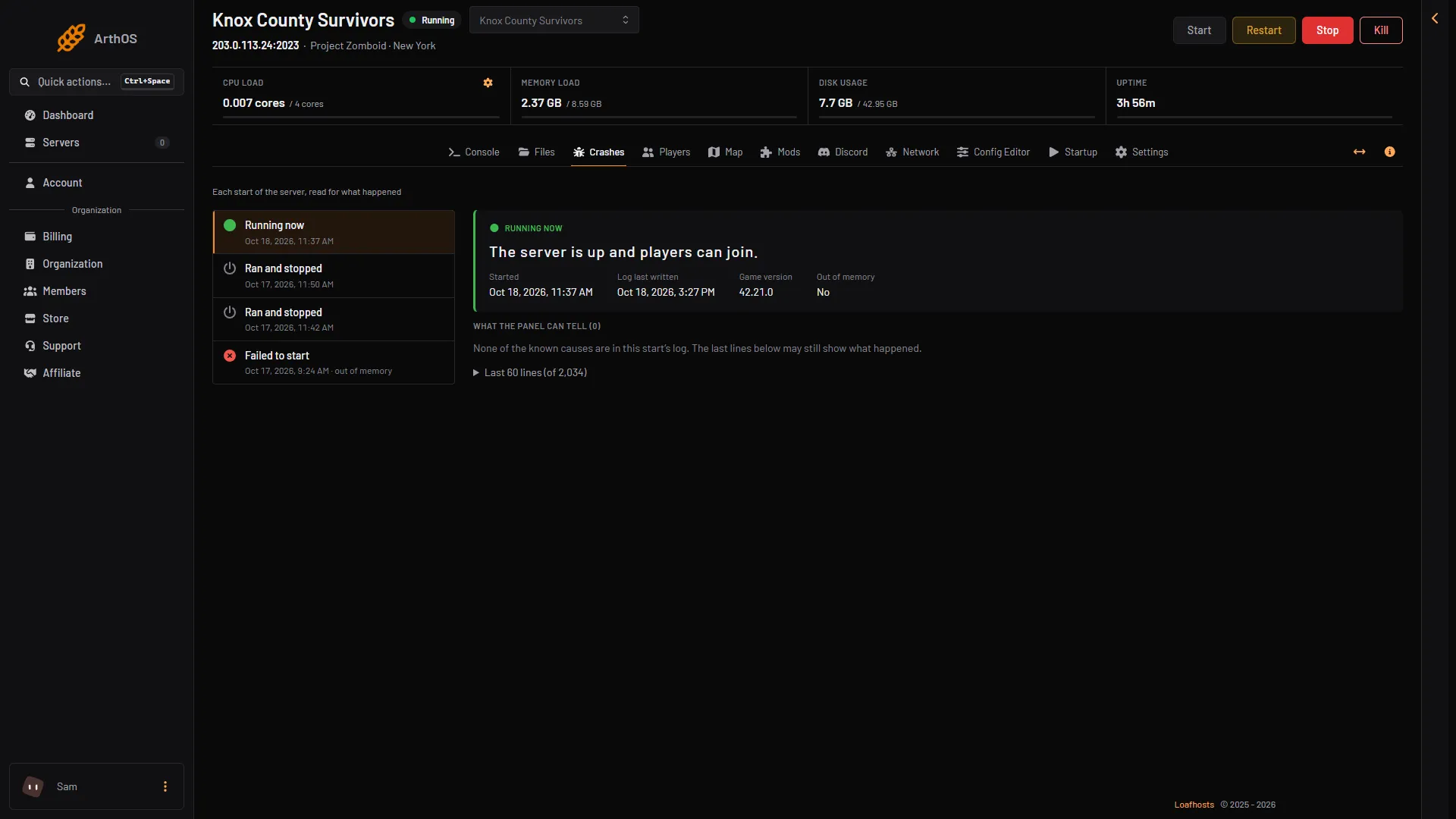
- Running now
- Failed to start
- Game version
- Out of memory
- What the panel can tell
In the picture, box 1 is a start that is running and box 2 is one that failed to start. Box 3 is the game version of the picked start, box 4 says whether it ran out of memory, and box 5 is where the findings appear.
How a start can end:
- Running now: the server is up and players can join.
- Starting: it is still loading.
- Ran and stopped: it started, ran and stopped normally.
- Failed to start: it never got as far as letting players in.
- Crashed: the game stopped without being asked to.
- Ended early: the log ends without saying how the server stopped.
Two starts in the same minute share one log name. The second can write over the first.
Here is a start that failed because the server ran out of memory. It shows Failed to start, an Exit code of 137 (1) and Out of memory as Yes. The finding below it (2) is “The server ran out of memory and was stopped”.
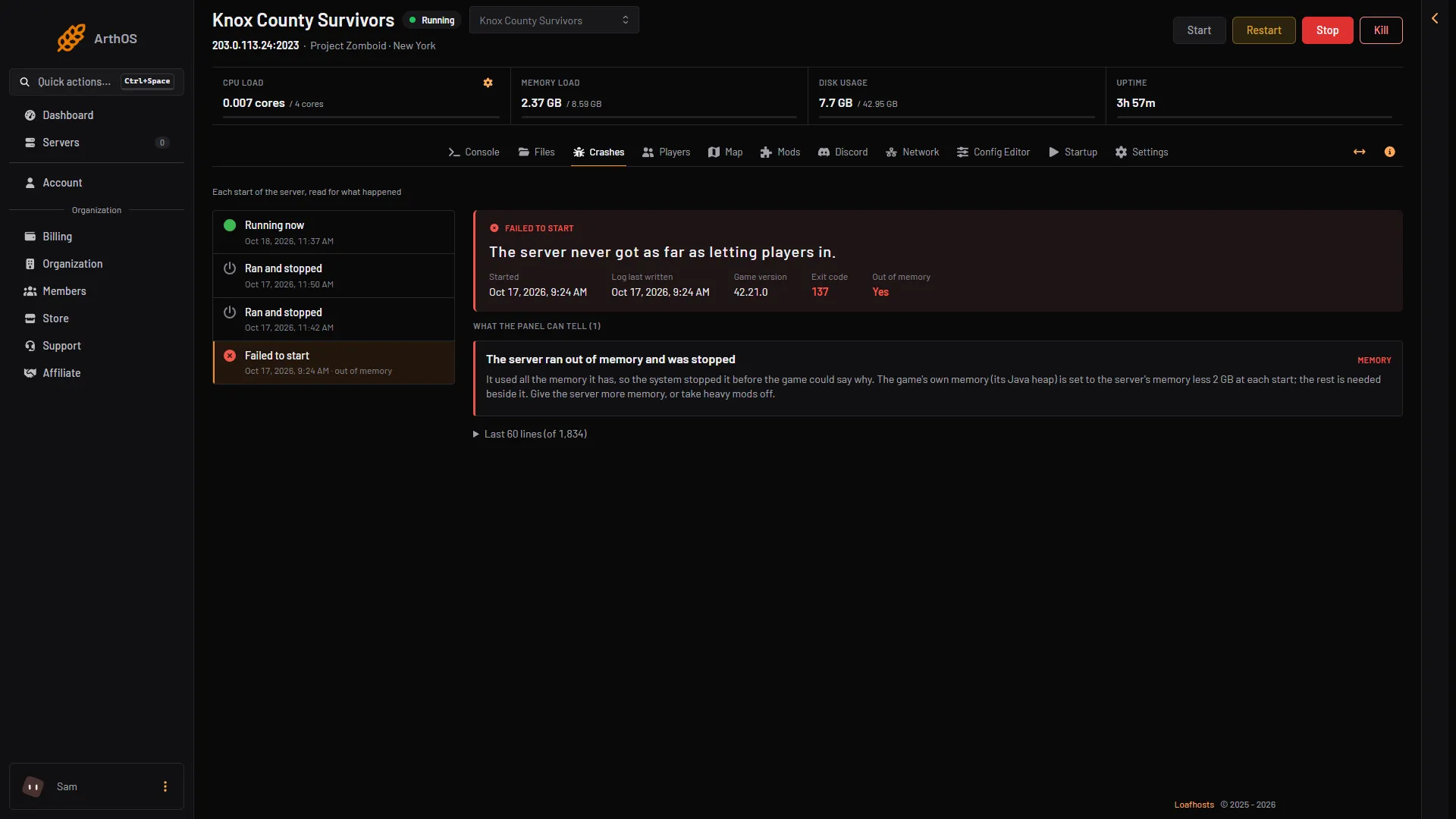
- Exit code 137
- Finding
What the findings mean
These are the titles you can see, with the fix the panel gives.
- The game ran out of Java memory. Give the server more memory, or take heavy mods off. See Project Zomboid out of memory.
- The server ran out of memory and was stopped. The system stopped it before the game could say why. Give the server more memory, or take heavy mods off.
- The server’s disk is full. Free space in Files, or give the server more disk. The game’s own backups take space too.
- The game’s port was in use. Another copy may still have been running. Stop the server, wait a minute, and start it again.
- A Workshop item could not be downloaded. It may have been removed or made private, or Steam did not answer. Check it on the Mods page, take it off, or start the server again.
- A mod needs another mod that is not loaded. Add the mod it names on the Mods page. The order check loads it first.
- The sandbox settings could not be read. Check the setting named in the lines below in the Config Editor.
- The save’s version file is damaged. Restore the save from a backup (see backups and saves), or ask support.
- A game thread stopped unexpectedly. This is often a mod. Try the server without the newest mods.
- The game could not reach Steam. Steam was probably down for a moment. Start the server again.
- A mod’s script failed, or A script in the mod (name) failed. Update the mod, or take it off the Mods page and see whether the server runs without it.
The sandbox file is put back for you
The sandbox file holds the world rules, such as zombie numbers. If you save one the game cannot read, the server cannot start. Before every start the panel checks it. If it does not read, the panel puts back the last copy that did, and keeps the broken one beside it with .broken added to its name. The Crashes page shows that the panel fixed the file.
Many ERROR lines are normal
A healthy start writes hundreds of lines marked ERROR, for things like missing sounds. They are not a problem. The panel does not treat an ERROR line alone as a cause, and neither should you. Look at the outcome and at What the panel can tell.
What to send support
If no finding explains it, send support:
- The start’s date and time from the Starts list.
- The Game version, Exit code and the outcome.
- The titles under What the panel can tell.
- The text of the last 60 lines box.
For the full log, see Project Zomboid server logs.
More about the game: Project Zomboid servers.
If it does not work
- The list says the server has not started yet. There is nothing to read until it has started once.
- Nothing names a cause. The page says none of the known causes are in the log. The last lines may still show what happened.
- A start is missing. The page shows the last 15 starts only.
Sources: pzwiki.net: Dedicated server, pzwiki.net: Admin commands