









PVP means players hurting each other. Open the Config Editor, find Players can hurt each other in the Gameplay group, set it, save and restart. When it is off, nobody can hurt another player.
Switch PVP on or off
- Open the Config Editor page and choose the
.inifile. - In the Gameplay group, find Players can hurt each other (
PVP). Its note says “Off, nobody can hurt another player.” - Choose Save, then restart the server. The page says “Saved changes apply after a restart.”
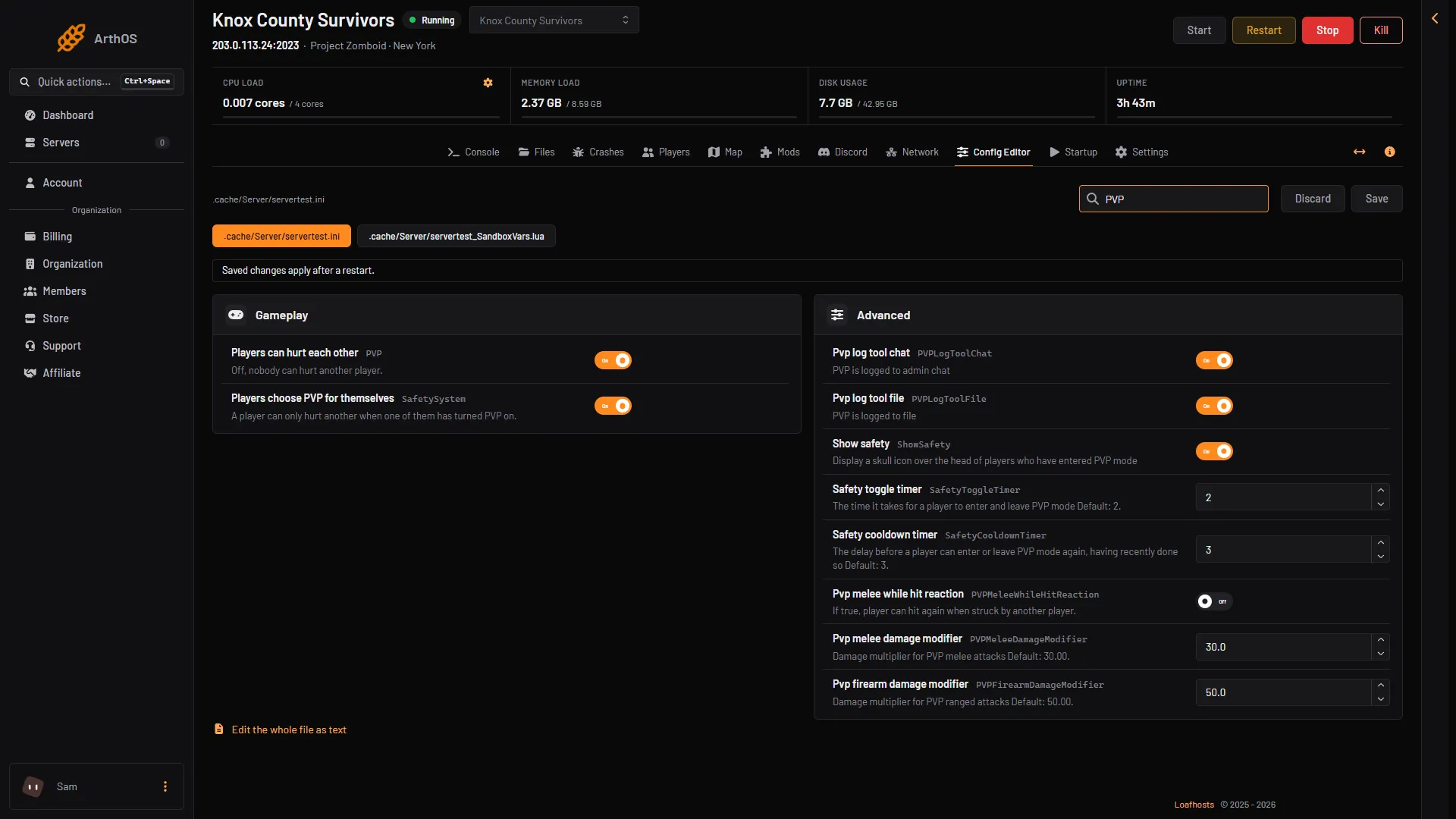
- Players can hurt each other
- Players choose PVP for themselves
- Pvp melee damage modifier
Box 1 is the main switch, box 2 the opt-in toggle and box 3 a damage row, which sits in Advanced and shows because the search shows it.
Let players choose
Players choose PVP for themselves (SafetySystem) works only when PVP is on. The game explains it like this: a player can only hurt another player when at least one of them is in PVP mode. PVP mode shows as a skull and crossbones on the left of the screen. With this off, players can hurt each other at any time.
These keys control the skull. Each is in the Config Editor under the label shown. The label comes from the key.
- Show safety (
ShowSafety): shows a skull over the head of players who are in PVP mode. - Safety toggle timer (
SafetyToggleTimer): the time it takes to enter or leave PVP mode. 0 to 1000, default 2. - Safety cooldown timer (
SafetyCooldownTimer): the delay before a player can switch again. 0 to 1000, default 3.
Change how hard players hit
- Pvp melee damage modifier (
PVPMeleeDamageModifier): a damage multiplier for melee attacks on players. 0 to 500, default 30. - Pvp firearm damage modifier (
PVPFirearmDamageModifier): the same for ranged attacks. 0 to 500, default 50.
A lower number means less damage. The game does not say what these multiply, so test with two players before you open to others.
Announce deaths
Turn on Announce deaths in chat (AnnounceDeath) in the Gameplay group. Everyone sees a message in chat when a player dies. It is off by default.
Where PVP is blocked
Players in the same faction can turn PVP off between them from the faction panel. This comes from the game’s own notes for earlier builds. Menu wording can change. Not checked on Build 42.21 as of 18 October 2026. See factions.
The Map page shows any No-PvP zones your server has. The panel only shows them on the Map; it cannot make or remove one. How they are made in game is not covered here. See the server map.
PVP log
Pvp log tool chat (PVPLogToolChat) and Pvp log tool file (PVPLogToolFile) are in Advanced and are on by default. PVP is logged to admin chat and to a file. A search shows them without Show them.
By hand
On your own server, set these lines in servertest.ini:
PVP=true
SafetySystem=true
PVP=true allows players to hurt each other. SafetySystem=true lets them choose PVP for themselves.
If it does not work
- Players can still hurt each other. Check that Players can hurt each other is off, save, then restart. Changes apply after a restart.
- There is no skull. Players choose PVP for themselves needs PVP on. Check Show safety too.
- You cannot find a key. Use the search box at the top of the Config Editor and type part of the label.
More about the game: Project Zomboid servers.
Sources: pzwiki.net: Server settings, pzwiki.net: Build 35, pzwiki.net: Build 42.20.0