









The Loafhosts staff server, with nobody on it, used about 2.4 GB of memory. The server files take about 7.7 GB of disk before the world and mods. More players, mods and zombies need more memory.
Memory (RAM)
No source gives a fixed memory figure per player. What was measured: the Loafhosts staff server with nobody on used about 2.37 GB of memory. The MEMORY LOAD figure at the top of the server page shows the same reading for your server. Mods, a large map, more zombies and a long-running world all add to it.
The game does not use all of a server’s memory for itself. It runs on Java, and Java has a fixed ceiling called the heap. The heap is the memory the game itself can fill. Java and the game also need about 1.3 GB beside the heap.
The game’s own ProjectZomboid64.json asks for a heap of -Xmx8g, which is 8.59 GB. At every start the panel checks it. If the ceiling is higher than the server’s memory less 2.15 GB, the panel lowers it to that figure. It never raises it. So the heap stays at the shipped size on a server with more than about 10.7 GB. Raise -Xmx by hand if you want more, but keep it at or below the server’s memory less 2.15 GB, or the panel lowers it again.
Store plans are in decimal GB, so an 8 GB plan shows 8 GB at the top of the server page. The staff server in the pictures shows 8.59 GB because its limit was set in binary units.
This matters because a heap that is too big gets the game killed for memory. On Build 42.21, a staff server with the shipped 8 GB heap at its memory limit was killed at its first start. With a 6 GB heap it ran at about 7 GB. Both figures were measured at a first start. The 2.4 GB figure above is an idle server.
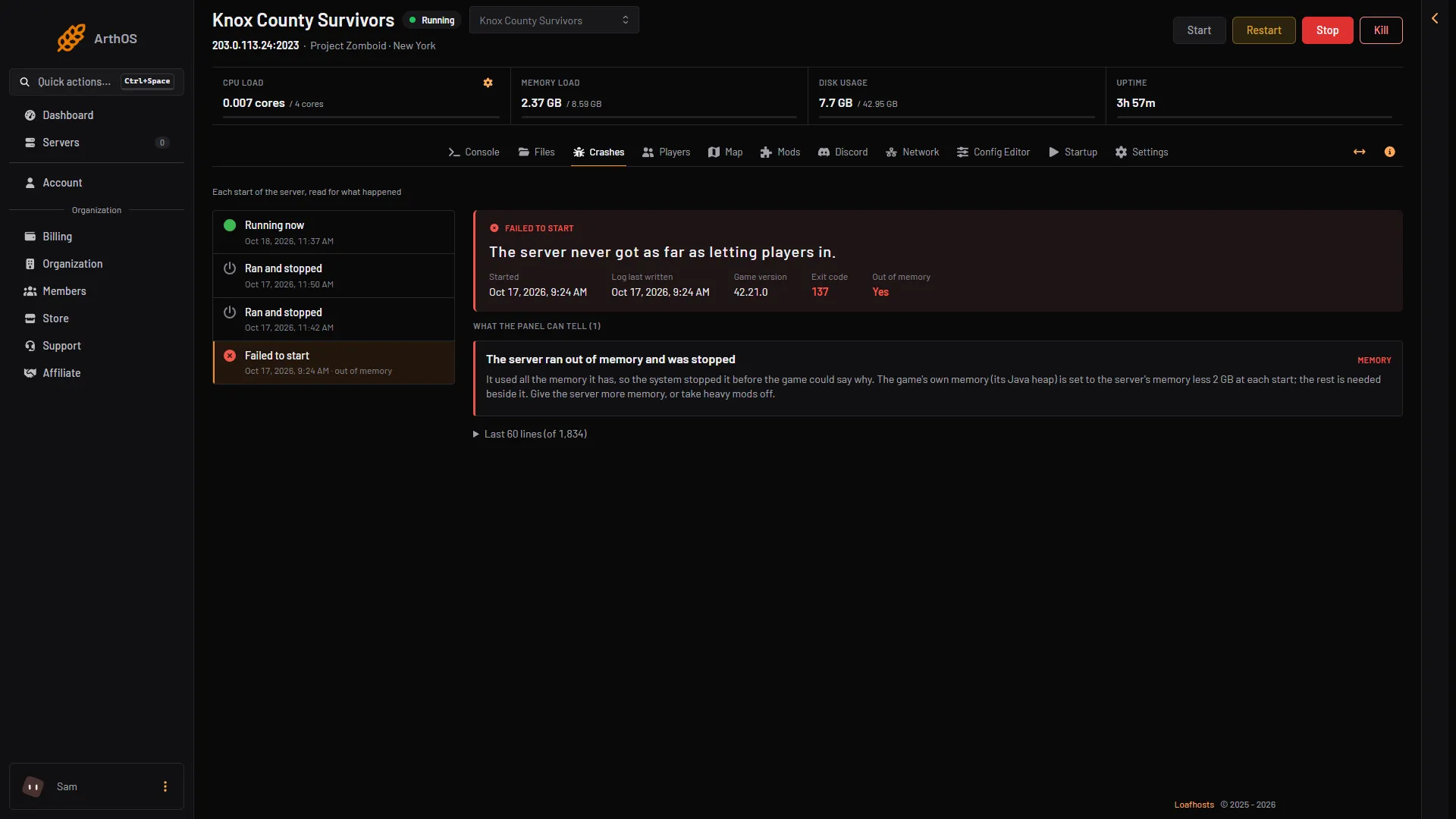
- Exit code 137
- Out of memory
- Finding
The picture shows that failed start on the Crashes page. Exit code 137 (1) and Out of memory (2) show the game was killed for memory, and the finding (3) says so in words.
Players do not all count the same. The game’s own comment on MaxPlayers warns that above 32 players the map can stream poorly and players can fall out of sync. See set the maximum players.
Sizes on the game page
The Project Zomboid game page lists three sizes:
| Size | Players | CPU cores | Memory | Disk |
|---|---|---|---|---|
| Small | 16 | 2 | 6 GB | 20 GB |
| Standard | 32 | 4 | 8 GB | 20 GB |
| Large | 64 | 6 | 12 GB | 30 GB |
You can change any number in the builder on that page.
Disk
A new server installs the game when it is created, before its first start. The installed server is about 7.7 GB on disk (the DISK USAGE figure at the top of the server page). With Steam Auto Update at 1, each start checks Steam for an update first. Your world, its backups and every Workshop mod come on top of that. The world grows as players explore, so give it room.
The Config Editor’s Save the world every (minutes) row (SaveWorldEveryMinutes) and the game’s backup settings decide how often the game writes and copies the world. Backups take disk too.
CPU
No source gives a core count for a Project Zomboid server. Not checked on Build 42.21 as of 18 October 2026. The sizes above show how many cores each Loafhosts size has. If the server lags with players on, the server lag guide covers what to look at first.
More players or more mods
Both need more memory. If the Crashes page shows “The game ran out of Java memory” or “The server ran out of memory and was stopped”, the server needs more memory, or fewer mods. See out of memory.
To give a server more memory, open Billing, then Services, then choose Customize on the server’s service. The box is titled “Customize server”. A bigger size pays the difference for the rest of the period and applies once paid. If the panel lowered -Xmx earlier, raise it by hand afterwards, because the panel never raises it. Keep it at or below the new memory less 2.15 GB.
If it does not work
- The server is killed at start. Its memory is too small for what it runs. Give it more memory or remove mods, then start it again.
- The game ran out of Java memory. The heap is full. More memory raises the ceiling at the next start.
- The server’s disk is full. Delete old backups or files in Files, or give the server more disk.
Sources: pzwiki.net: Dedicated server, pzwiki.net: Server settings, pzwiki.net: Startup parameters