









A Workshop mod updated, and the player’s copy and the server’s copy are not the same version. The player cannot join until they match. Update the mod on the Mods page and restart the server. Then the player updates the mod in Steam.
Why it happens
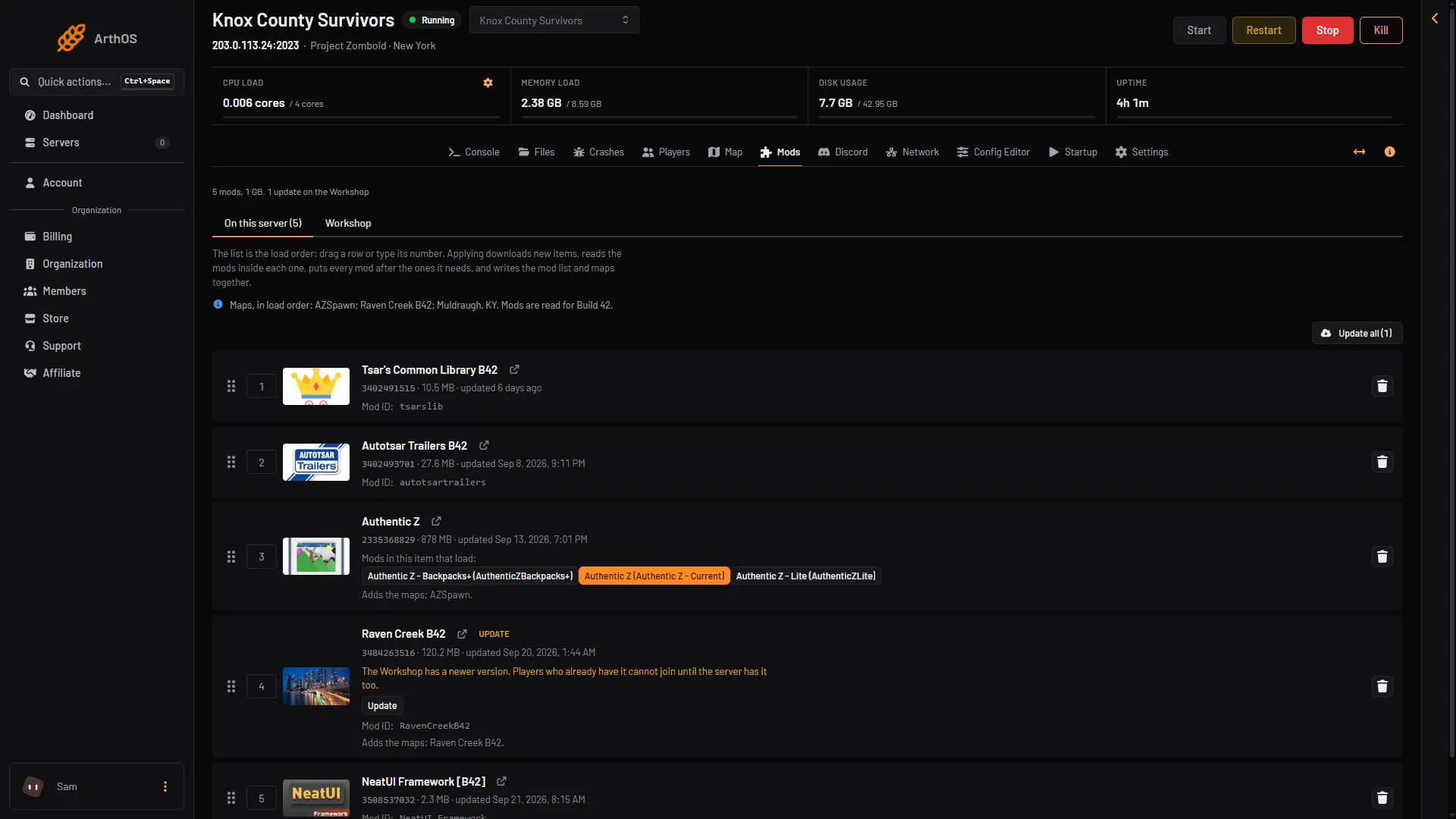
A mod’s author publishes a new version on the Steam Workshop. Steam updates it for players who are subscribed. Your server keeps the version it downloaded until you update it. So a player can have a newer version than the server. The panel says it on the mod’s row: “The Workshop has a newer version. Players who already have it cannot join until the server has it too.”
The exact message the game shows is not covered here. When the server’s copy of a mod differs from the player’s, the fix is below.
Fix it on the server
- Open the Mods page. Under On this server, find mods with an Update tag (box 1).
- Choose Update on the row (box 2), or Update all for every mod with a newer version.
- Choose Apply and restart and confirm with the button of the same name. Players online are disconnected while the server restarts. On a stopped server the button reads Apply.
- Wait for
*** SERVER STARTED ****in the Console.
- Update tag
- Update
Not checked on Build 42.21 as of 18 October 2026: whether a plain restart also updates mods. Use Update on the Mods page.
Steps in more detail: update mods.
If a mod shows no Update tag but you know it changed, its row may say “Which version the server has is not known: it was not downloaded by the panel.” Use Download again on that row, then apply.
Fix it on the player’s side
If the player’s mod is older than the server’s, they update it in Steam. PZwiki’s steps for a player who cannot connect because of a mod:
- Close the game.
- Unsubscribe from the mod in the Workshop.
- Subscribe to it again and wait for Steam to finish the download.
- Start the game and join the server again.
PZwiki also says a mod can download while the game runs, and the game should be restarted if the mod is not in the mod manager. PZwiki notes that the server’s mods download to the player’s computer as they connect.
If it does not work
- The mod has an update but the server will not take it. The panel says the mod could not be updated and why. The copy the server had stays. Try again in a few minutes.
- The player is kicked for game files, not for a mod. The setting
DoLuaChecksumkicks clients whose game files do not match the server’s. Do not switch it off to fix a mod problem. It is a security setting. Not checked on Build 42.21 as of 18 October 2026. - The player cannot find the server at all. See cannot connect.
- The player’s game version is different from the server’s. That is a different problem. See version mismatch.
More about the game: Project Zomboid servers.
Sources: pzwiki.net: Resolving problems with mods, pzwiki.net: Dedicated server, pzwiki.net: Server settings