









Restart the server so it updates, then ask the player to let Steam finish updating. If it still does not match, compare both builds below.
A version mismatch means the player’s game and the server are on different Project Zomboid builds. Find out which build each side runs, then bring the older side up to date. Since Build 42.21, the game shows a notification to a player who tries to join a server on a different game version.
The current build is 42.21, both stable and unstable. Build 41 is older. A Build 41 server and a Build 42 game do not match, and Build 41 mods do not load on Build 42.
Find the server’s build
- Open the Crashes page.
- Choose the newest start in the list.
- Read Game version.
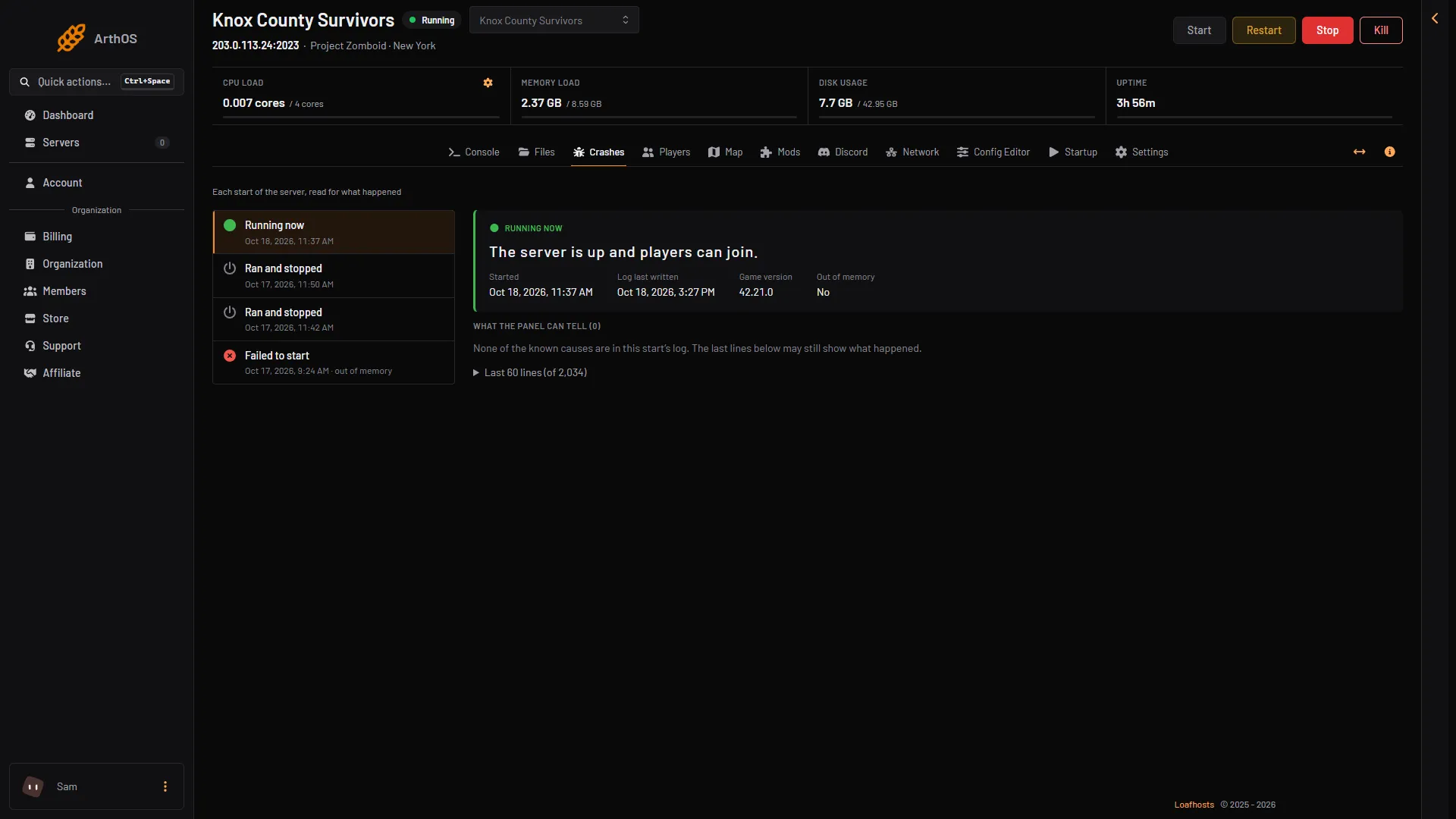
- Game version
The row is filled in from the server’s log. If it is not there, the start’s log has no version line yet. Wait for the server to finish starting, then look again.
Find the player’s build
In their Steam Library, the player right-clicks Project Zomboid and chooses Properties, then Betas. This shows which branch their game is on.
Update the server
- Open the Startup page.
- Check that Steam Auto Update is 1. New servers start with it on.
- Check Steam Beta Branch [requires reinstall]. Empty is the normal branch: a new Loafhosts server runs the newest Build 42 release (42.21 on 18 October 2026). A server whose Steam Beta Branch is
legacy41runs Build 41. The hint under the box names an older branch (“such as b41multiplayer”); for Build 41 typelegacy41. - Choose Restart at the top of the server page. The server updates when it starts.
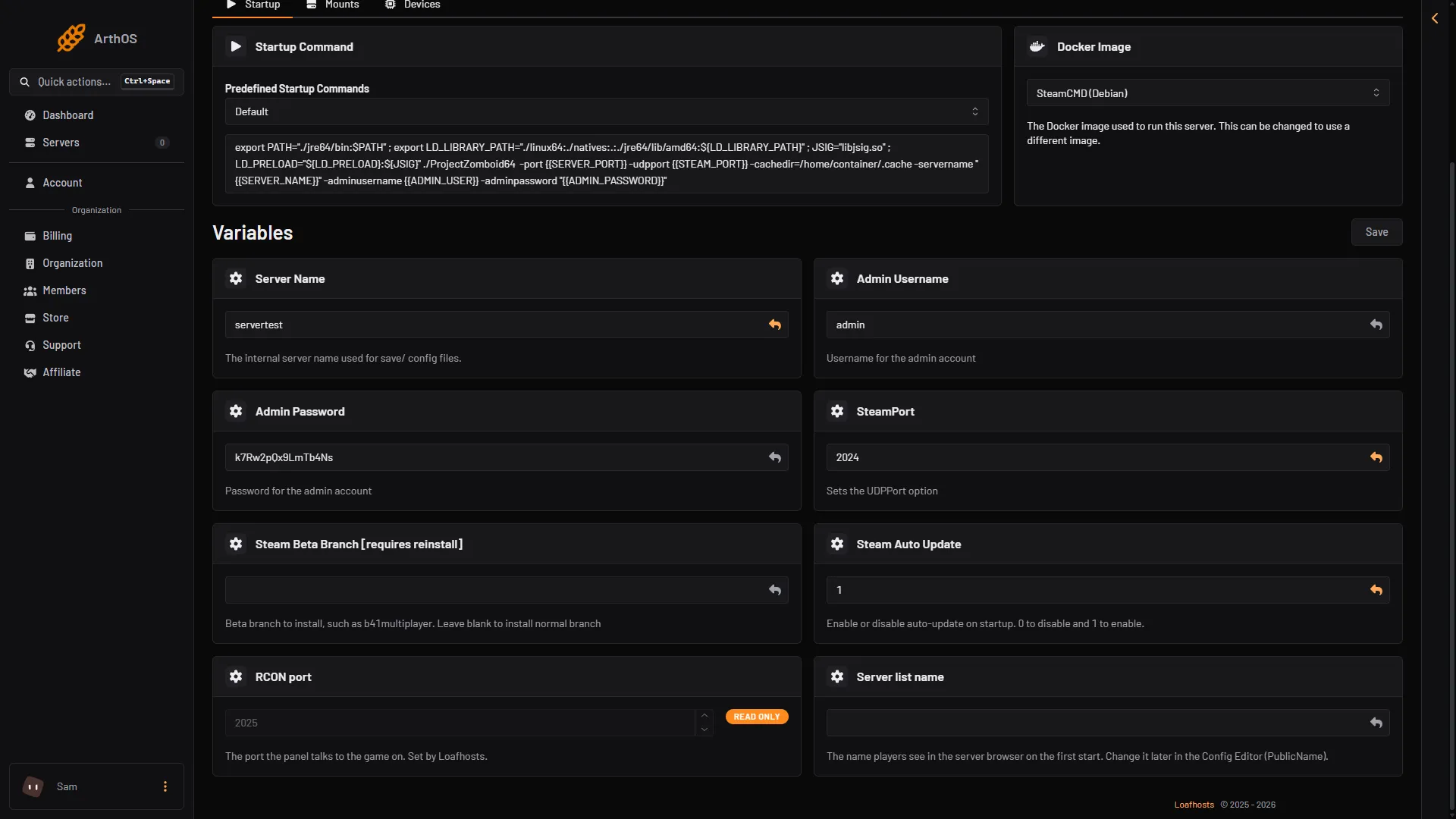
- Steam Beta Branch [requires reinstall]
- Steam Auto Update
If you set Steam Auto Update to 0, the server keeps its build until you turn it back on and restart. See update a Project Zomboid server.
Update the player
Ask the player to let Steam finish its update. If their game is on another branch than the server, they pick the matching branch under Properties, Betas. If the game still does not match, they can verify the game files: Properties, Installed Files, Verify integrity of game files.
The beta branch on both sides
The Steam branches for Project Zomboid are public, unstable, 42.19 and legacy41. The server and the players must be on the same one. If you run a server on a beta branch, every player must opt in to the same branch. For a Build 41 server, see a Build 41 Project Zomboid server.
If it does not work
- Both are on 42.21 and the player still cannot join. The cause is something else. See Project Zomboid cannot connect.
- The server was on the wrong branch. Changing Steam Beta Branch [requires reinstall] needs a reinstall, which is in Settings (the Reinstall Server card). Some files may change, so back up the world first. For Build 41, see a Build 41 Project Zomboid server.
- The player’s trouble is about a mod. That is a Workshop item mismatch, not a game build one. See Project Zomboid Workshop item version mismatch.
More about the game: Project Zomboid servers.
Sources: pzwiki.net: Build 42.21.0, pzwiki.net: Dedicated server, pzwiki.net: Tech Support