






Admin Radar (by nivex) draws players, sleepers, stashes, boxes and other things on an admin’s own screen, to help find cheaters. Install it from the Plugins tab, join the server as an owner or moderator, and type /radar in game chat. Type /radar again to turn it off.
Your server needs Oxide or Carbon first (see install Oxide or Carbon).
In the ArthOS panel
- Open your server and choose Plugins. Under Find plugins, type
Admin Radarin Search uMod (1), find the Admin Radar card (2) by nivex, and choose Install (3). The panel offered version 5.4.4 on 11 October 2026. It does not ask a question.
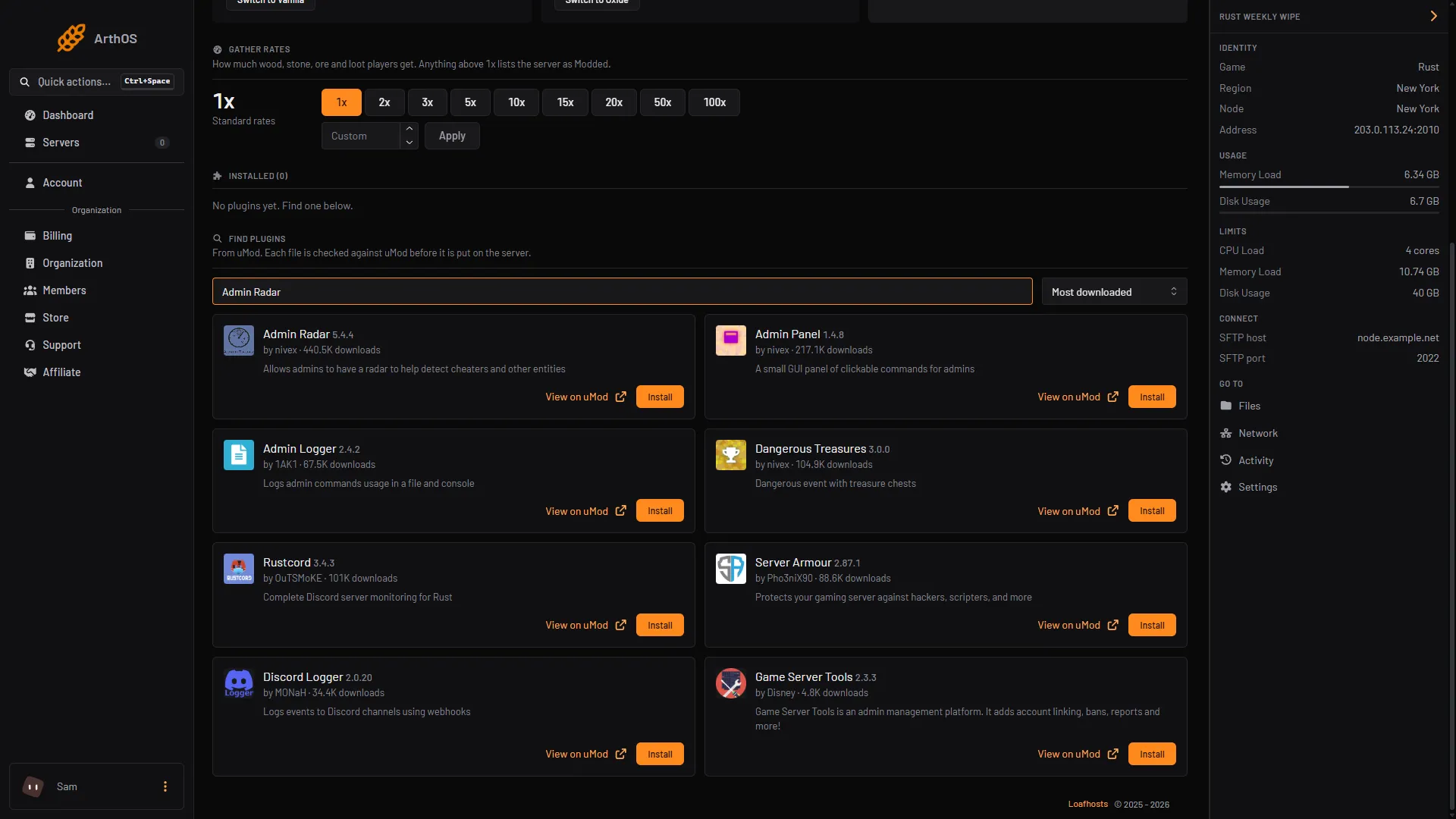
- Search uMod
- Admin Radar card
- Install
- Look at its row under Installed. It should say LOADED. If it says NOT LOADED, see plugins not loading. Not checked as of 11 October 2026: that the newest Admin Radar loads on your framework.
- Join the server in Rust with an account that is an owner or a moderator. To add one, see add an owner or moderator. A new owner or moderator must reconnect first.
- In game chat, type
/radar.
The radar works only for a player in game. The plugin answers “Not a player!” to the server console, so the panel’s Console cannot run it.
Who can use it
The plugin lets in the first rule that fits:
- A Rust developer account.
- If the config key
Restrict Access To Steam64 IDslists any IDs, only those IDs. - A player who holds the
adminradar.allowedpermission. - A player whose auth level is at least
Restrict Access To Auth Level, which is 1 by default: moderators (level 1) and owners (level 2).
A player with no auth level who types /radar gets “Unknown command”, as if it did not exist. A moderator or owner who is not let in gets “You are not allowed to use this command.”
To let in someone who is not an owner or moderator, grant the permission in the Console tab, with no slash and the 17 digit Steam ID:
| Framework | Command |
|---|---|
| Oxide | oxide.grant user 76561198123456789 adminradar.allowed |
| Carbon | c.grant user 76561198123456789 adminradar.allowed |
More about permissions is in grant plugin permissions. The plugin also registers adminradar.auto, which turns the radar on when a player wakes up, and adminradar.list, which allows /radar list.
What you type
The form is /radar [seconds] [metres] [filters]. The first number is how often the radar refreshes. The second is how far it looks. The plugin’s help gives these examples:
/radar 1 1000 box loot stash
/radar 0.5 400 all
The default is a refresh every 5 seconds and a distance of 500 metres. A filter is a kind of thing to show, such as box, loot or stash.
| Command | What it does |
|---|---|
/radar help | Lists the filters your server has, and the other commands |
/radar f | Reuses your last filters |
/radar ui | Shows or hides the row of filter buttons |
/radar online | Draws boxes only for players who are online |
/radar ext | Shows extra information for players |
/radar list | Lists active radar users. Needs adminradar.list |
The plugin draws with the game’s own ddraw commands (boxes, arrows and text), on the screen of the admin who turned the radar on.
Why it is admin only
The plugin’s uMod page describes it as a radar “to help detect cheaters and other entities”. It shows things a player is not meant to see. If you let a player use it, you give them a view that other players do not have. Keep it to staff you trust.
To hide yourself from players while you watch, see Vanish. Grant both only to staff you trust.
What it costs your server
No listed source gives a figure for its cost. Not checked as of 11 October 2026: its effect on server speed.
By hand
Download AdminRadar.cs from its uMod page and upload it to oxide/plugins (Oxide) or carbon/plugins (Carbon). The settings are in AdminRadar.json in oxide/config or carbon/configs. The chat command is set by Chat Command, radar by default. Reload with oxide.reload AdminRadar or c.reload AdminRadar.
If it does not work
- “Unknown command: radar”. You have no auth level and no permission, or the plugin is not loaded. Check its row says LOADED, and that you reconnected after you were made an owner or moderator.
- “You are not allowed to use this command.” The config limits access. Check
Restrict Access To Steam64 IDsandRestrict Access To Auth Level. - “Not a player!”. You ran it from the server console. Use it in game.
- Nothing is drawn. Check the distance and the filters. Type
/radar help, then try/radar 1 1000 all.
Hosting Rust? See the Rust page.
Sources: umod.org: Admin radar, umod.org: Permissions, wiki.facepunch.com: Creating a server, wiki.facepunch.com: Useful commands