






Backpacks (by WhiteThunder) gives each player an extra inventory they open with /backpack. Install it from the Plugins page and grant the backpacks.use permission to your default group so everyone can open one. Out of the box a backpack has 6 slots. Bigger sizes come from permissions.
Your server needs Oxide or Carbon first (see install Oxide or Carbon).
In the ArthOS panel
- Open your server and choose Plugins. Under Find plugins, type
backpacksin Search uMod (1). Find the Backpacks card (2) by WhiteThunder and choose Install (3). The panel offered version 3.17.8 on 11 October 2026. It does not ask a question.
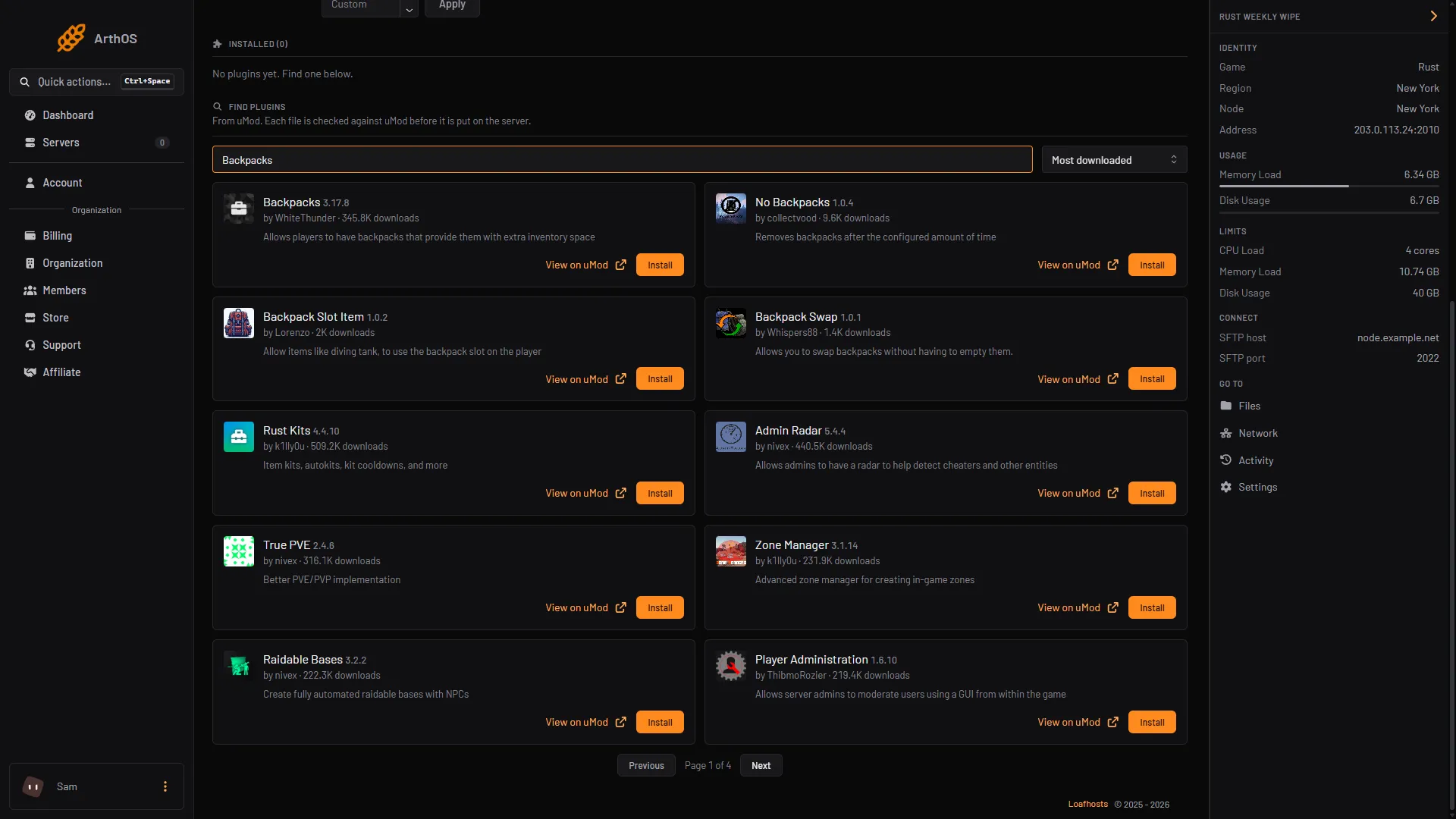
- Search uMod
- Backpacks card
- Install
- Look at its row under Installed. It should say LOADED. If it says NOT LOADED, see plugins not loading.
- Open the Console tab and let every player open a backpack. Type, with no slash:
| Framework | Command |
|---|---|
| Oxide | oxide.grant group default backpacks.use |
| Carbon | c.grant group default backpacks.use |
The default group holds every player who connects. More about groups is in grant plugin permissions.
- Join the server and type
/backpackin chat. The backpack opens. Typing it again goes to the next page, and closes the inventory when there are no more pages.
The plugin’s uMod page writes its example as o.grant group default backpacks.use. That o. form is Oxide’s shorthand and does not work on Carbon. Use the c. form there.
Open it with a key or a button
- A key. Each player can bind a key in the game’s F1 console. The uMod page gives this example, which binds the
bkey:bind b backpack. - A button on the screen. Grant
backpacks.guito the group. The page says players then see a button next to their belt, and/backpackguihides or shows it:
| Framework | Command |
|---|---|
| Oxide | oxide.grant group default backpacks.gui |
| Carbon | c.grant group default backpacks.gui |
The button is on by default (GUI Button, Enabled by default (for players with permission)). If you turn the GUI Button Enabled setting off for everyone, the page says that also helps performance.
Set the size
The default size is 6 slots, one row. The plugin works in slots. A row is 6 slots, and one page holds up to 48 (Max size per page). More than that makes more pages.
To give some players more, grant a size permission. The page lists these in its default settings:
| Permission | Size |
|---|---|
backpacks.size.6 | 6 slots (1 row) |
backpacks.size.12 | 12 slots (2 rows) |
backpacks.size.18 | 18 slots (3 rows) |
backpacks.size.24 | 24 slots (4 rows) |
backpacks.size.30 | 30 slots (5 rows) |
backpacks.size.36 | 36 slots (6 rows) |
backpacks.size.42 | 42 slots (7 rows) |
backpacks.size.48 | 48 slots (8 rows) |
backpacks.size.96 | 96 slots (2 pages) |
backpacks.size.144 | 144 slots (3 pages) |
If a player holds several, the highest one applies. A common setup is to give each VIP group a bigger one:
| Framework | Command |
|---|---|
| Oxide | oxide.grant group vip backpacks.size.24 |
| Carbon | c.grant group vip backpacks.size.24 |
To make a size that is not in the list, press Config on the plugin and add the number to Permission sizes under Backpack size. Save, then press Reload. The plugin then makes the permission backpacks.size.<number>.
What happens on death
- By default (
Drop on Death (true/false)istrue), the backpack’s items drop in a bag by the player’s body. The player respawns with an empty backpack and can find the bag. The bag is protected from despawning for at leastMinimum Despawn Time (Seconds), which is300by default. - To destroy the items instead, set
Erase on Death (true/false)totrue. The page says erased items cannot be recovered. - A player with the
backpacks.keepondeathpermission keeps their items either way. - Another plugin can stop the drop. The page names arena plugins as an example.
What happens on a wipe
By default nothing is cleared. A backpack keeps its items across a map wipe, because Clear on wipe is off (Enabled is false).
To clear backpacks at a wipe:
- Press Config on the plugin.
- Under
Clear on wipe, setEnabledtotrue. - The default rule,
Max slots to keep, is0. That clears everything. Set a number to let players keep that many item slots. - Save and press Reload.
Give the backpacks.keeponwipe.all permission to players who should keep everything. The page also describes other keep rules by permission, such as 1row and 2rows in its example.
The page says this works only if the plugin is loaded when the server first starts on the new map. If your server started once after the Rust update without the framework, or with the plugin failing to compile, the backpacks are not wiped. The page’s fix is to wipe the server again, or to unload the plugin, delete oxide/data/Backpacks, and load it again. Check the plugin is LOADED before every wipe. Every Rust restart updates the game and the framework, so look at the row after a wipe-day update.
Limit what goes in
Press Config. Under Item restrictions, set Enabled to true. The Default ruleset then decides which categories, item short names and skins are allowed. The page gives rulesets such as no_c4, which disallows the short name explosive.timed. Each ruleset you add under Rulesets by permission makes a permission backpacks.restrictions.<name>. The page’s backpacks.restrictions.allowall lets a player put in anything.
For admins
| Command | What it does |
|---|---|
viewbackpack <name or steam id> | Opens another player’s backpack. Needs backpacks.admin, or backpacks.admin.view to look only. |
backpack.erase <steam id> | Erases a player’s backpack. It is a server command, typed in the Console tab. |
What it costs your server
The plugin’s page gives no figure for its cost. The one setting it says helps performance is turning the GUI Button Enabled setting off for everyone (see above).
By hand
Download Backpacks.cs from its uMod page and upload it to oxide/plugins (Oxide) or carbon/plugins (Carbon). Player data is in oxide/data/Backpacks. Edit the settings, then reload with oxide.reload Backpacks or c.reload Backpacks.
If it does not work
/backpacksays you cannot. You do not holdbackpacks.use. Grant it to thedefaultgroup.- Backpacks do not drop on death. The page gives three causes:
Drop on Death (true/false)isfalse, the player hasbackpacks.keepondeath, or another plugin blocked the drop. - A player’s backpack is the wrong size. The highest size permission applies. Run
backpack.debug.size <name or steam id>. The page says it prints why the size is what it is. In game it needs the permissionbackpacks.admin.debug. - The plugin says NOT LOADED. Read the Console from the start of the server for the reason.
Not checked in game as of 11 October 2026. Check each step on your own server.
Hosting Rust? See the Rust page.
Sources: umod.org: Backpacks, umod.org: Permissions, umod.org: Configuration