






Better Chat (by LaserHydra) gives your chat groups a title, a name colour, a message colour and a format. Install it from the Plugins tab, make a group with chat group add, and put players in it with chat user add. It works with Oxide or Carbon, so your server needs one of them first (see install Oxide or Carbon).
A chat group is a normal Oxide permission group with the same name. Anyone in the group gets its title.
In the ArthOS panel
- Open your server and choose Plugins. Under Find plugins, type
Better Chatin Search uMod (1), find the Better Chat card (2) by LaserHydra, and choose Install (3). The panel offered version 5.2.15 on 11 October 2026. It does not ask a question.
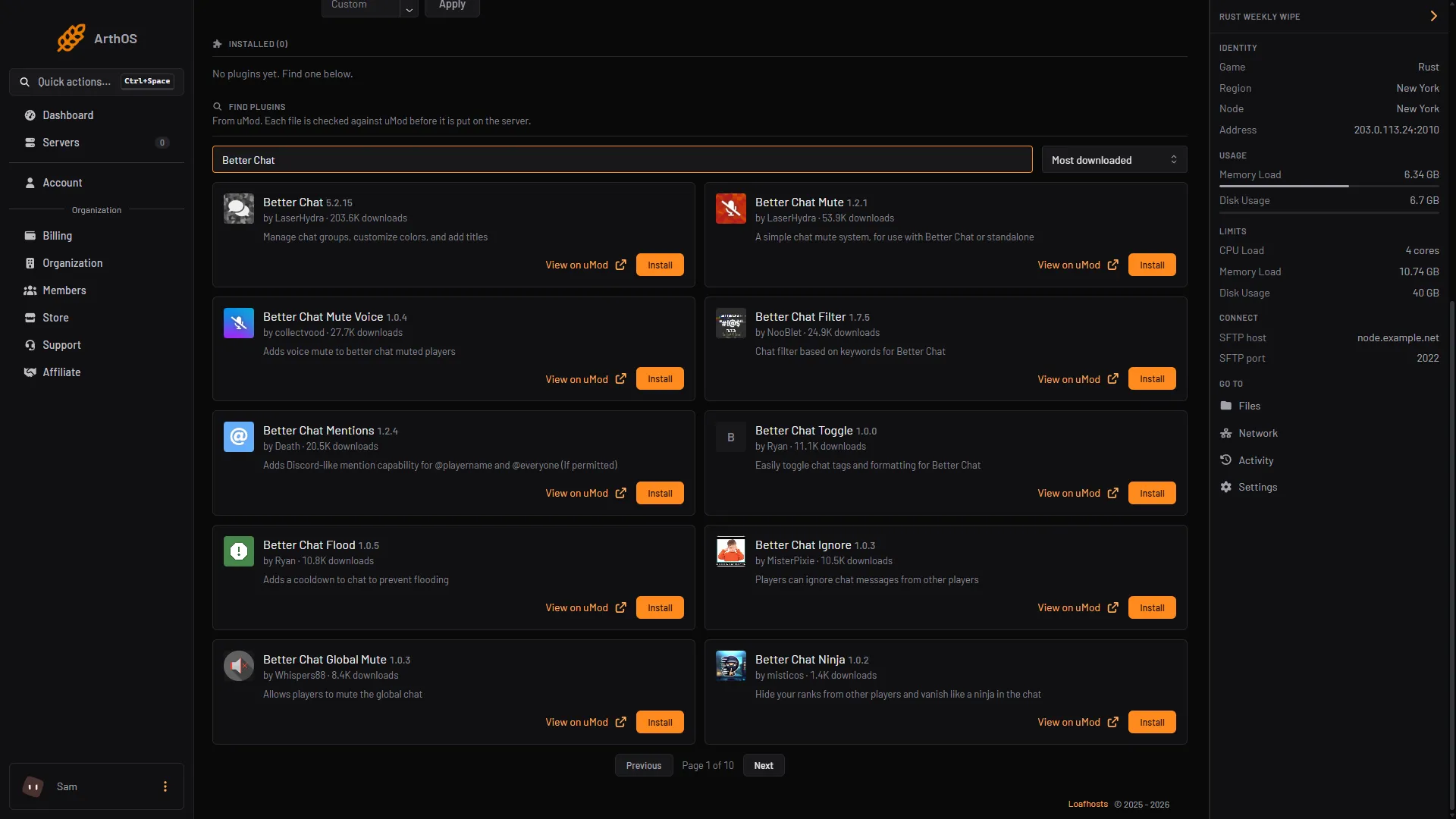
- Search uMod
- Better Chat card
- Install
- Look at its row under Installed. It should say LOADED. If it says NOT LOADED, see plugins not loading. Not checked as of 11 October 2026: that the newest Better Chat loads on your framework.
- Open the Console tab. Commands here have no slash. The
chatcommand needs thebetterchat.adminpermission, so grant it first. Not checked as of 11 October 2026: whether a command typed in the panel’s Console needs it too.
| Framework | Command |
|---|---|
| Oxide | oxide.grant user YourName betterchat.admin |
| Carbon | c.grant user YourName betterchat.admin |
To use /chat in game, the same permission applies. See grant plugin permissions.
- Make a group:
chat group add vipThe plugin makes the group in its own list and as a permission group. Group names are lower case.
- Set its look. Each command sets one field, and the value is one word with no spaces:
chat group set vip Title [VIP]
chat group set vip TitleColor #ffaa00
chat group set vip UsernameColor #ffaa00
chat group set vip Priority 1- Put a player in the group, by name or by 17 digit Steam ID:
chat group list
chat user add Wulf vip
chat group list lists every chat group. To take the player out, type chat user remove Wulf vip. A player can be in several groups at once.
Say something in game chat to check the title. No restart is needed.
The fields you can set
Type chat group set with nothing after it and the plugin prints the list of fields.
| Field | What it sets | Default |
|---|---|---|
Priority | Which group is the primary one. The lowest number wins. | 0 |
Title | The title text. | [Player] for default, [<group name>] for others |
TitleColor | The title colour, as hex like #55aaff or a name like white. | #55aaff |
TitleSize, UsernameSize, MessageSize | The text sizes. | 15 |
TitleHidden | true hides the title. | false |
TitleHiddenIfNotPrimary | true shows the title only when this is the player’s primary group. | false |
UsernameColor | The name colour. | #55aaff |
MessageColor | The message colour. | white |
ChatFormat, ConsoleFormat | The line layout. | {Title} {Username}: {Message} |
The name colour, message colour and format come from the player’s primary group, the one with the lowest Priority number. The titles come from every group the player is in, in Priority order. A value with a space does not work in a command, so set ChatFormat in the data file (see By hand).
Limits in the config
The config file BetterChat.json is in oxide/config (Oxide) or carbon/configs (Carbon). The groups are in a different file with the same name, in oxide/data or carbon/data. The config holds Maximal Titles (3 by default, the most titles before a name), Maximal Characters Per Message (128, longer messages are cut) and Reverse Title Order (false).
What it costs your server
No listed source gives a figure for its cost. Not checked as of 11 October 2026: its effect on server speed.
Pair it with Better Chat Mute
Better Chat Mute is a separate plugin by the same author. Its uMod page calls it “a simple chat mute system, for use with Better Chat or standalone”. With Better Chat installed, Better Chat Mute checks each message through Better Chat and stops a muted player’s message.
Its commands are /mute, /unmute and /mutelist, and they need betterchatmute.use. A mute with no time needs betterchatmute.permanent. Muting a player is covered in mute a player in Rust chat. The plugin keeps its own list, apart from the game’s mute command.
By hand
Download BetterChat.cs from its uMod page and upload it to oxide/plugins (Oxide) or carbon/plugins (Carbon). The plugin writes the groups to a data file named BetterChat.json in oxide/data or carbon/data, and its settings to BetterChat.json in oxide/config or carbon/configs.
To set a title with a space, or a ChatFormat, stop the server, edit the group in the data file, and start it. Keep the file’s structure and quotes.
If it does not work
- A player has no title. They are not in the group. Run
oxide.show user Wulfon Oxide and look for the group. On Carbon typec.showalone to see its syntax. - “is not a correct value for field”. The plugin refused the value. A number field needs a number, and
TitleHiddenneedstrueorfalse. - “does not seem to be in any BetterChat group”. The log shows this when a player has no chat group. The plugin says to make sure a group called
defaultexists. - The plugin says NOT LOADED. Read the Console from the start of the server for the reason. See Rust plugins not loading after an update.
Hosting Rust? See the Rust page.
Sources: umod.org: Better chat, umod.org: Better chat mute, umod.org: Permissions, umod.org: Configuration