






Economics (by MrBlue) gives every player a money balance. On its own it has no shop. Other plugins read the balance and take money from it when a player buys something. Install it from the Plugins page, change the starting balance in its settings, and give your admins the permissions for the money commands.
Your server needs Oxide or Carbon first (see install Oxide or Carbon).
What it does
- Keeps one balance per player.
- Lets a player check their balance and send money to another player.
- Lets admins add, take, set and wipe balances.
- Gives other plugins a way to read and change balances. Many uMod plugins list Economics as a way to pay for things, for example Server Rewards and Raidable Bases.
If you want a shop, or points earned by playing, you need another plugin on top. Economics only holds the money.
In the ArthOS panel
- Open your server and choose Plugins. Under Find plugins, type
economicsin Search uMod (1). Find the Economics card (2) by MrBlue and choose Install (3). The panel offered version 3.9.2 on 11 October 2026. It does not ask a question.
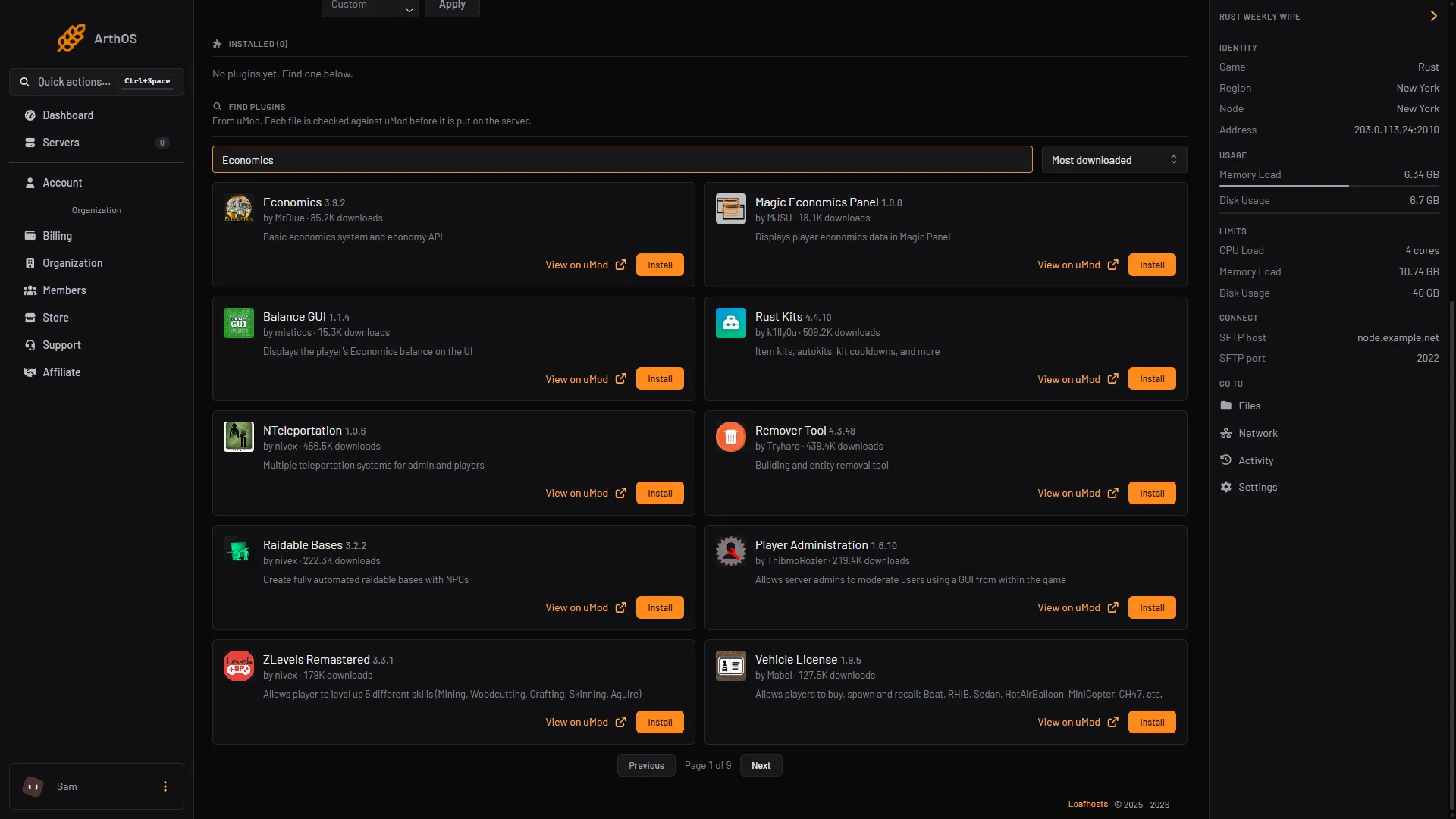
- Search uMod
- Economics card
- Install
- Look at its row under Installed. It should say LOADED. If it says NOT LOADED, see plugins not loading.
- Press Config on the plugin. Config appears once the plugin has loaded and written its settings file. This opens the settings file as JSON.
- Change what you need (see the table below), keep the file valid JSON, and save it.
- Press Reload on the plugin. The new settings apply at once.
The settings
These are the names and defaults on the plugin’s uMod page.
| Setting | Default | What it does |
|---|---|---|
Starting account balance (0 or higher) | 1000 | What a new player’s account starts with. |
Allow negative balance for accounts | false | Lets a balance go below zero. |
Balance limit for accounts (0 to disable) | 0 | The most an account can hold. 0 means no limit. |
Negative balance limit for accounts (0 to disable) | 0 | How far below zero an account can go, when negative balances are allowed. |
Remove unused accounts | true | Cleans up accounts that are not used. |
Log transactions to file | false | Writes each money change to a log file. |
Wipe balances on new save file | false | Resets every balance when the map is wiped. |
The starting balance only affects accounts made after you change it. Players who already have an account keep their balance. The uMod page says the wipe option currently works only for Rust and Hurtworld, which is fine on a Rust server.
Commands and permissions
Players type these in game chat, with a slash. The uMod page lists the commands without a slash.
| Command | Who can use it |
|---|---|
/balance | Everyone. It needs no permission. |
/balance <player name or id> | Needs economics.balance. |
/transfer <player name or id or *> <amount> | Needs economics.transfer. |
/deposit <player name or id or *> <amount> | Needs economics.deposit. Adds money. |
/withdraw <player name or id or *> <amount> | Needs economics.withdraw. Takes money. |
/setbalance <player name or id or *> <amount> | Needs economics.setbalance. |
/ecowipe | Needs economics.wipe. Deletes all Economics data, including every balance. |
An asterisk (*) means all players. Using it needs the matching “all” permission: economics.transferall, economics.depositall, economics.withdrawall or economics.setbalanceall. Use these with care.
Grant a permission in the Console tab, with no slash and your own name:
| Framework | Command |
|---|---|
| Oxide | oxide.grant user YourName economics.deposit |
| Carbon | c.grant user YourName economics.deposit |
If your name has a space in it, use your Steam ID. More about groups and wildcards is in grant plugin permissions.
Give a group money commands
Grant to a group so you do it once. Staff only:
| Framework | Command |
|---|---|
| Oxide | oxide.group add staff then oxide.grant group staff economics.deposit |
| Carbon | c.group add staff then c.grant group staff economics.deposit |
Do not give economics.deposit or economics.setbalance to the default group. Everyone would be able to print money.
Wipe balances
Balances are kept across a map wipe unless you turn on Wipe balances on new save file. To wipe them by hand, an admin with economics.wipe types /ecowipe in game. This cannot be undone.
What it costs your server
The plugin’s page gives no figure for its cost, and no setting on it is described as a performance help.
By hand
Download Economics.cs from its uMod page and upload it to oxide/plugins (Oxide) or carbon/plugins (Carbon). Plugin settings are in oxide/config or carbon/configs. After editing them, reload in the console with oxide.reload Economics or c.reload Economics.
If it does not work
- A command says “You are not allowed to use the command”. You do not hold the permission. Grant it and check with
oxide.show user YourName(Oxide). - Players still start with the old balance. The starting balance applies to new accounts only. Use
/setbalancefor players who already have one. - Other plugins cannot charge players. Check that Economics is LOADED and that the other plugin’s settings are set to use Economics. Each plugin has its own setting for this on its uMod page.
- The plugin says NOT LOADED. Read the Console from the start of the server for the reason. See plugins not loading after a Rust update.
Not checked in game as of 11 October 2026. Check each command on your own server.
Hosting Rust? See the Rust page.
Sources: umod.org: Economics, umod.org: Permissions, umod.org: Configuration, umod.org: Server rewards, umod.org: Raidable bases