






Server Rewards (by k1lly0u) is a point store for your Rust server. Players spend its points, called RP, in a menu they open with /s. Install it from the Plugins page, give yourself points with /rp add, then add products from inside the store. The plugin does not hand out points for playing by itself. For that, add the Playtime Tracker plugin (see below).
Your server needs Oxide or Carbon first (see install Oxide or Carbon).
What it does
- A store menu in game. Players buy items, kits and commands with RP.
- It keeps its own money, RP, so it is also a small bank.
- Players can sell items back, send RP to each other, and swap RP for Economics money and back, when you turn those on.
- You can lock a product behind a permission, so only VIPs see it.
In the ArthOS panel
- Open your server and choose Plugins. Under Find plugins, type
server rewardsin Search uMod (1). Find the Server Rewards card (2) by k1lly0u and choose Install (3). The panel offered version 2.0.9 on 11 October 2026.
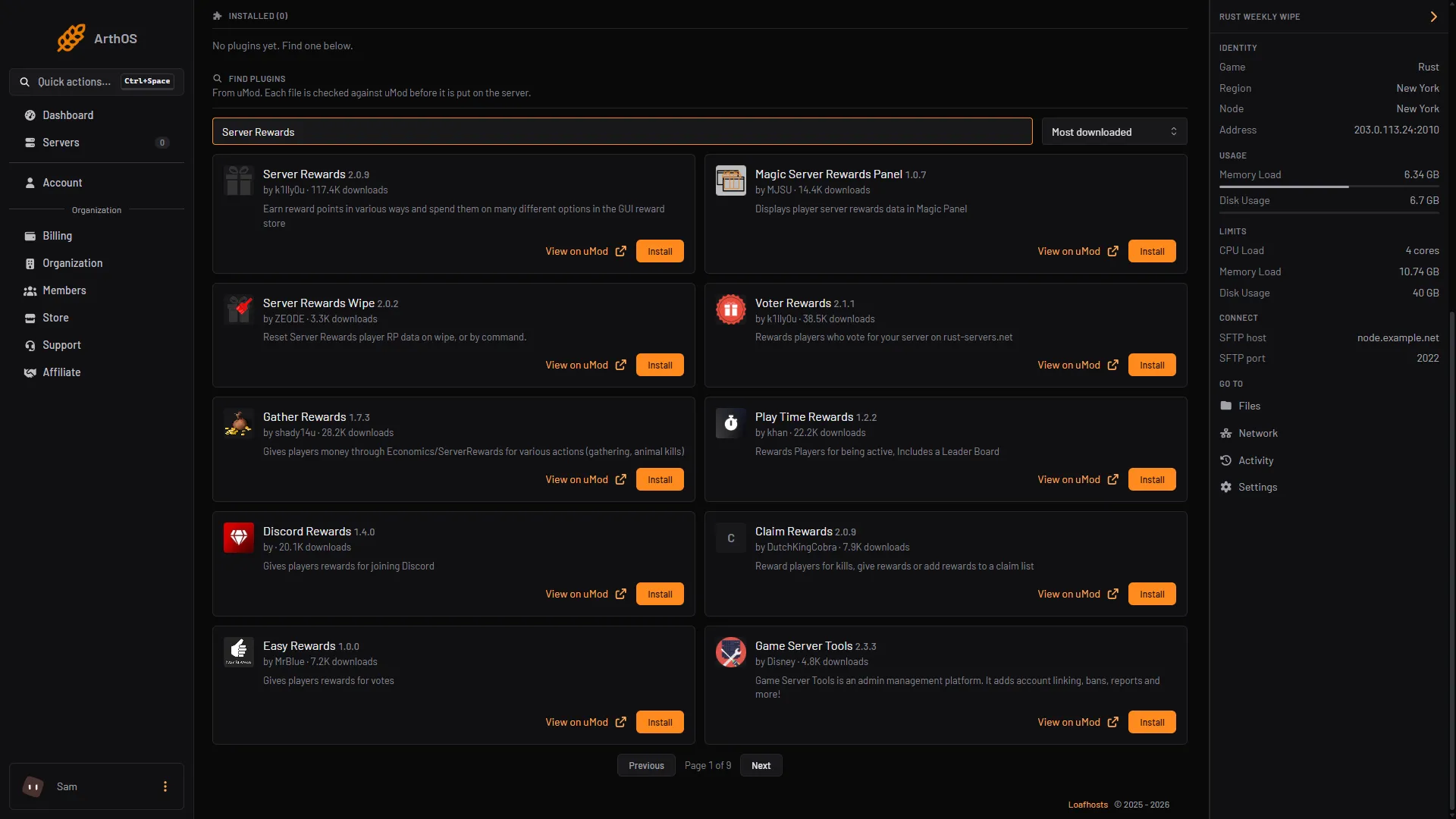
- Search uMod
- Server Rewards card
- Install
- Its uMod page says it depends on the Image Library plugin. Look under Installed. If Image Library is not there, install it from the same search (the panel offered version 2.0.67 on 11 October 2026). The panel may install it for you and tell you so.
- Check the plugin row says LOADED. If it says NOT LOADED, see plugins not loading.
- Join your server and type
/sin chat. The store opens.
Open the store as an admin
A player with game auth level 2 (an owner) can edit the store with no permission. Anyone else needs the permission serverrewards.admin. Grant it in the Console tab, with no slash and your own name:
| Framework | Command |
|---|---|
| Oxide | oxide.grant user YourName serverrewards.admin |
| Carbon | c.grant user YourName serverrewards.admin |
More about permissions is in grant plugin permissions.
Add products
All store editing is done in the store menu.
- Open the store with
/s. - Press ADMIN MODE (bottom left). It shows for owners and for players with
serverrewards.admin. - In admin mode each product has EDIT and DELETE buttons, and each category has an ADD PRODUCT button in the footer.
- Fill in the product and press CONFIRM to save.
A product can be an item, a kit, or a command. A command product runs a server command when a player buys it. You can put these words in the command and the plugin swaps them for the buyer’s details:
| Word | Replaced with |
|---|---|
$player.name | The buyer’s display name. |
$player.id | The buyer’s Steam ID. |
$player.x, $player.y, $player.z | The buyer’s position in the world. |
The uMod page gives this example: inventory.giveto $player.id wood 100. It gives the buyer 100 wood.
You can give a product a permission, so only players who hold it see the product. Kits come from the Kits plugin.
Give and check points
These work in game chat with a slash, or in the Console tab without one. The command word rp can be changed in the settings. The uMod page lists the form for each:
| Command | What it does |
|---|---|
rp add <username or userid or *> <amount> | Adds RP to a player. |
rp take <username or userid or *> <amount> | Takes RP away. |
rp clear <username or userid or *> | Sets a player to 0 RP. |
rp check <username or userid> | Shows how many RP a player has. |
An asterisk means all players.
Pay points for playing
Server Rewards on its own has no timer. Its uMod page says players “earn reward points in various ways”, and other plugins add points through it. The plugin that pays for time on the server is Playtime Tracker, also by k1lly0u. Its uMod page says it can pay “RP (Server Rewards) or coins (Economics)” by playtime, and for inviting other players.
- Install Playtime Tracker from the Plugins page.
- Press Config on it. Under
Reward Options, setReward plugin (ServerRewards, Economics)to"ServerRewards". The default is"Economics". - Check
Playtime rewards. These are the defaults on its uMod page:Issue rewards for playtimeistrue,Reward interval (seconds)is3600, andReward amountis5. That is 5 RP for each hour played. - Save the file and press Reload on the plugin.
Players see their time with /playtime, and /playtime top lists the top ten. Playtime Tracker’s own page also covers a referral reward with /refer and a multiplier for VIPs.
The settings
Press Config on Server Rewards. These are the options on its uMod page:
| Setting | Default | What it does |
|---|---|---|
Open Store Command | s | The word players type to open the store. |
Admin RP Command | rp | The word for the admin point commands. |
Log all transactions | true | Keeps a record of each purchase. |
Use NPC dealers only | false | Players can only open the store by talking to a store NPC. This needs the Human NPC plugin. |
Economics exchange rate (1 RP is worth this much Economics) | 1.0 | The rate when players swap RP and Economics money. |
Show items tab, Show kits tab, Show commands tab, Show exchange tab, Show transfer tab, Show seller tab | all true | Which tabs show in the store. |
The page says exchange and transfer are options you turn on in the settings. Every item starts with no sell price, so nothing can be sold back until you set one. Set a price with sr.sellable setprice <shortname> <price> in the console.
What it costs your server
The plugin’s page gives no figure for its cost, and no setting on it is described as a performance help. Not checked as of 11 October 2026: the load added by Log all transactions on a busy store.
By hand
Download ServerRewards.cs from its uMod page and upload it, and Image Library, to oxide/plugins (Oxide) or carbon/plugins (Carbon). The page names the data folder oxide/data/ServerRewards/. After editing settings, reload with oxide.reload ServerRewards or c.reload ServerRewards.
If it does not work
/sdoes nothing. The plugin is not loaded, or Image Library is missing. Check both on the Plugins page.- There is no ADMIN MODE button. You are not an owner and do not hold
serverrewards.admin. - Players never earn points. The plugin does not pay for time. Install Playtime Tracker and point it at ServerRewards.
- Playtime Tracker pays money, not RP. Its
Reward pluginsetting is still"Economics". - A bought kit does nothing. The kit comes from the Kits plugin. Check that it is loaded and that the kit exists.
Not checked in game as of 11 October 2026. Check each step on your own server.
Hosting Rust? See the Rust page.
Sources: umod.org: Server rewards, umod.org: Playtime tracker, umod.org: Economics, umod.org: Rust kits, umod.org: Permissions