






NTeleportation (by nivex) gives players /home to save and return to a base, and /tpr to send another player a teleport request. Install it from the Plugins page, then grant the players the permissions nteleportation.home and nteleportation.tpr. Without nteleportation.home the home commands do nothing. Your server needs Oxide or Carbon first (see install Oxide or Carbon).
In the ArthOS panel
- Open your server and choose Plugins. Under Find plugins, type
nteleportationin Search uMod (1). On the NTeleportation card by nivex (2), choose Install (3). It installs at once, with no question.
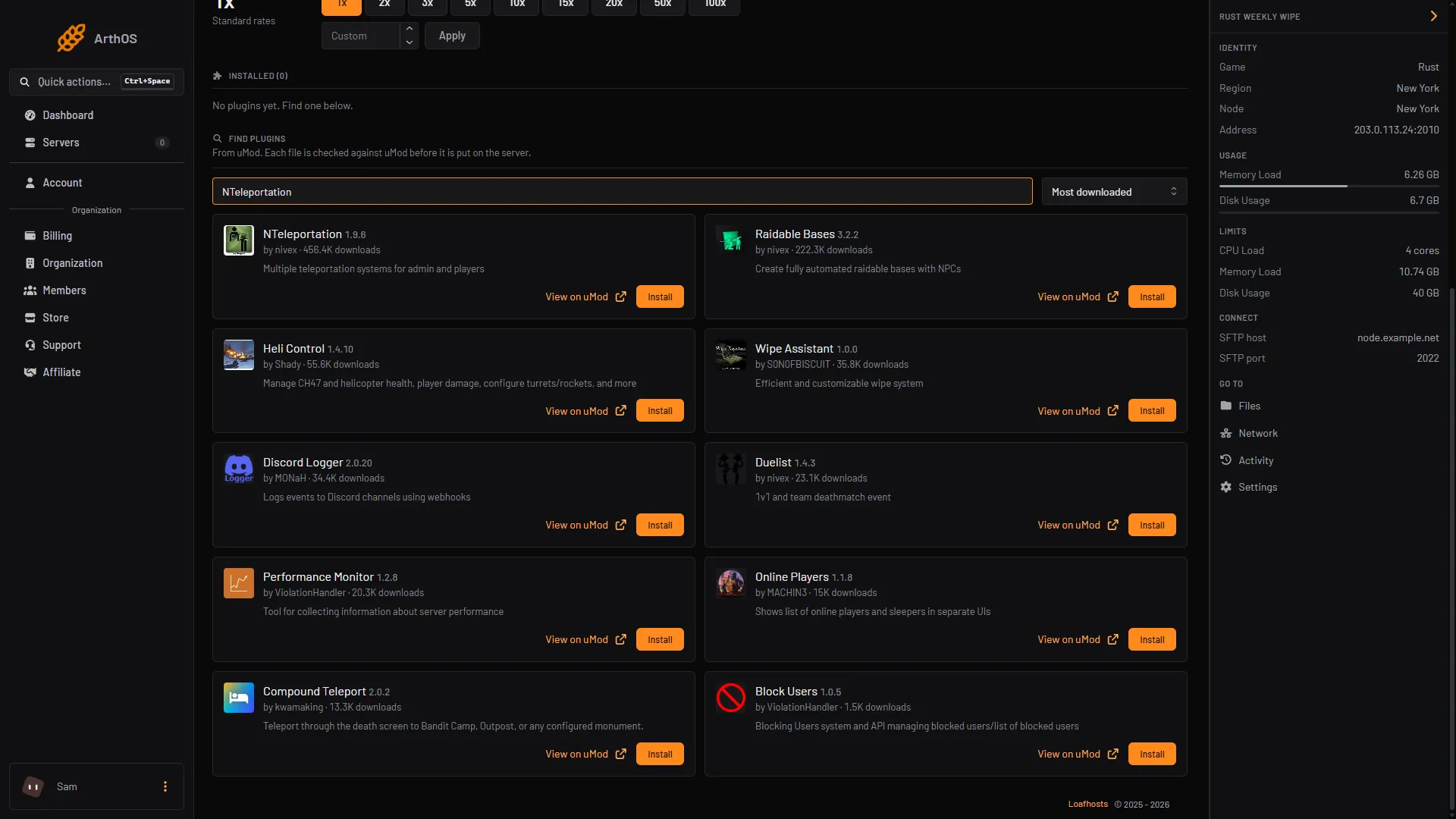
- Search uMod
- NTeleportation
- Install
- Look at its row under Installed. NTeleportation should read LOADED. If it says NOT LOADED, see plugins not loading. The reason is in the Console. On a running server the plugin loads by itself. The message “It loads when the server starts” shows whenever the panel has not yet seen the plugin load.
- Give your players the permissions. Open the Console tab and type, with no slash. These give them to every player who joins:
| Framework | Command |
|---|---|
| Oxide | oxide.grant group default nteleportation.home |
| Oxide | oxide.grant group default nteleportation.tpr |
| Carbon | c.grant group default nteleportation.home |
| Carbon | c.grant group default nteleportation.tpr |
What players type
These go in game chat, with the slash.
| Command | What it does |
|---|---|
/home add base | Saves where you stand as the home called base. |
/home base | Teleports you to that home. |
/home list | Lists your homes. |
/home remove base | Deletes a home. |
/tpr Name | Sends a teleport request to that player. |
/tpa | Accepts a request sent to you. |
/tpc | Cancels your request or a teleport in progress. |
/tpinfo | Shows your limits and cooldowns. |
By default a home must be set on a foundation or a floor (the setting Force On Top Of Foundation), and you cannot teleport out of an area where building is blocked.
Change cooldowns and limits
- On the Plugins page, press Config on NTeleportation. Config appears once the plugin has loaded and written its settings file. The file opens in the editor.
- The settings for homes are under
Homeand for requests underTPR. The defaults on the plugin’s page are:
| Setting | Home | TPR | What it does |
|---|---|---|---|
Cooldown | 600 | 600 | The wait before the player can teleport again. |
Countdown | 15 | 15 | The wait between asking and arriving. |
Daily Limit | 5 | 5 | How many times a player can teleport per day. |
Homes Limit | 2 | not used | How many homes a player can save. |
- Change only the numbers, keep the file valid JSON, and save it.
- Press Reload on the plugin. Players can check the result with
/tpinfo.
Use "Homes Enabled": false or "TPR Enabled": false in Settings to turn a whole system off.
Give VIP players more
The VIP Homes Limits, VIP Daily Limits, VIP Cooldowns and VIP Countdowns lists each have an entry for the permission nteleportation.vip. Change its number, or add a second line such as "nteleportation.gold": 10. After a reload the plugin registers the new permission. Then grant it to a group:
| Framework | Command |
|---|---|
| Oxide | oxide.grant group vip nteleportation.vip |
| Carbon | c.grant group vip nteleportation.vip |
Set a town for /town
Players can use /town, /outpost and /bandit if they hold nteleportation.tptown, nteleportation.tpoutpost or nteleportation.tpbandit. An admin stands where players should arrive and types /town set in game.
By hand
Download NTeleportation.cs from its uMod page and upload it to oxide/plugins (Oxide) or carbon/plugins (Carbon). The settings file is NTeleportation.json in oxide/config or carbon/configs. Reload with oxide.reload NTeleportation or c.reload NTeleportation in the server console.
If it does not work
/homedoes nothing. The player lacksnteleportation.home. Grant it to the group they are in and check withoxide.show user Name.- A teleport is refused in some places. By default the plugin does not let you teleport out of an area where building is blocked. The
Usable Out Of Building Blockedsetting underHomechanges it. - The plugin says NOT LOADED. Read the Console from the start of the server for the reason. See plugins not loading after a Rust update.
- Your settings are gone after an edit. The file was not valid JSON. Put back the missing comma or bracket.
Hosting Rust? See the Rust page.
Sources: umod.org: Nteleportation, umod.org: Permissions, umod.org: Configuration, carbonmod.gg: Oxide porting