






PvE means “player versus environment”: players fight the game, not each other. To make your Rust server PvE, open Config Editor, turn on PvE under Gameplay, choose Save and restart the server. Players then cannot hurt each other in most cases. Facepunch’s 2015 devblog warns that some edge cases still let players hurt each other or their buildings. The game adds the PvE tag to your server in the browser by itself.
In the ArthOS panel
- Open the Config Editor tab. On a Loafhosts server it opens
server/rust/cfg/server.cfg. - Under Gameplay, find PvE (the setting is
server.pve). It is off by default. - Turn it on (2) and choose Save (3). The Search… box (1) finds the row fast.
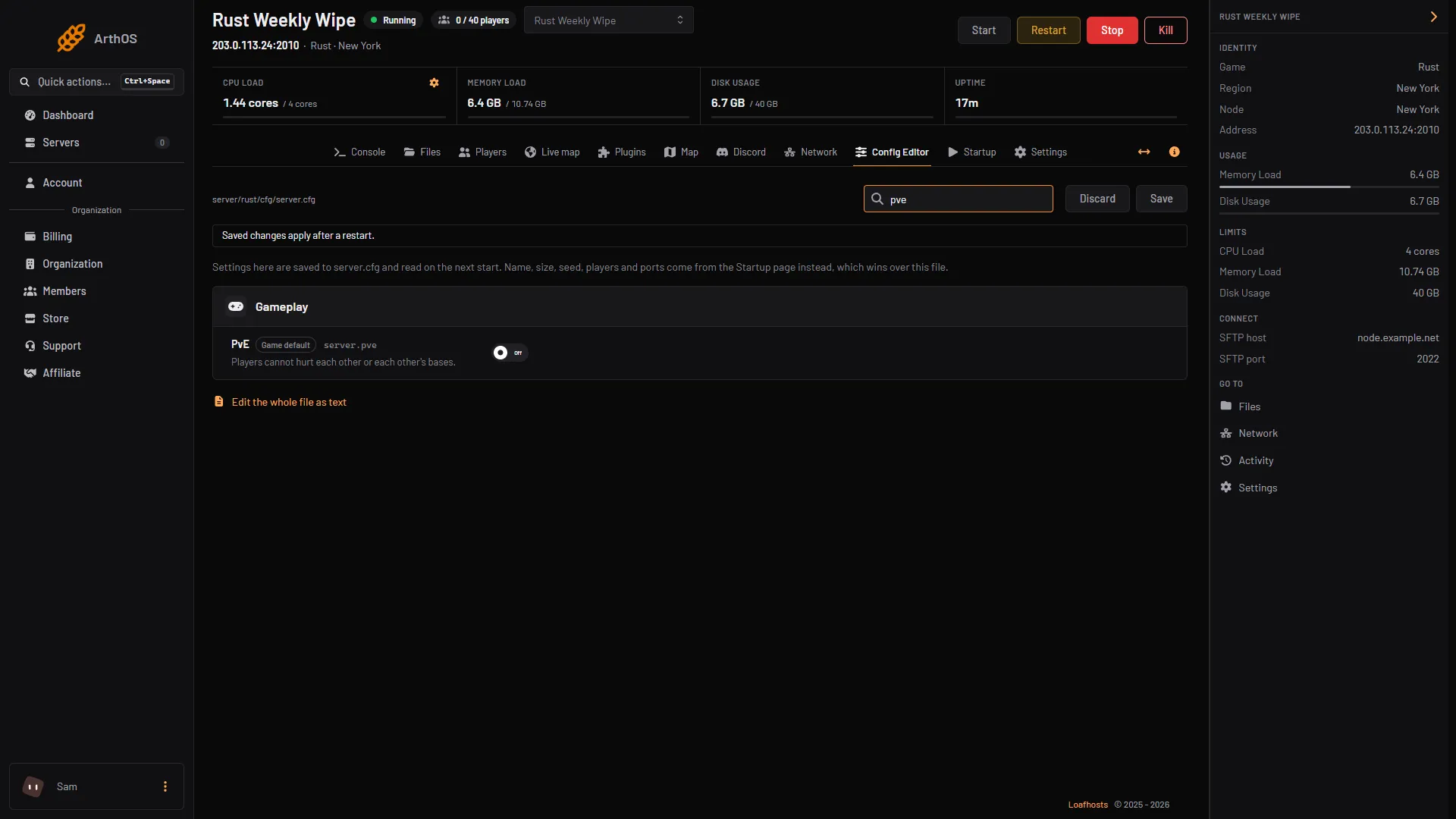
- Search for PvE
- Turn PvE on
- Press Save
The row’s help text reads “Players cannot hurt each other or each other’s bases.” A Game default chip shows while the file does not set it.
- Restart the server. The panel’s note says: “Settings here are saved to server.cfg and read on the next start.”
- Check it with two accounts. Ask a friend to join and shoot you. Nothing should hurt you.
What built-in PvE does
Facepunch added server.pve in 2015. Its description from that time: “When a server is in PVE mode players can’t damage each other, and if you hurt a player the damage will be reflected back at you. Buildings can’t be damaged when inside an active cupboard (and you’re not authed).” It adds: “There’s a bunch of edge cases here that will probably let you hurt players, or their buildings.”
That tells you what to expect:
- Player against player damage is blocked, and attackers hurt themselves.
- A base is protected while its tool cupboard is active. A tool cupboard is the box in the game that claims the ground around it and holds the resources that keep the base from decaying. A base with no working cupboard is not protected.
- It does not stop decay. Decay is a separate setting, see Change decay and upkeep on a Rust server.
- It gives you no rules of your own: no PvP zones, no exceptions, no raiding on some nights.
The PvE browser tag
Facepunch’s tag list says “server.pve will automatically apply the PvE tag.” You do not add it yourself. If you use a plugin instead and keep server.pve off, type pve in Browser tags on the Startup tab. See Rust server not showing in the server list for how tags work.
Plugins for PvE
A plugin gives you the rules the built-in mode lacks. One that is made for this is TruePVE. Check that TruePVE is listed under Find plugins. Its own description: “a damage control plugin originally intended to improve the default server PVE mode (server.pve = true) for servers who wish to truly be PVE.” It works with rulesets, and with ZoneManager it can give one area different rules.
Use one or the other. TruePVE’s readme says: “TruePVE is meant to be used with server.pve false (PVP mode ON)! Running TruePVE with server.pve true can have unintended effects.”
- Open the Plugins tab and switch to Oxide or Carbon. Carbon describes itself as a drop-in replacement for Oxide. See Install Oxide or Carbon.
- In Find plugins, use Search uMod for TruePVE. If it is listed, choose Install. The panel installs it at once.
- Look at its row under Installed. Wait until the row says LOADED. If it says NOT LOADED, see plugins not loading. If TruePVE does not load, leave built-in PvE on.
- When TruePVE is loaded, open the Config Editor, turn PvE off and choose Save. Then restart the server.
- Type
pvein Browser tags on the Startup tab.
TruePVE’s rules are set in its own config. Read its page for them; this guide does not describe them.
By hand
Add this line to server/<identity>/cfg/server.cfg, without a +, and restart. The identity is set with +server.identity. On Loafhosts the folder is server/rust, so the file is server/rust/cfg/server.cfg.
server.pve trueThe server reads that file at start.
If it does not work
- Players can still hurt each other. You did not save, or you did not restart. The setting is read at the next start.
- A base was destroyed. Decay, not a player, removed it: its tool cupboard had no upkeep left, or it had no cupboard.
- The PvE tag is missing. The game adds it when
server.pveis on. With a plugin, addpveto Browser tags yourself. - Odd behaviour with TruePVE. Check that PvE is off in the Config Editor.
More about Rust hosting on the Rust page.
Sources: rust.facepunch.com: Devblog 63, wiki.facepunch.com: Server browser tags, wiki.facepunch.com: Creating a server, wiki.facepunch.com: The tool cupboard, github.com: TruePVE, docs.carbonmod.gg