











The Config Editor for Satisfactory edits one file, Server settings, which is the game’s Engine.ini. You can only save while the server is stopped, because the game rewrites its settings files when it stops. The game’s other options, such as autosave timing and seasonal events, are on the Server page.
Where it is
Open the Config Editor page of your server. The file Server settings is the first button in the row of files. If you have mods that keep settings, each one has a button after it, named after the mod’s file. See mod settings.
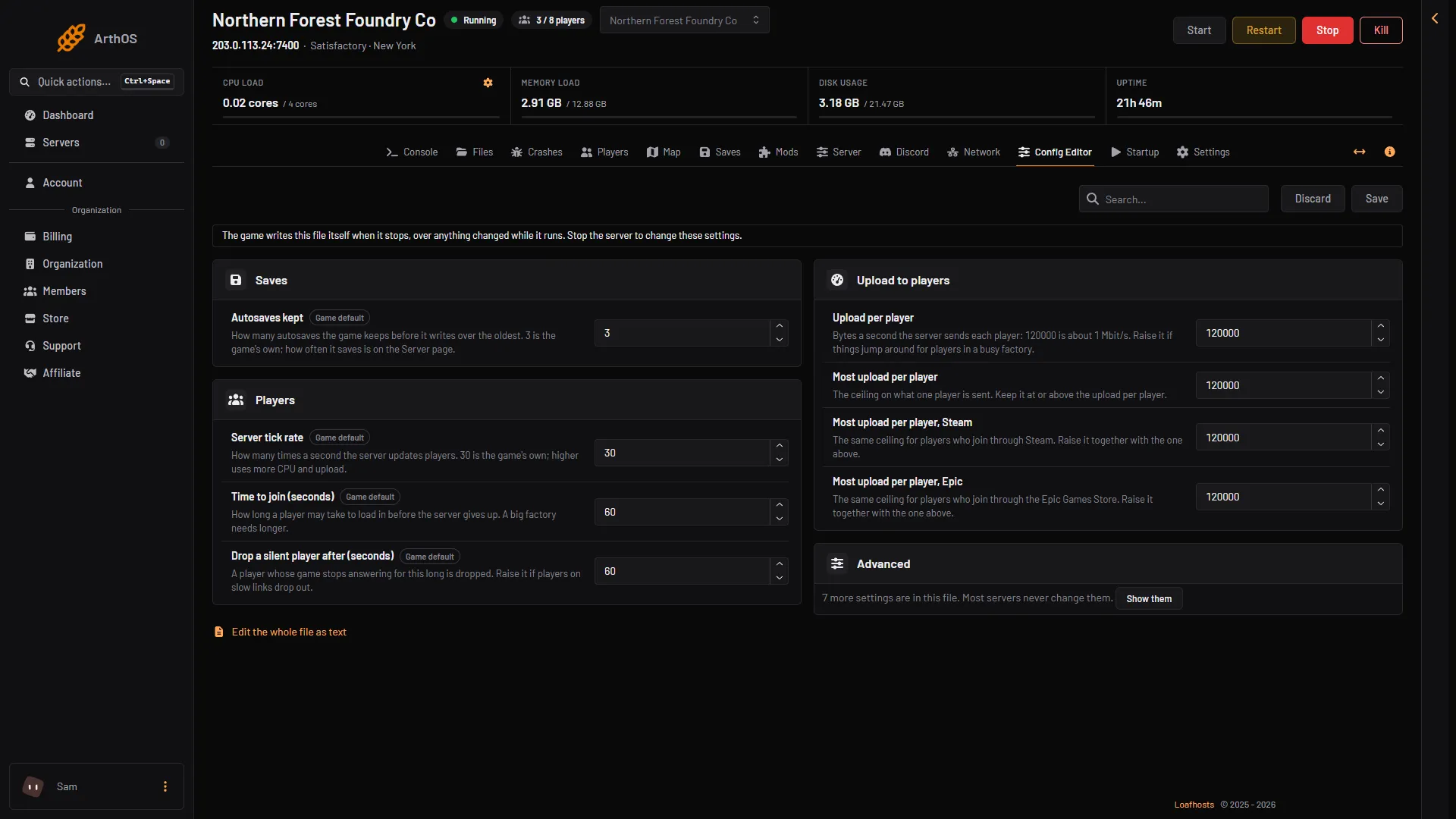
- Stop the server first
- Autosaves kept
- Server tick rate
- Upload per player
- More settings
Save only while stopped
The page tells you: “The game writes this file itself when it stops, over anything changed while it runs. Stop the server to change these settings.” While the server runs you can read the values, but Save stays off.
- Choose Stop at the top right of the server page.
- Change the values.
- Choose Save. The page says “Saved. The changes apply when the server starts.”
- Choose Start at the top right of the server page.
Choose Discard to throw away changes you have not saved. The search box finds a setting by name.
If the page says the file does not exist yet, choose Start once. The game creates it at its first start.
The groups
Each setting below shows its key in Engine.ini, with the section it sits in.
Saves
- Autosaves kept: how many autosaves the game keeps before it writes over the oldest. The game’s own is 3. Key
mNumRotatingAutosavesin[/Script/FactoryGame.FGSaveSession]. How often it saves is on the Server page. See autosave settings.
Players
All three are in [/Script/OnlineSubsystemUtils.IpNetDriver].
- Server tick rate: how many times a second the server updates players. 30 is the game’s own. Higher uses more processor time and upload. Key
NetServerMaxTickRate. - Time to join (seconds): how long a player may take to load in before the server gives up. A big factory needs longer. The game’s own is 60. Key
InitialConnectTimeout. - Drop a silent player after (seconds): a player whose game stops answering for this long is dropped. Raise it if players on slow links drop out. The game’s own is 60. Key
ConnectionTimeout.
Upload to players
These set how much the server sends each player, in bytes a second. 120000 is about 1 Mbit/s.
- Upload per player: raise it if things jump around for players in a busy factory. Key
ConfiguredInternetSpeedin[/Script/Engine.Player]. - Most upload per player: the ceiling on what one player is sent. Keep it at or above the upload per player. Key
MaxInternetClientRatein[/Script/OnlineSubsystemUtils.IpNetDriver]. - Most upload per player, Steam: the same ceiling for players who join through Steam. Raise it together with the one above. Key
MaxInternetClientRatein[/Script/SteamSockets.SteamSocketsNetDriver]. - Most upload per player, Epic: the same ceiling for players who join through the Epic Games Store. Key
MaxInternetClientRatein[/Script/SocketSubsystemEOS.NetDriverEOS]. - Upload for everyone together: bytes a second for all players together. Key
TotalNetBandwidthin[/Script/Engine.GameNetworkManager]. - Send only what is near: players get updates only for what is near them. Leave it on. Key
bUseDistanceBasedRelevancyin[/Script/Engine.GameNetworkManager].
Advanced
Settings the panel has no name for wait behind the Advanced card. It says how many more settings are in the file. Choose Show them to see them. Most servers never change them.
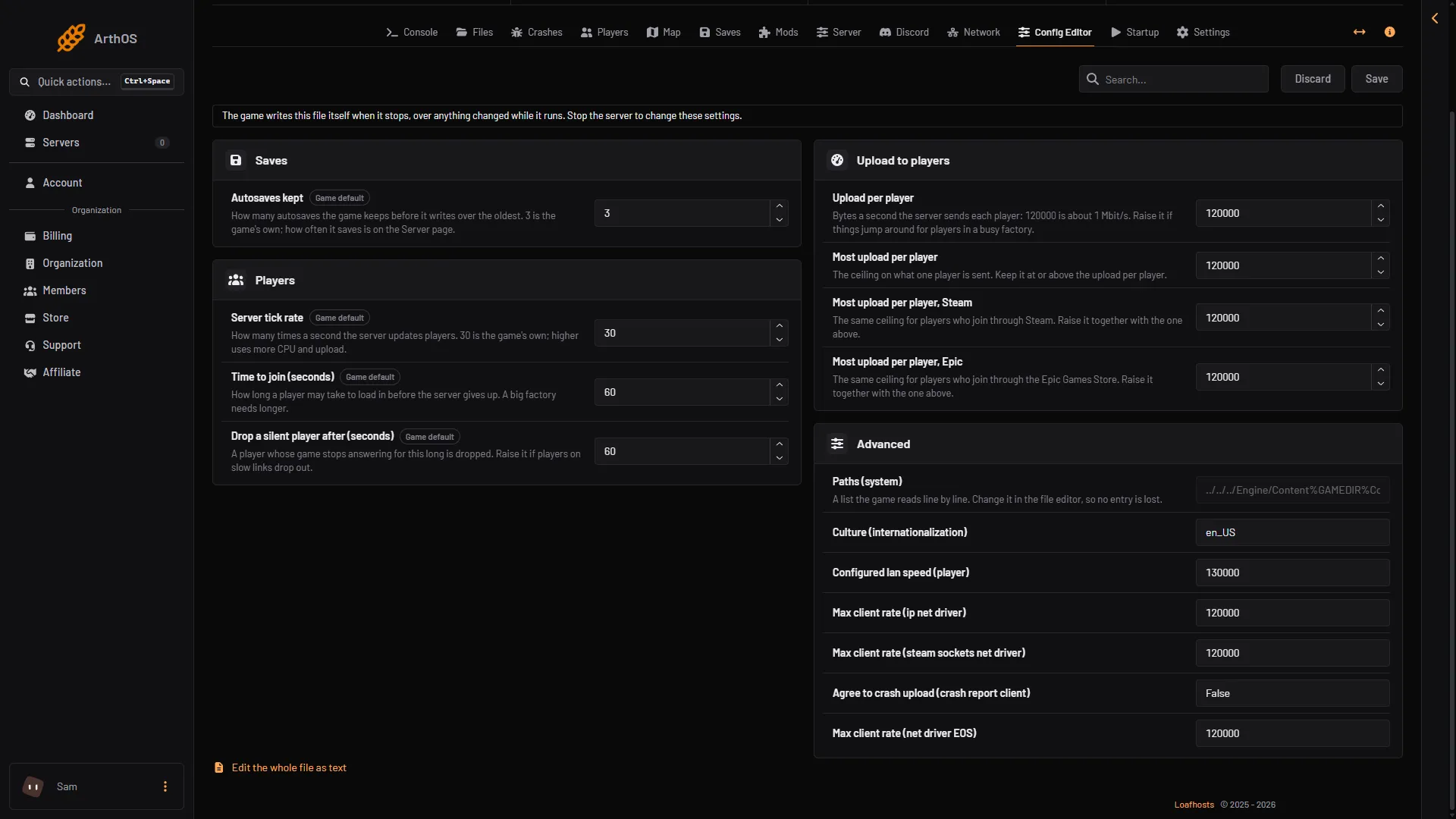
- Advanced
By hand
At the foot of the page, Edit the whole file as text opens the file in the file editor. The file is FactoryGame/Saved/Config/LinuxServer/Engine.ini. Choose Stop first. Unreal leaves out any line equal to the default, so a setting at its default may not be in the file at all. An example with valid ini:
[/Script/OnlineSubsystemUtils.IpNetDriver]
NetServerMaxTickRate=30
InitialConnectTimeout=60

[/Script/FactoryGame.FGSaveSession]
mNumRotatingAutosaves=3
What is not here
- Max players: the Players setting on the Startup page. The game reads it at the next start. The panel offers no
Game.ini. Not checked on 1.2 as of 27 October 2026: whether aMaxPlayersline you add toGame.iniby hand has any effect. - Seasonal events, autosave interval, pause when empty, daily restart, network quality, weather: the Options card on the Server page. See server options.
- Name and passwords: the Server page.
If it does not work
- Save is greyed out. The server is running, starting or stopping. Choose Stop and wait until it is offline.
- Your change is gone after a restart. You edited the file while the server ran. The game wrote over it as it stopped. Change it again while stopped.
- Players still drop. Raise Drop a silent player after (seconds), and check the player’s own connection.
More about the game: Satisfactory servers.
Not checked on 1.2 as of 27 October 2026: the best upload values for large groups of players.