











A Satisfactory server autosaves every 300 seconds, which is five minutes, and keeps the 3 newest autosaves. You change how often on the Server page, in Autosave every (seconds). You change how many are kept in the Config Editor, in Autosaves kept. The first needs the server running. The second needs it stopped.
How often it saves
- Open the Server page. The game must be running: the page cannot show the options while the server is stopped. To start it, choose Start at the top right of the server page.
- Find Options. In Autosave every (seconds), type a number from 60 to 3600. The help line says: “The game’s own is 300, five minutes.”
- Choose Save options.
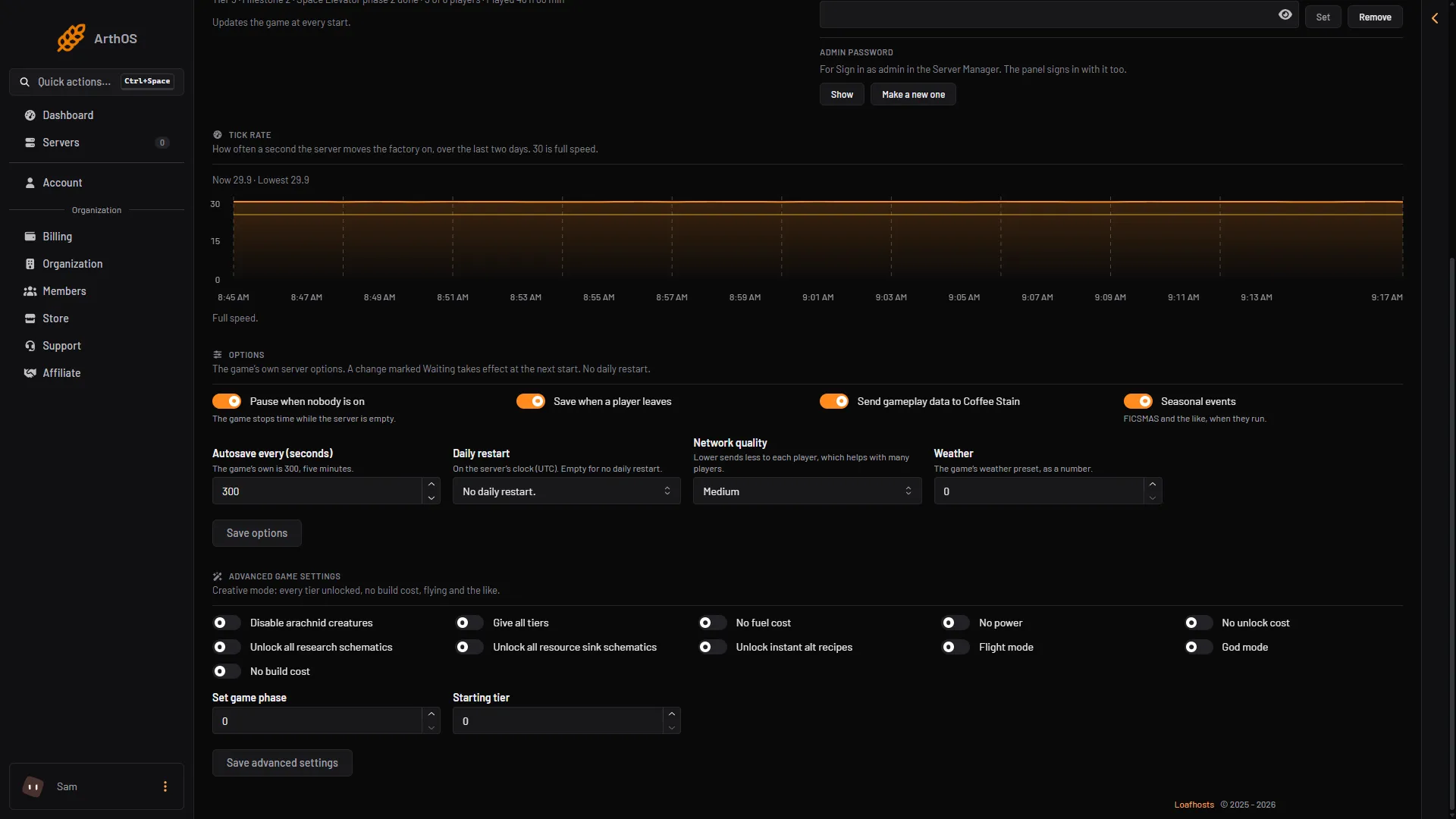
- Autosave every (seconds)
- Save options
If the option shows Waiting with the new value, it applies at the next start. Choose Restart at the top right of the server page when you want it to apply. See restart a Satisfactory server.
The panel does not take 0, because the game would then never autosave. The lowest gap is 60 seconds.
A shorter gap means less lost if the server crashes. A longer gap means fewer saves. Not checked on 1.2 as of 27 October 2026: how long a save pauses the game.
The game’s own server screen shows this setting in minutes. The panel shows seconds.
Save when a player leaves
Next to it is Save when a player leaves. When it is on, the game also saves each time a player disconnects. This is a separate option, saved with Save options in the same way.
How many autosaves it keeps
The game writes autosaves in turn. When it has written as many as it keeps, the next one replaces the oldest. Each is a save you can load, so a higher number lets you go back further. See load a save.
- Stop the server with Stop at the top right of the server page. The game rewrites its settings files (ini files) when it stops, over anything changed while it runs, so a change made on a running server is lost.
- Open the Config Editor. It has one file, Server settings.
- Open the group Saves and find Autosaves kept. It shows 3 when you have not changed it, which is the game’s own number.
- Type a number from 1 to 30 and save.
- Start the server. The new number is used from the start.
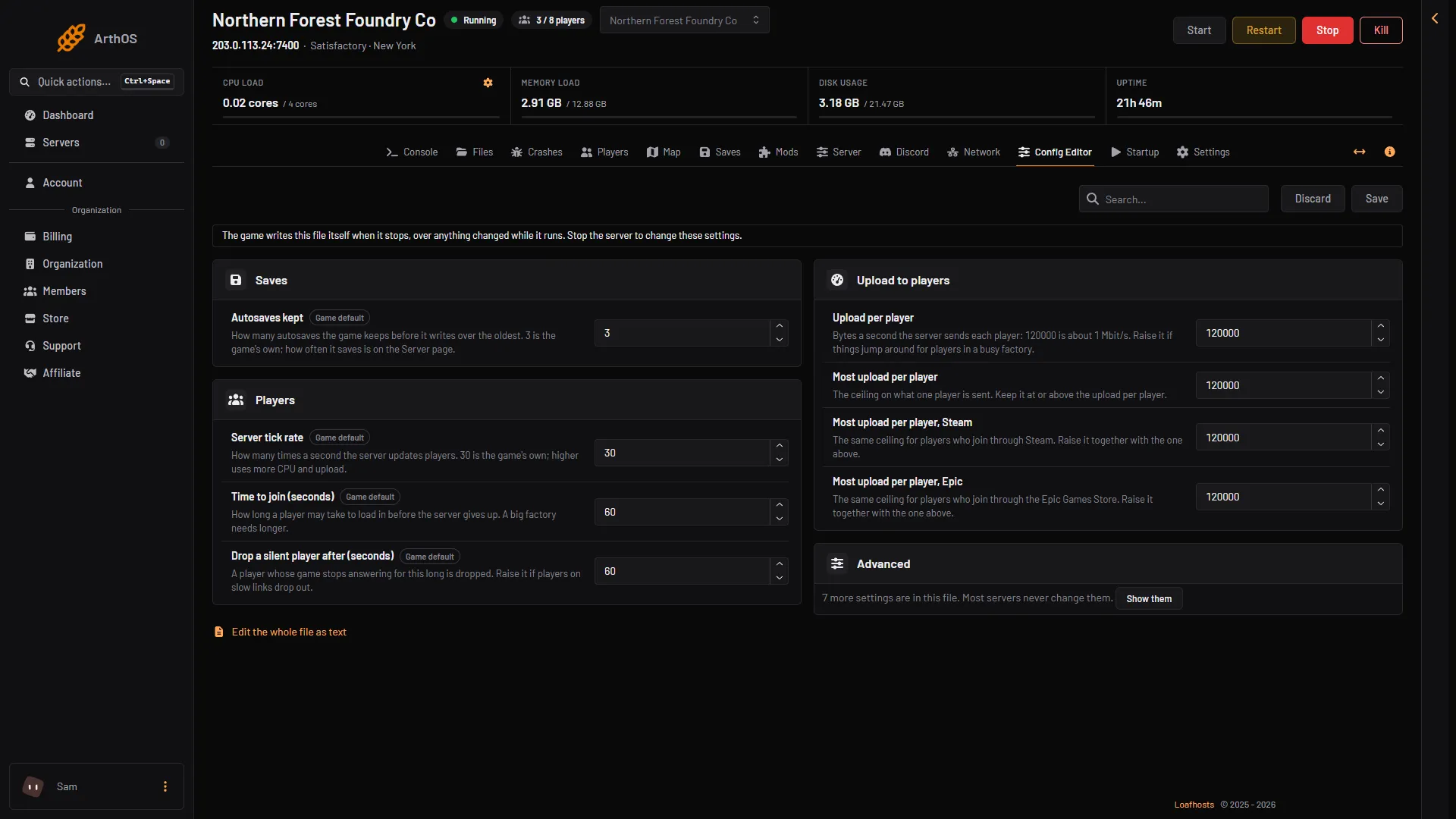
- Stop the server first
- Autosaves kept
By hand: stop the server, then edit FactoryGame/Saved/Config/LinuxServer/Engine.ini in Files. The key is mNumRotatingAutosaves in the section [/Script/FactoryGame.FGSaveSession]. A valid example:
[/Script/FactoryGame.FGSaveSession]
mNumRotatingAutosaves=5
The interval is not in this file; it is the Server page option.
Every autosave is a save file on the server’s disk, so keeping more of them uses more disk.
If it does not work
- The Options card is empty or not there. The server is stopped, still starting, or loading a save. Start it and wait for the game to answer.
- The value shows Waiting and does not change. It applies at the next start. Choose Restart at the top right of the server page.
- The panel refuses the number. The interval takes 60 to 3600 seconds. Autosaves kept takes 1 to 30.
- Autosaves kept went back to its old value. It was changed while the server was running. Stop the server first, then change it.
More about the game: Satisfactory servers.