











The Options card on the Server page holds the game’s own server options. Change them there and choose Save options. A change marked Waiting takes effect at the next start.
Open the card
- Open the Server page.
- Find the card Options.
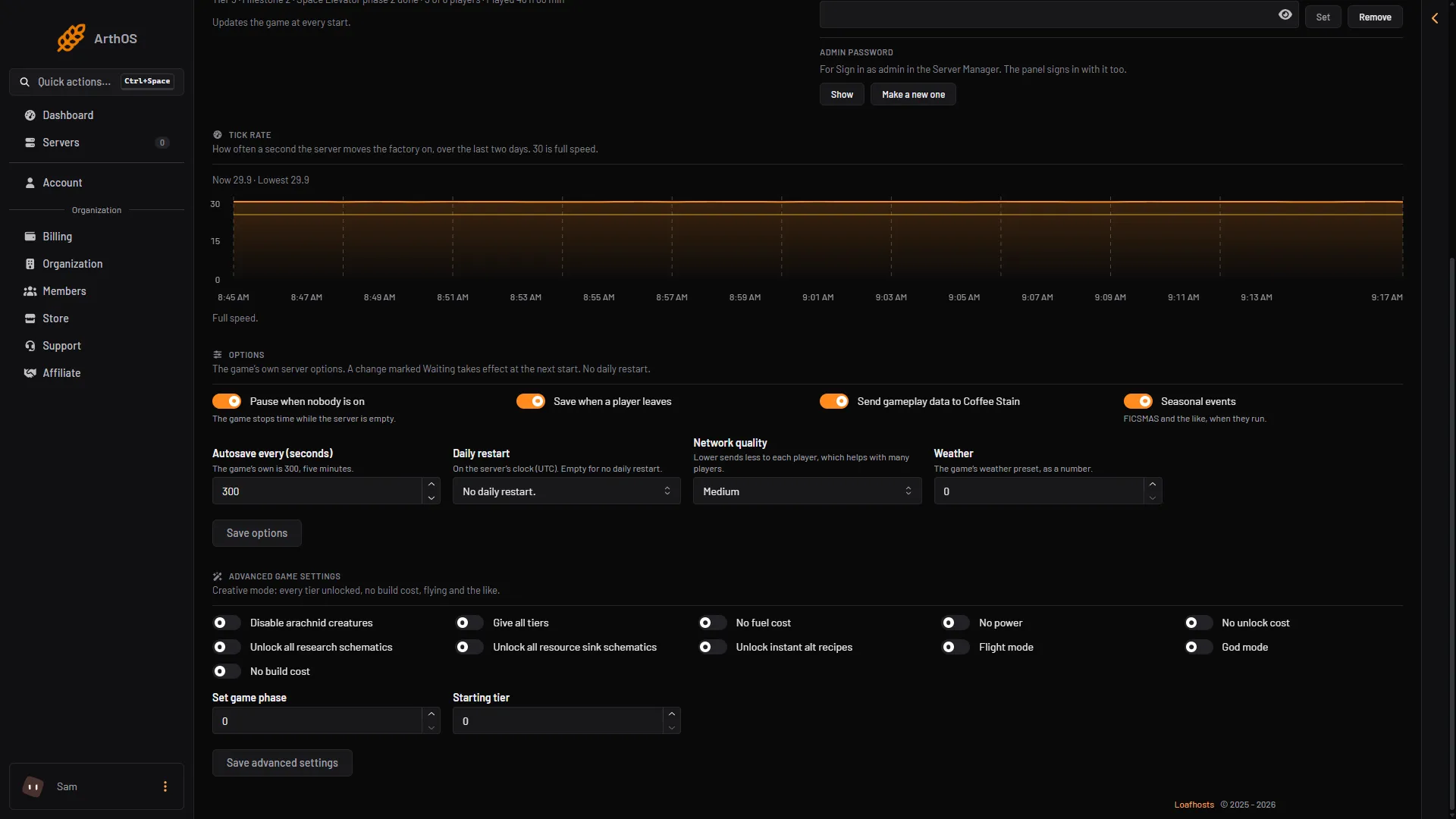
- Pause when nobody is on
- Autosave every (seconds)
- Daily restart
- Network quality
- Save options
The game keeps these options itself, so the server must be running to show or change them. If it is stopped, the page says: “The server is stopped. The game keeps its name, passwords and options itself, so start it to see or change them.” Choose Start at the top right of the server page. If it is still starting, wait until the game answers.
Seeing or changing anything on the Server page needs a role that may change the startup settings.
The options
Switches
- Pause when nobody is on: the game pauses while the server is empty. Not checked on 1.2 as of 27 October 2026: whether machines keep producing during the pause.
- Save when a player leaves: the game saves when a player goes.
- Send gameplay data to Coffee Stain: the game’s own switch for sending gameplay data to its maker, Coffee Stain.
- Seasonal events: FICSMAS and the like, when they run. FICSMAS runs between 1 December and 18 January. Turn the switch off to leave seasonal events out. Started by hand, the game’s start flag for this is
-DisableSeasonalEvents. On Loafhosts, use this switch.
Values
- Autosave every (seconds): the game’s own is 300, which is five minutes. The page takes 60 to 3600. The number of autosaves the game keeps is Autosaves kept in the Config Editor. See also autosave settings.
- Daily restart: pick an hour, or No daily restart. The hours are on the server’s clock, and the card names the zone (UTC in the picture). When one is set, the card says “Restarts every day at (time) (zone).”
- Network quality: Low, Medium, High or Ultra. Lower sends less to each player, which helps with many players.
- Weather: the game’s weather preset, as a number from 0 to 100.
Save them
- Change what you want.
- Choose Save options.
An option that cannot change while the game runs shows Waiting with the new value, for example “Waiting: 240”. It takes effect at the next start. Choose Restart at the top right of the server page to apply it. See restart the server.
Slow factory
The Server page also shows the tick rate over two days. A big factory slows the server down. The page says a daily restart helps, and so does a lower network quality when many players are on.
If it does not work
- There is no Options card, or it is empty. The server is stopped, still starting or loading a save. Wait until it runs.
- Save options is missing. Your role cannot change startup settings.
- A value says Waiting. It is saved. It applies at the next start.
- You want max players or the join password. Max players is the Players setting on the Startup page. The join password is on the Server page.
More about the game: Satisfactory servers.
Not checked on 1.2 as of 27 October 2026: what each weather number does, and which options apply without a restart.
Sources: satisfactory.wiki.gg: FICSMAS, satisfactory.wiki.gg: Dedicated servers