











Creative mode lets players skip the progression and build for free. On your server you turn it on from the Server page, under Advanced game settings. The panel asks you to confirm first, because the save stays creative for good.
What creative mode is
Creative mode is a set of options that change how Satisfactory plays. Players can unlock every tier, build without paying, fly, and drop the need for power. Before game version 1.2 the game called it Advanced Game Settings. The panel still uses that name.
It has two costs you cannot take back:
- Achievements are turned off for that save.
- The save stays creative. The game has no way to turn creative mode off again.
Everything players already built stays. In the game, a creative save has a pencil icon in the Load Game menu.
Turn it on
-
Make sure the server is running. If it is stopped, choose Start at the top right of the server page and wait until it answers. The Advanced game settings card only shows while the game is running and answering.
-
Open the Server page.
-
Find Advanced game settings (1). Its hint reads “Creative mode: every tier unlocked, no build cost, flying and the like.”
-
Switch on the settings you want (2). Each setting is described in the advanced game settings guide.
-
Choose Save advanced settings (3).
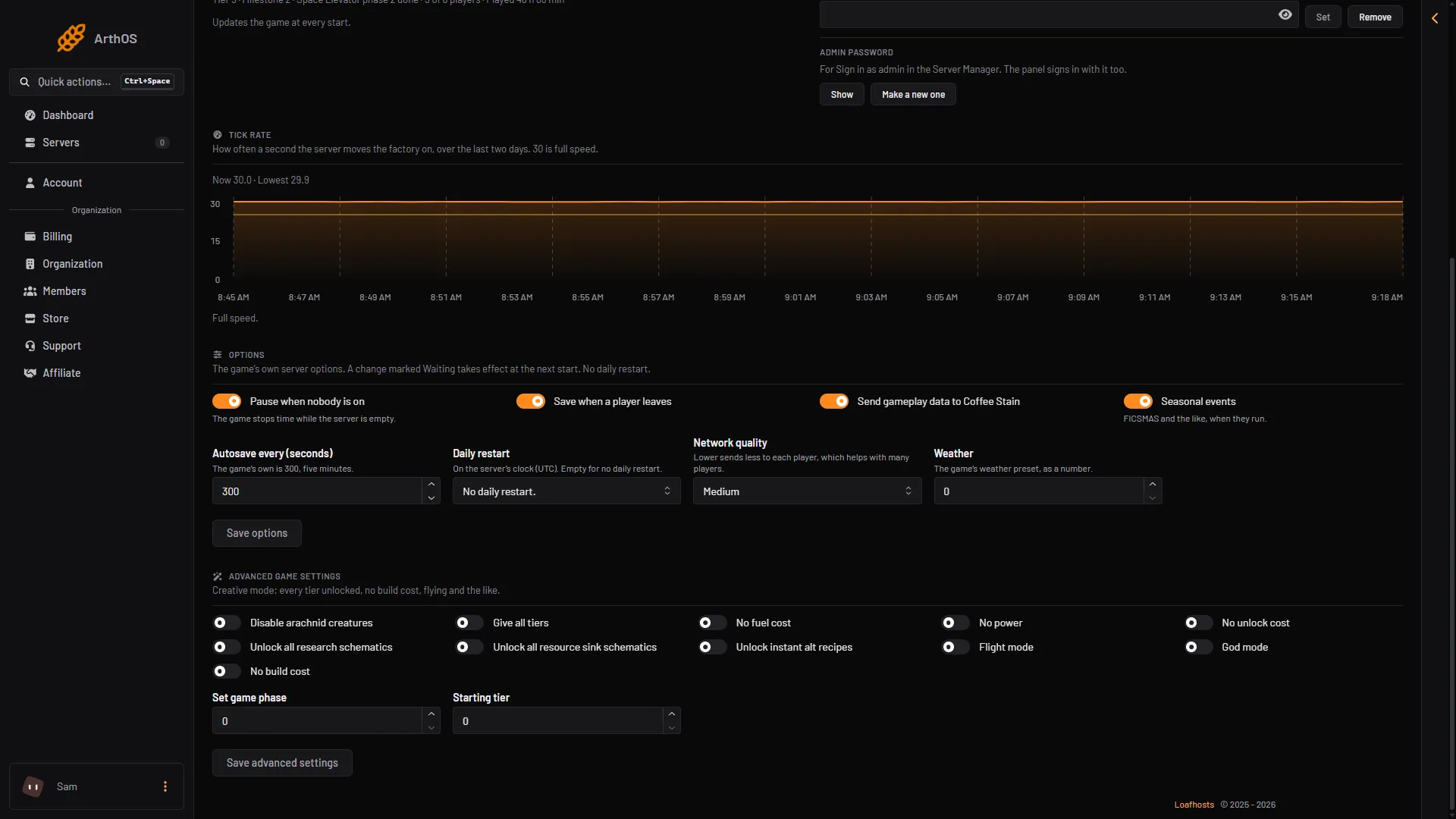
- Open the card
- Switch settings on
- Save advanced settings
-
A box asks “Turn on advanced game settings?” It says the save becomes a creative one for good. If you agree, choose Turn on and save (2 in the second picture).
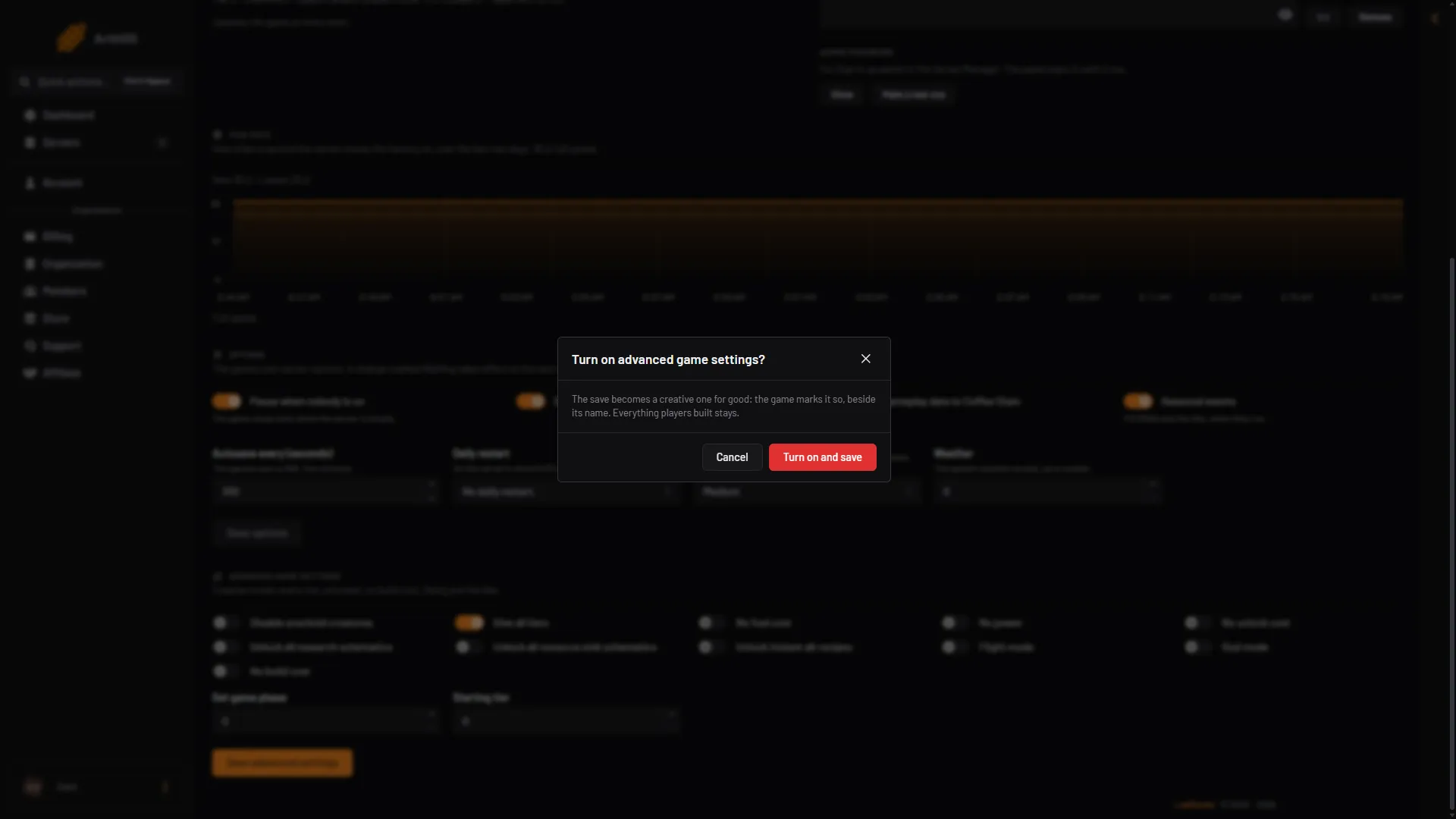
- Read the warning
- Turn on and save
After that, the card shows “This save is a creative one: its advanced settings are on.” Later changes save without the warning.
The card needs a game in play. A new server from the store has no game loaded until you start one on the Saves page. A session is one factory and all its saves. Start a game first.
Who gets it
On a dedicated server, an admin turns creative mode on. After that, every player can use the settings. Some settings only change things for the player who uses them, such as flying. Others change the game for everyone, such as No unlock cost.
Before you switch it on
The game says creative mode cannot be switched off on a save file once it is on. Make a save you can load again:
- Open the Saves page.
- Choose Save now.
- Type a name of your own in Save name, then choose Save.
- Then turn on creative mode.
Use a name of your own. Save now with an empty name, Refresh now on the Map page, and the save the panel makes before a load, a new game or an upload all write the same file, (session)_panel, over itself. A save with your own name is not replaced.
To try creative mode without touching your real game, start a New game on the Saves page and turn creative on there. After New game, check that the session shows Loads at start on the Saves page. If it does not, open the session’s menu and choose Load at start. Not checked on 1.2 as of 27 October 2026: whether other saves of the same session become creative too.
To keep a copy on your own computer, download the save from the Saves page.
If it does not work
- There is no Advanced game settings card. The server is stopped, still starting, or loading a save. Wait until the Server page shows the game in play under In play.
- There is no Save advanced settings button. Seeing or changing anything on the Server page needs a role that may change the startup settings.
- The settings do not seem to change anything for players. Not checked on 1.2 as of 27 October 2026: how soon a player already in the game sees each setting. In the game, once creative mode is on, players can also switch the individual settings from the Esc menu.
More about the game: Satisfactory servers.
Sources: satisfactory.wiki.gg: Creative Mode