











The panel can post your server’s events to a Discord channel: when it starts, stops or crashes, when your team unlocks a tier, and when a player joins or leaves. A webhook is a web address that lets a program post into one channel. You make a webhook in your own Discord, paste its address into the Discord page, and choose what to post. No bot is needed.
Make a webhook in Discord
- In Discord, open the settings of the channel that should get the posts.
- Choose Integrations, then Webhooks, then New Webhook.
- Choose Copy Webhook URL.
The address starts with https://discord.com/api/webhooks/. The panel refuses any other address.
Add it in the panel
- Open the Discord page of your server.
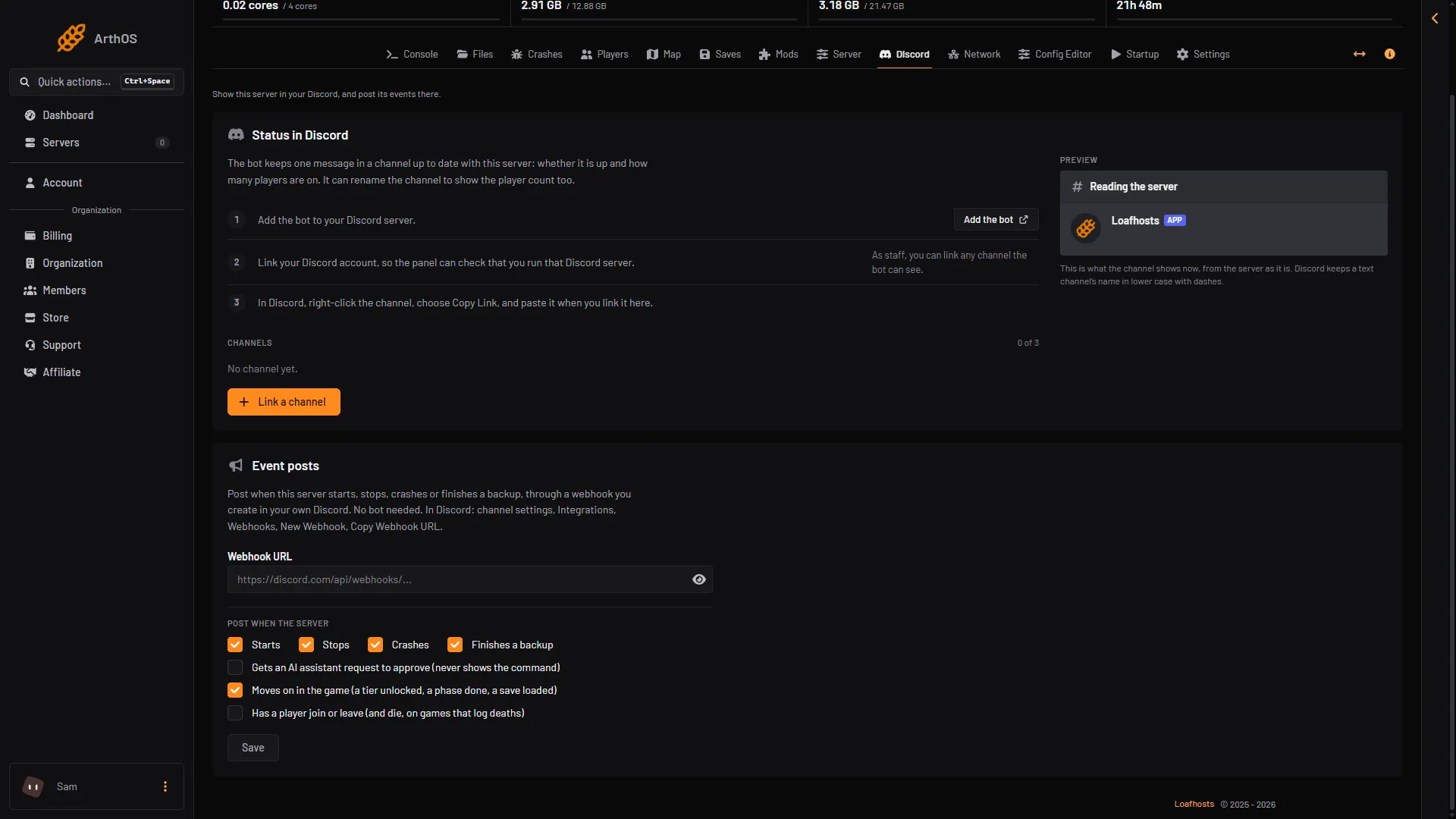
- In the card Event posts, paste the address into Webhook URL.
- Under Post when the server, tick what you want.
- Choose Save. The panel says “Saved. Events are posted within 20 seconds.”
- Choose Send a test. A test message should appear in the channel.
- Paste the webhook address
- Tier and save posts
- Joins and leaves
What you can post
Each tick posts this:
- Starts: The server started.
- Stops: The server stopped.
- Crashes: The server crashed, with the reason when the panel has one.
- Finishes a backup: A backup finished.
- Moves on in the game (a tier unlocked, a phase done, a save loaded): “Tier 5 is unlocked.”, “Phase 3 of the Space Elevator is done.”, “Now playing (session name).”
- Has a player join or leave (and die, on games that log deaths): “(name) joined.” and “(name) left.”
- Gets an AI assistant request to approve (never shows the command): A note that an assistant is waiting for you to approve something.
On a new webhook, the ticks for approvals and for joins and leaves start off. A busy server posts a lot of joins and leaves, and approval notes can be public if the channel is. Tick them if you want them.
Satisfactory’s player posts come from the game’s log. They appear a short time after the join.
Change or remove it
- To change what is posted, tick or untick and choose Save. Leave New webhook URL empty to keep the webhook you have. The panel shows only its number, never the address.
- To use another channel, paste a new address into New webhook URL and choose Save.
- Choose Remove to stop posting. The webhook stays in your Discord until you delete it there.
If it does not work
- “A webhook URL starts with https://discord.com/api/webhooks/”. You pasted something else. Copy the address again from Discord.
- Nothing is posted. Choose Send a test. If the test fails, the webhook was deleted or its channel is gone.
- The card says “Posting stopped”. Discord said the webhook no longer exists. Make a new one and save its address.
- A tier or join is missing. The tick for it is off. Joins and leaves are off until you tick them.
More about the game: Satisfactory servers. To see who is on without Discord, see who is online.